Exit SAM:
To exit the Service Alignment Mode, press the Power button.
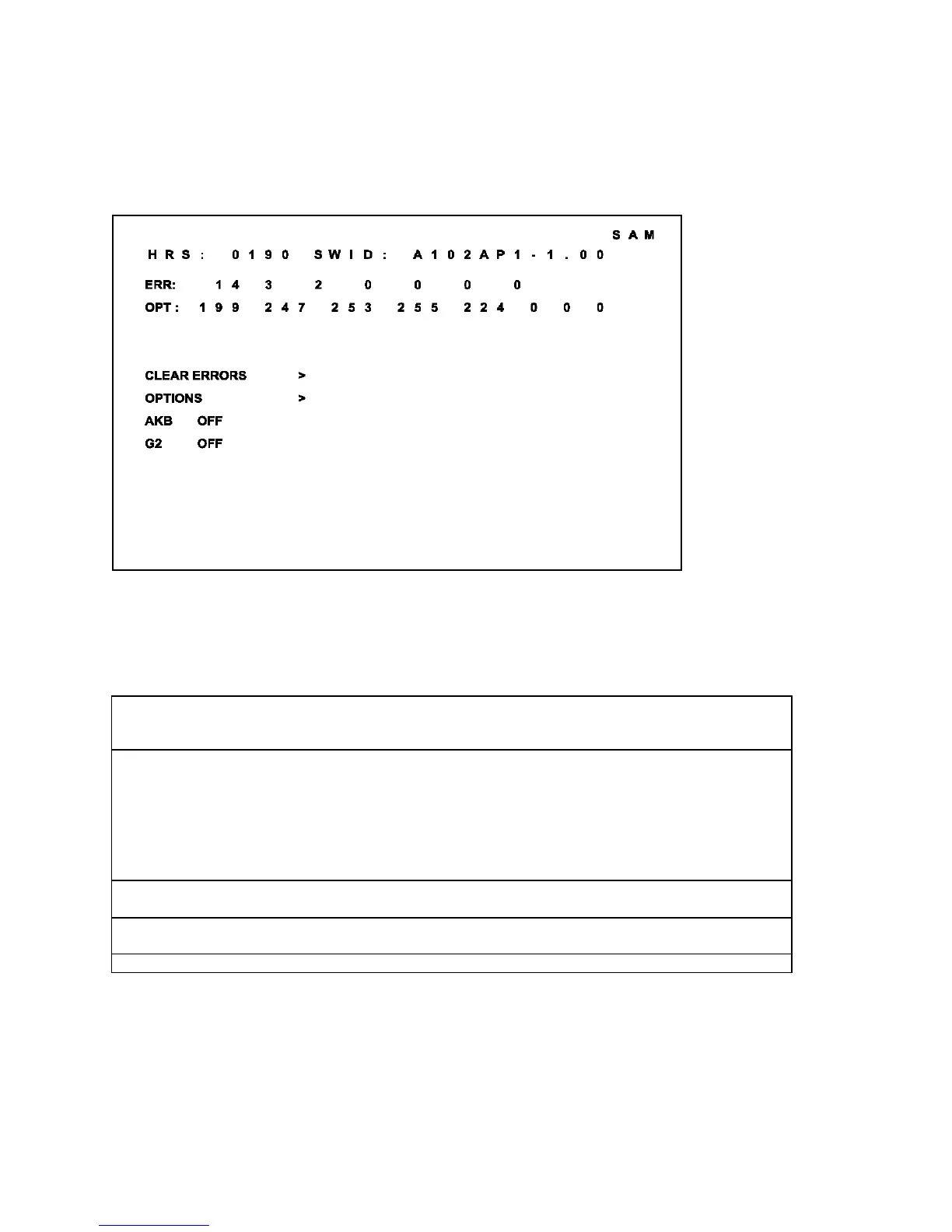
In SAM the following information is displayed on the screen:
Figure 2: SAM Screen
Explanation notes/references:
1 Operation Hours (Run Timer):
This display indicates the accumulated total of operational hours. (Shown in hexadecimal
format)
2 Software identification of the main micro controller (A101US1-2.06)
A10 is the engineering chassis name for the A10 PTV chassis
• 1US1 is a character combination to indicate the software type and the supported languages:
3AP1 or 3AP2 are also possible in the Asian Pacific Region.
• US = United States, AP = Asian Pacific
• 1 = Main Software language version number
• 2.06 = sub-version number
3 Error buffer (7 errors possible):
Displays the 7 most recent errors. The most recent error is displayed at the upper left.
4 Option bytes (8 codes possible):
Summary of options is explained below.
5 Sub menus are listed in a scroll menu.



 To Next Page