The Customer Service Mode Information Screen
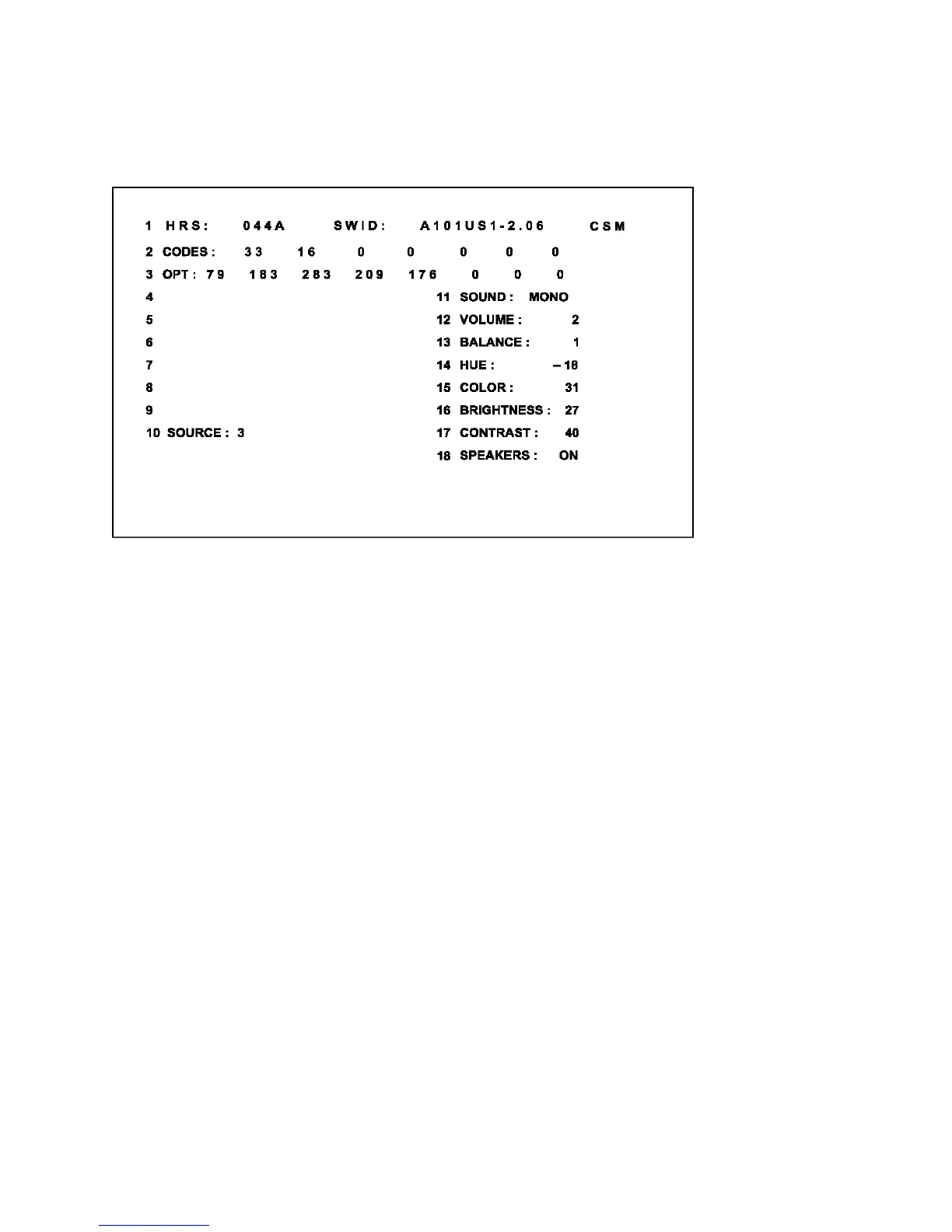
Upon entry into the Customer Service Mode the following screen will appear.
Figure 4: CSM Screen
The Customer Service Menu shows the following information:
- Line 1: “HRS : nnnnn” and SWID : “A10BBC-X.Y”
HRS:
Indicates the accumulated total of operational hours. (Shown in hexadecimal format.) (Standby hours are
not counted as operating hours).
SWID:
Software identification of the main micro controller (example: A10US1-2.7)
A10 is the engineering chassis name for the PTV900 series chassis
· 1US1 is character combination to indicate the software type and the supported languages:
3AP1 or 3AP2 are also possible for the Asian Pacific regions.
· US = USA/NAFTA, AP = Asian Pacific
· 1 = Main Software language version number
· 2.7 = sub-version number
- Line 2: “CODES: xx xx xx xx xx xx xx ”
Error code buffer (see explanation of error codes above) Displays the last 7 errors of the error code
buffer.
- Line 3: “OPT xxx xxx xxx xxx xxx xxx xxx xxx”
Option bytes
Option bits control the software and hardware functionality of the A10.0. An option byte or option number
represents 8 of those bits. Each option number is displayed as a number between 0 and 255. The set
may not work correctly when an incorrect option code is set. See Service Adjustments for more
information on correct option settings



 To Next Page