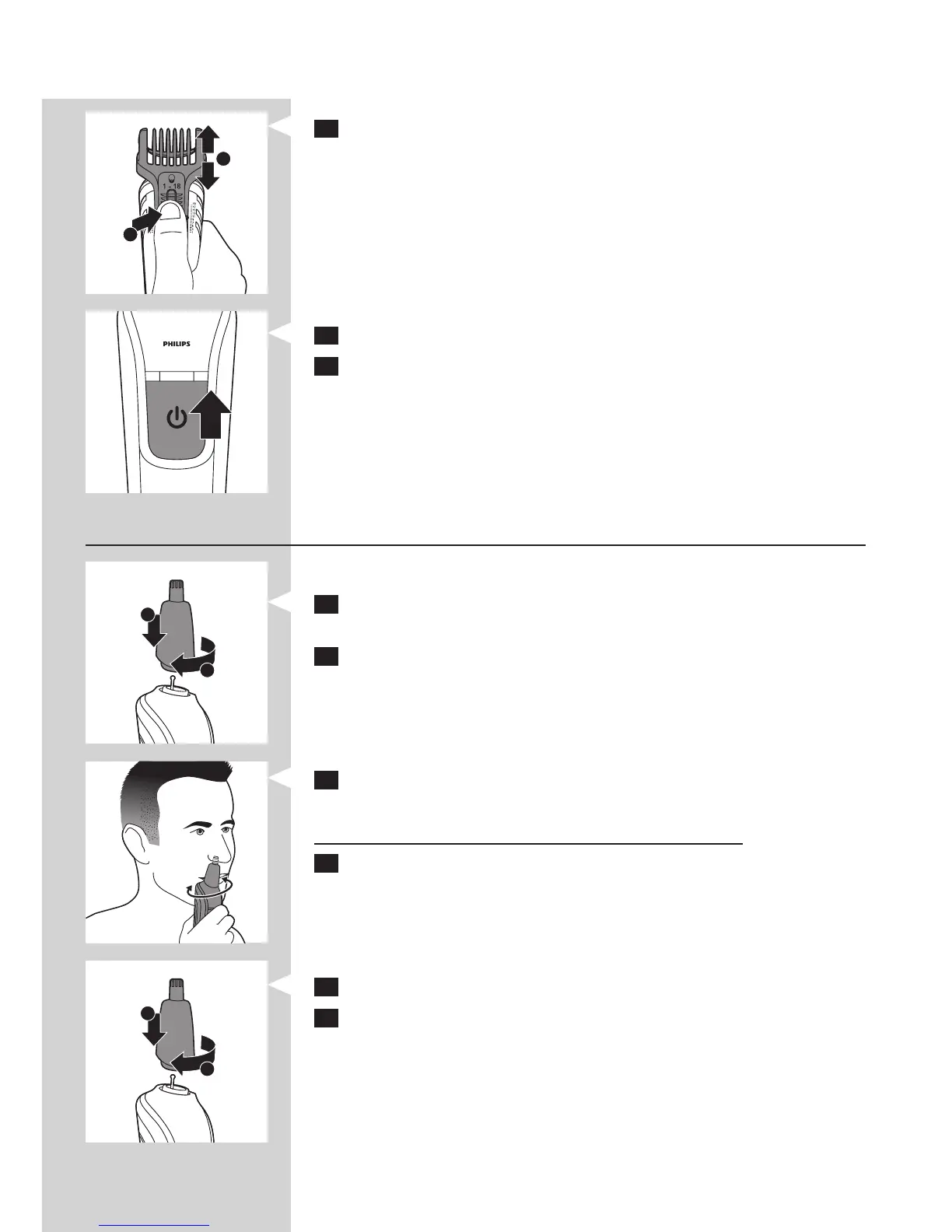
3 Press the setting selector (1) and slide the comb to the desired
hair length setting (2).
You can choose any setting between 1 and 18mm.
4 Switch on the appliance.
5 Slowly move the trimmer against the hair growth direction.
Press lightly and always make sure the surface of the comb
is in full contact with the skin.
Note: When you trim for the rst time, start at the highest setting
(18mm) to familiarise yourself with the appliance.
Trimming nose and ear hair
Trimming nose hair
1 Place the nose/ear trimmer on the handle (1).
Turn the nose/ear trimmer clockwise to x it (2).
2 Make sure your nostrils are clean.
3 Switch on the appliance and insert the tip of the trimmer into
one of your nostrils.
Do not insert the tip more than 0.5cm into your nostril.
4 Slowly move the tip in and out while turning it round at the same
time to remove unwanted hair.
To reduce the tickling effect, make sure that you press the side of the
tip rmly against the skin.
Trimming ear hair
1 Attach the nose/ear trimmer onto the handle.
2 Clean the outer ear channel. Make sure it is free from wax.
1
1
1
ENGLISH8



 To Next Page