EasyManua.ls Logo

Philips Respironics Actiwatch 2 - User Manual

Philips Respironics Actiwatch 2
8 pages
Print Icon
To Next Page IconTo Next Page
Loading...
1
Actiwatch
WEARER GUIDE
Intended Use
The Actiwatch devices are wrist-worn activity data recorders that can record data relevant to
circadian rhythms and sleep parameters in any instance where quantifiable analysis of physical
motion is desirable.
In addition, the Actiwatch Spectrum PRO device has a built-in score pad that allows the
subject to subjectively assign and enter a numeric score. The score pad can be used as a
substitute or in addition to the traditional patient diary used in conjunction with activity data
recording.
Caution! US Federal law restricts this device to sale by or on the order of a physician.
Warnings
Discontinue use if skin reddening or inflammation appears.
If the device becomes damaged, discontinue use and return it for a
replacement.
Do not attempt to take the device apart. No user-serviceable parts
are inside.
What is Actiwatch?
Actiwatch is a medical device that records motion and light.
What will it tell about me?
The Actiwatch provides information about your general activity, sleep
schedule, naps, wake episodes, as well as information about your sleep
quantity and quality.
Where and how do I wear it?
Wear the Actiwatch snugly and securely on either wrist.
Is the Actiwatch water resistant?
Yes. Wear it while you shower or bathe for up to 30 minutes.
Actiwatch Spectrum
PRO or Plus
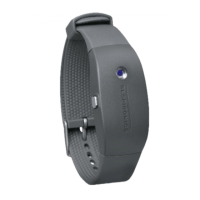
Actiwatch 2
Question and Answer IconNeed help?

Do you have a question about the Philips Respironics Actiwatch 2 and is the answer not in the manual?

Summary

Intended Use

Warnings

Actiwatch Features

Event Marking

Marks an event by pressing and holding the left button or marker button for 3 seconds.

Scheduled Scoring for Actiwatch Spectrum PRO

Device vibrates and sounds reminder for score entry as instructed by health care professional.

Manual Scoring for Actiwatch Spectrum PRO

Allows manual score entry of 'A' or 'b' as instructed by health care professional.

Silence Next Reminder

To silence the next reminder

Press left button until reminder icon displayed, select '0' with right button, confirm with left.

To restore the next audible reminder

Press left button until reminder icon displayed, select '1' with right button, confirm with left.

Actiwatch Spectrum Display

Time Display

Shows time of day in 12- or 24-hour format based on settings.

Date Display

Displays date in MM-DD or DD-MM format after pressing right/backlight button for 3 seconds.

Data Collection

Indicates data collection start with a black border and initial tone.

Device Display Screens and Icons

Stand By

Indicates device is waiting to begin data collection, shows days remaining.

Off Wrist

Indicates device is not fastened properly on wrist while collecting data.

Backlight

Indicates a button press; backlight turns off automatically after 5 seconds.

Score Entry

Enables score entry or indicates time for scheduled score entry.

Event Marker

Indicates successful event marking by pressing and holding a button.

Additional Display Screens and Icons

Audible Reminder

Indicates scheduled scoring is enabled; device vibrates and sounds an audio alert.

Battery Status

Indicates the level of charge remaining in the battery.

Data Collection Complete

Indicates data collection is complete or device is in sleep mode.

Cleaning and Disposal

Cleaning

Clean with a soft cloth and mild detergent; avoid abrasives or alcohol.

Disposal

Do not dispose of the Actiwatch; return it to your health care professional.

Sleep Diary

Philips Respironics Actiwatch 2 Specifications

General IconGeneral
BrandPhilips
ModelRespironics Actiwatch 2
CategoryFitness Trackers
LanguageEnglish