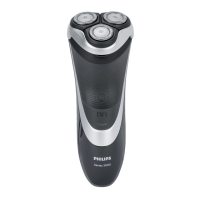
2 Shaving unit
3 Shaving unit release button
4 On/off button
5 1-Level battery status indicator
(S3112,S3115only)
6 3-Level battery status indicator
(S3212,S3311 only)
7 Socket for small plug
8 Pop-up trimmer
9 Trimmer release slide
10 Power plug
11 Small plug
12 Charging stand (S3311only)
13 Storage pouch (S3112, S3212, S3311 only)
Introduction
Congratulations on your purchase and
welcome to Philips Norelco!
To fully benefit from the support that Philips
Norelco offers, register your product at
www.philips.com/register.
The display
S3112, S3115
Battery fully charged
When the battery is fully charged, the charging
light lights up white continuously.
Note: After approx. 30 minutes, the charging
light goes out to save energy.
9
English



 To Next Page
 Loading...