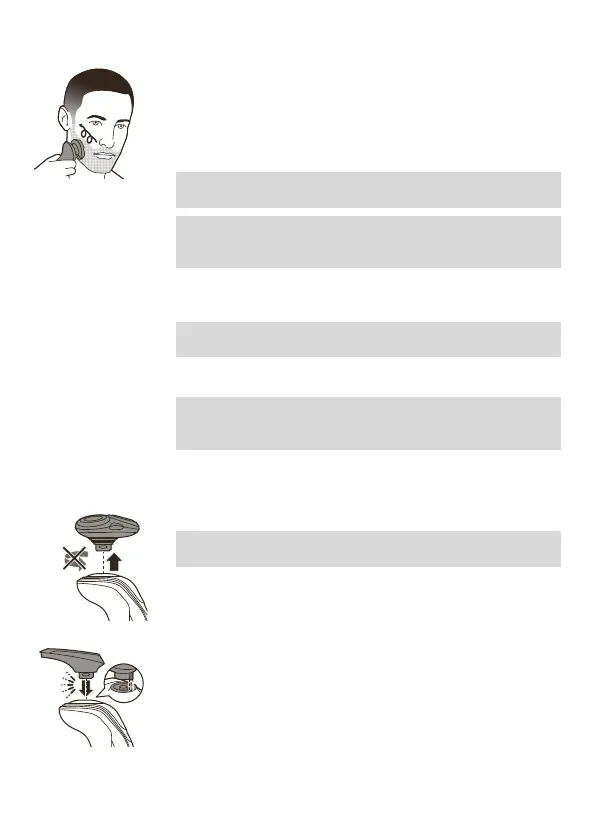
5 Move the shaving heads over your skin in
circular movements to catch all hairs growing in
different directions. Make sure each shaving
head is fully in contact with the skin. Exert
gentle pressure for a close, comfortable shave.
Note: Do not press too hard, this can cause skin
irritation.
Note: Rinse the shaving unit regularly to ensure
that it continues to glide smoothly over your
skin.
6 Dry your face.
7 Clean the appliance after use.
Note: Make sure you rinse all foam or shaving
gel off the appliance.
Using the click-on attachments
Note: The accessories supplied may vary for
different products. The box shows the accessories
that have been supplied with your product.
Removing or attaching click-on attachments
1 Make sure the appliance is switched off.
2 Pull the attachment straight off the appliance.
Note: Do not twist the attachment while you
pull it off the appliance.
3 Insert the lug of the attachment into the slot in
the top of the appliance. Then press down the
attachment to attach it to the appliance (‘click’).
Using the precision trimmer attachment
You can use the precision trimmer attachment to
touch up your beard, sideburns and moustache.
15
English





 To Next Page