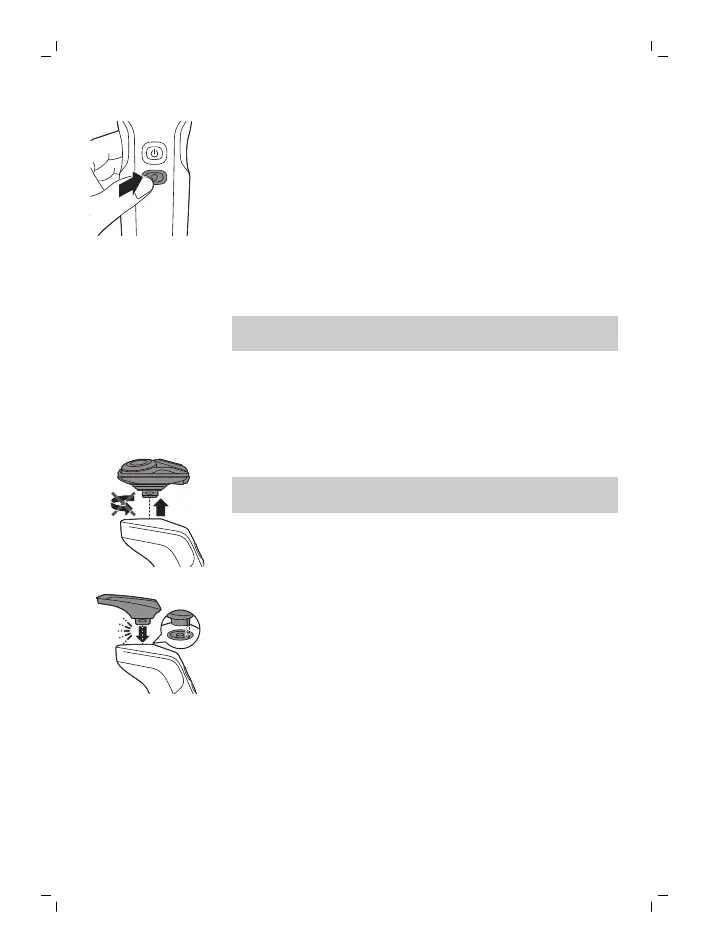
2 Press the guard button once if you want to
shave at a lower, more gentle speed.
3 Move the shaving heads over your skin in
circular movements to catch all hairs growing in
different directions. Make sure each shaving
head is fully in contact with the skin. Exert
gentle pressure for a close, comfortable shave.
4 Switch off the guard mode by pressing the
guard button once.
Note: The shaver automatically starts operating
at normal speed when you switch it on again.
Using click-on attachments
Removing or attaching click-on attachments
1 Make sure the shaver is switched off.
2 Pull the attachment straight off the appliance.
Note: Do not twist the attachment while you
pull it off the appliance.
3 Insert the lug of the attachment into the slot in
the top of the appliance. Then press down the
attachment to attach it to the appliance (‘click’).
Using the precision trimmer attachment (specific types
only)
You can use the precision trimmer attachment to
touch up your beard, sideburns and moustache.
17
English



 To Next Page