10 EN
Overview
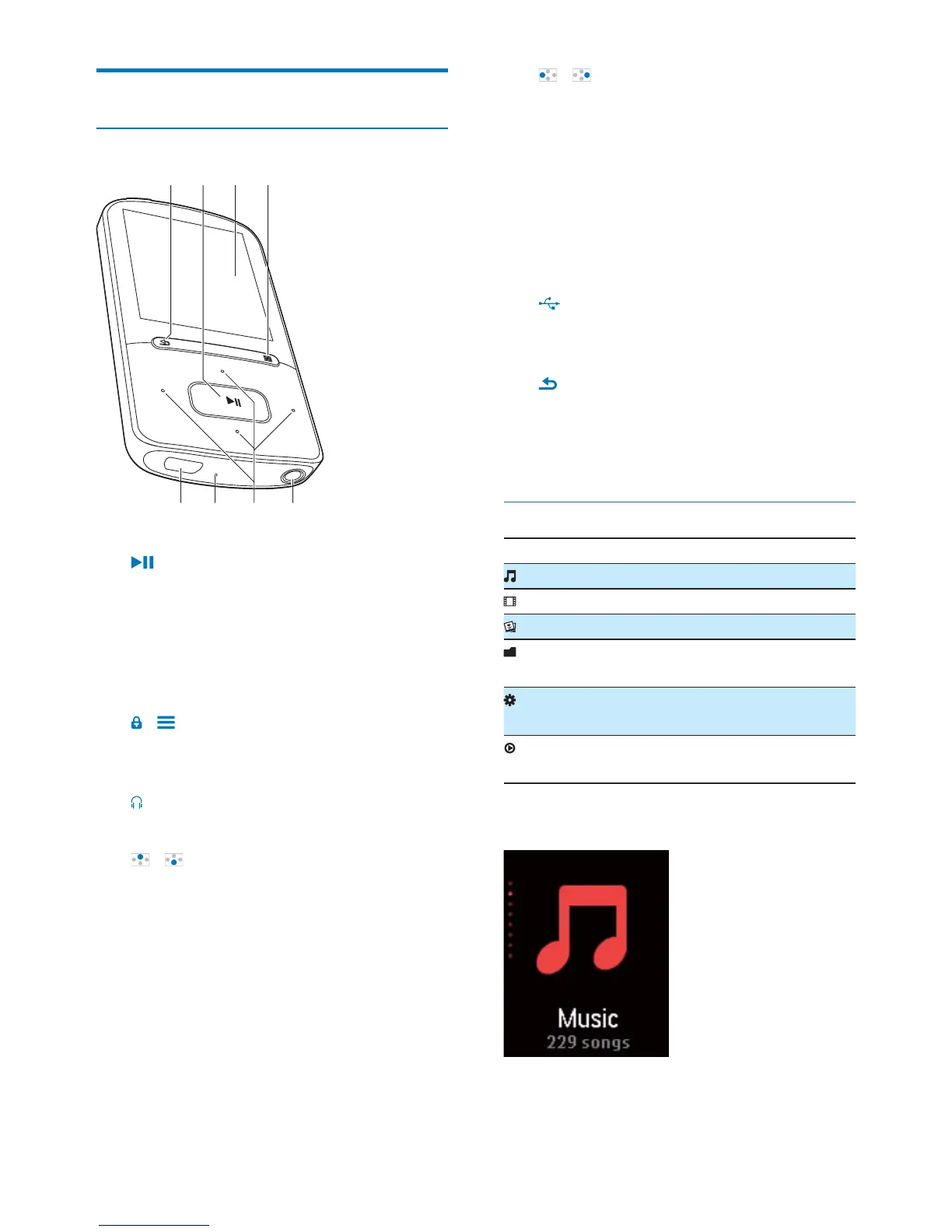
Controls
a
Press and hold: Switch the player on
or off
Press: Select options, or start/pause/
resume play
b Display
c
/
Press: Show options menu
Press and hold: Lock/unlock all buttons
d
3.5 mm headphone connector
e
/
on the list of options:
Press: Skip to the previous/next option
Press and hold: Show the initial of
current option in a list of options that
are sorted by alphabet
on the play screen:
Press: Increase/decrease the volume
Press and hold: Increase/decrease the
volume quickly
habc
defg
/
on the play screen:
Press and hold: Fast forward or rewind
f RESET
Press the hole by using the tip of a
ball pen when the screen does not
respond to the pressing of keys
g
USB connector for power charging and
data transfer
h
Press: Back one level
Press and hold: Return to the Home
screen
Home screen
Menu Mode To
Music
Video watch videos
Pictures view pictures
Folder
view
Settings customize the settings of
VIBE
Now
playing
show current play screen
Navigate from the Home screen












 To Next Page