
 Need help?
Do you have a question about the Philips Saeco Xelsis SM7480 and is the answer not in the manual?
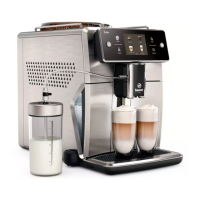
This document describes the Saeco Xelsis SM758x series (SM7583, SM7581, SM7580, SM7480) fully automatic espresso machine, designed to deliver optimal coffee flavor and aroma.
The machine features a control panel with one-touch drink icons, navigation icons (up, down, back, OK), a display, and dedicated buttons for power, start/stop, machine settings, cleaning menu, and personal profiles. The SM7580, SM7581, and SM7583 models offer a menu with 6 additional drinks, while the SM7480 offers 4 additional drinks.
The Saeco Xelsis allows for personalized drink preparation and profile creation. Users can adjust coffee strength, volume of coffee and milk, coffee temperature, and taste. Customized drinks can be saved to personal profiles, each with a different color. The machine supports brewing two cups simultaneously for most drinks by tapping a drink icon twice or pressing the start/stop button twice.
The grinder settings can be adjusted using a knob inside the bean container, offering 12 different grind settings. A lower setting results in stronger coffee. It's recommended to adjust grinder settings only after brewing 100-150 cups (approximately 1 month of usage) to allow the machine to complete its self-adjustment. When adjusting, turn the knob only one notch at a time to prevent damage.
The machine can also prepare coffee using pre-ground coffee by opening the lid and pouring one measuring scoop into the dedicated compartment. Hot water can be dispensed by selecting the 'Hot water' icon.
A key feature is the AquaClean filter, designed to reduce limescale deposits and provide filtered water. Using a series of 8 AquaClean filters, as indicated by the machine and manual, can extend descaling intervals up to 5000 cups. Each filter lasts for up to 625 cups, depending on coffee varieties and cleaning frequencies.
Before activation, the AquaClean filter must be prepared by shaking it for 5 seconds and immersing it upside down in cold water for at least 30 seconds until no air bubbles emerge. The filter is then pushed onto its connection in the water tank. Activation is required for each new filter and can be done during first installation, when prompted by the machine, or at any other time via the settings menu. The machine monitors filter capacity and usage. In some cases, descaling may be required before a new AquaClean filter can be installed.
Regular cleaning and maintenance are crucial for optimal performance and taste. The machine provides a cleaning table outlining when and how to clean detachable parts.
Only Philips descaler should be used. Using other descalers (e.g., sulfuric acid, hydrochloric acid, sulfamic acid, or acetic acid) can damage the water circuit and void the warranty. The descaling process is initiated when prompted by the machine or manually via the cleaning menu. It involves emptying the drip tray and coffee grounds container, removing and emptying the water tank and AquaClean filter, filling the water tank with Philips descaler and water up to the CALC CLEAN level, placing a large container under the coffee dispensing spout, and following on-screen instructions. The procedure takes approximately 30 minutes, consisting of a descaling cycle and a rinsing cycle. After descaling, the water tank and circuit must be rinsed, and a new AquaClean filter installed.
If the descaling procedure is interrupted, the user must empty and rinse the water tank, refill it with fresh water up to the CALC CLEAN level, restart the machine for an automatic rinsing cycle, and then perform a manual rinsing cycle (dispense half a water tank of hot water and brew two cups of pre-ground coffee without adding ground coffee) before brewing any drinks. An interrupted descaling procedure will require another descaling as soon as possible.
The manual provides a list of error codes (e.g., 01 for clogged coffee funnel, 03 for dirty brew group, 04 for incorrectly positioned brew group, 05 for air in the water circuit, 14 for overheated machine) with possible solutions. Video instructions for troubleshooting are available on www.saeco.com/care.
Philips maintenance products (descaling solution CA6700, AquaClean filter CA6903, brew group grease HD5061, coffee oil remover tablets CA6704, milk circuit cleaner CA6705, maintenance kit CA6707) are recommended and can be purchased from local retailers, authorized service centers, or online at www.saeco.com/care. The model number, found inside the service door, is needed to find spare parts online.
 General
| Brand | Philips |
|---|---|
| Model | Saeco Xelsis SM7480 |
| Category | Coffee Maker |
| Language | English |





 To Next Page