- 7 -
About your phone
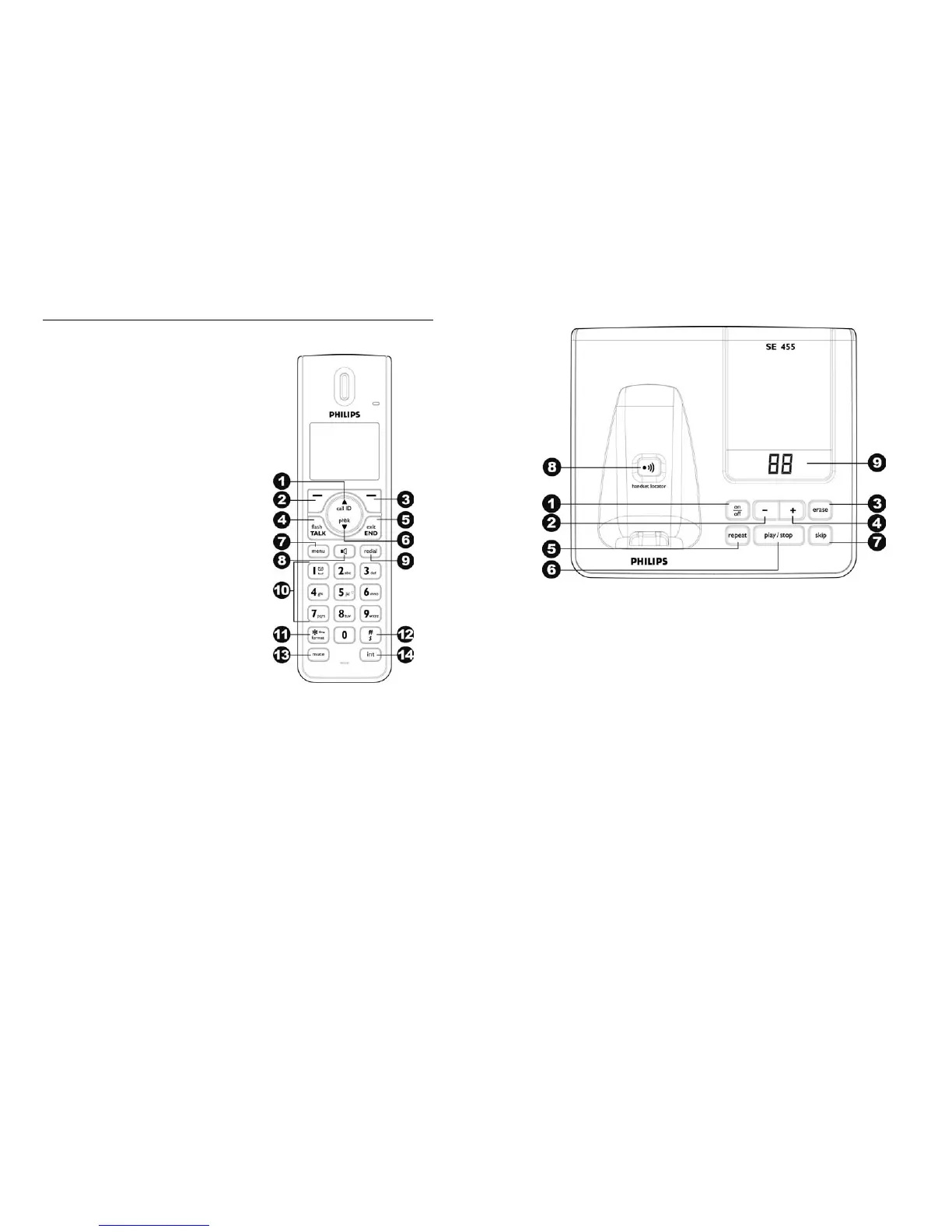
THE HANDSET
1 Call Log/Up key
Scroll up menu
Increase earpiece volume
Enter call log
2 Left soft key
Confirm selection
Enter options menu
3 Right soft key
Delete text or digit(s)
Cancel operation
View more record information
4 Talk/Recall key
Make and receive calls
Send flash signal
5 End /On/Off key
End call
Exit menu / operation
Turn handset on/off
6
Menu key
Access main menu
7
Phonebook/Down key
Scroll down menu
Decrease earpiece volume
Enter phonebook
8 Spe a k e r key
Turn speaker on / off
9 Redi a l key
Enter redial list & dial last number
12 Rin ge r O ff / P ause key
Dial # and enter pause
Turn ringer on / off
Change input letter case
10
Digit keys
Dial digit and enter text
Use as shortcut key for quick dial
13 Mute key
Mute / unmute microphone
11 Star/ K e y lock key
Dial *
Lock / unlock keypad
14 Intercom/Conference key
Make intercom call
Make conference call
About Your Phone
- 8 -
THE BASE AND ANSWERING MACHINE
1 Answering Machine On/Off key
Turn the answering machine on/off
5 B a c kw a r d key
Skip backward during playback
2 Vol u m e do wn
Decrease speaker volume
6 Pl a y/ S t op key
Play messages
Stop message playback
3 Del e t e key
Delete messages
7 Forward key
Skip forward during playback
4 Vol u m e up
Increase speaker volume
8 Pa g e k e y
Find handset(s)
Enter registration mode
9 LED message counter
Display message number
Display answering machine operation



 To Next Page