Home
Philips
Digital Photo Frame
SPF1307
Page 7 (Create an Alarm)
Philips SPF1307 - Create an Alarm; Access Alarm Menu; Select Alarm Slot; Set Alarm Time or Turn Off
8 pages
Manual
Save Page as PDF
To Next Page
To Next Page
To Previous Page
To Previous Page
Loading...
Cr
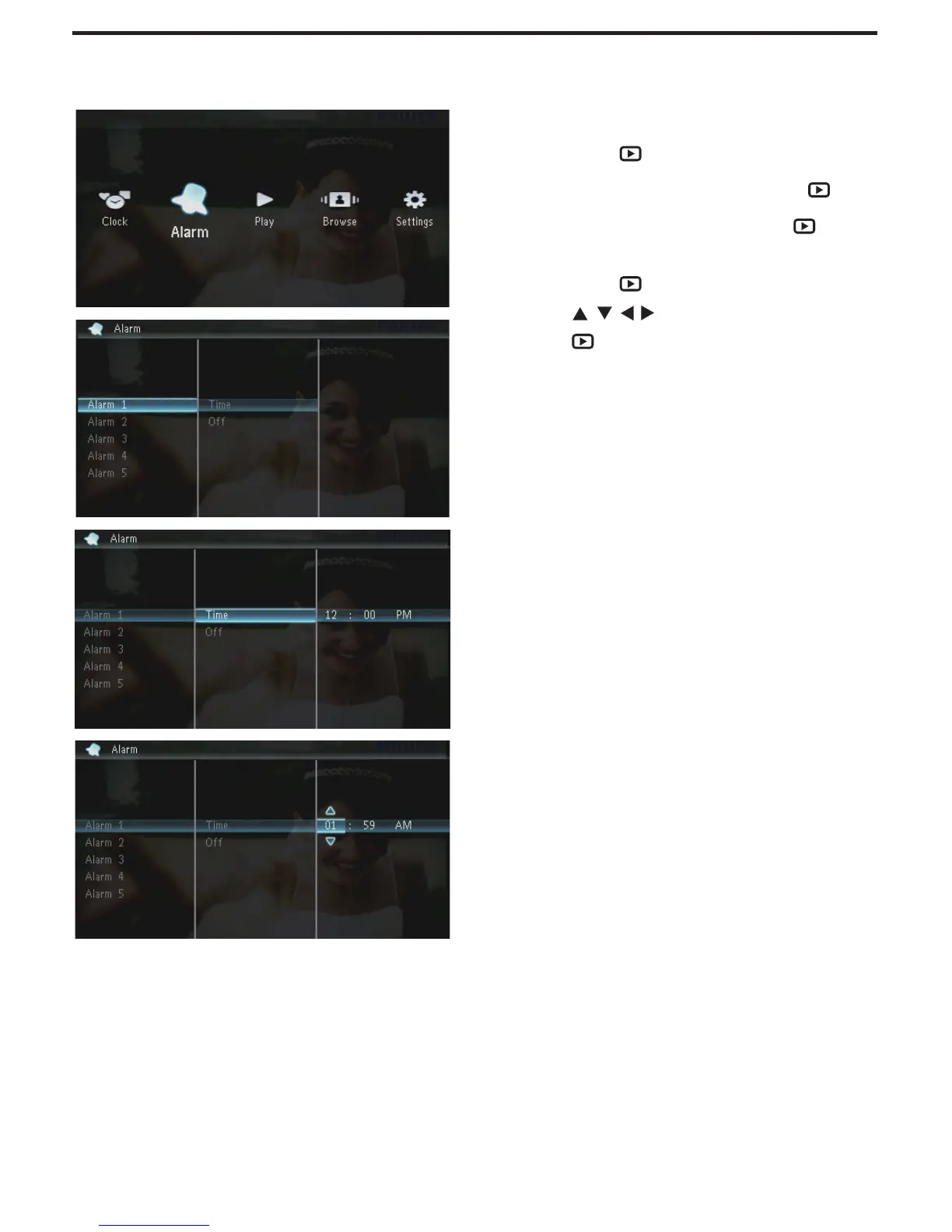
eate an alarm
1
In the home screen,
select
[Alarm]
and
then press
.
2
Select an alar
m,
and then press
.
3
Select
[Time]
,
and then press
.
T
o tur
n off the alar
m,
select
•
[Off]
and
then press
.
4
Press
/
/
/
to set time
,
and then
press
.
6
8
Table of Contents
Main Page
Quick Start Guide
2
Create an Alarm
7
Other manuals for Philips SPF1307
Specifications
2 pages
Related product manuals
Philips SPF1017
28 pages
Philips SPF1208
18 pages
Philips SPF1207
2 pages
Philips SPF1127
2 pages
Philips SPF1208/05
18 pages
Philips SPF2307
4 pages
Philips SPF4608
34 pages
Philips SPF3408
2 pages
Philips SPF3400
2 pages
Philips SPF4610
19 pages
Philips SPF3410/G7
44 pages
Philips SPF3482/G7
126 pages



 To Next Page