This manual describes a full-motion wall mount designed for LCD, Plasma, and LED displays, with model number SQM9232/05. It is suitable for displays ranging from 26 to 70 inches and can support a maximum load of 35 kg (77 lbs). The mount features a tilt range of up to 12 degrees and a pan/swivel range of up to 180 degrees, offering flexible viewing angles.
Function Description
The device is a full-motion wall mount that allows users to position their display in various angles and orientations. It is designed for secure attachment to either drywall (wood studs) or concrete walls. The mount consists of a main arm assembly that attaches to the wall and a display plate that attaches to the back of the television. The full-motion design enables tilting and swiveling of the display to achieve optimal viewing from different positions in a room.
Important Technical Specifications
- Display Size Compatibility: 26 to 70 inches
- Maximum Load Capacity: 35 kg (77 lbs)
- Mounting Pattern (VESA Compatibility):
- 75 mm x 75 mm
- 100 mm x 100 mm
- 200 mm x 100 mm
- 200 mm x 200 mm
- 300 mm x 300 mm
- 400 mm x 400 mm
- Tilt Range: Up to 12 degrees
- Pan/Swivel Range: Up to 180 degrees
- Materials: The mount is constructed to support the specified weight, implying robust materials suitable for wall mounting.
- Hardware Kit: Includes drywall screws (A), concrete anchors (B), washers (C), M6x10 screws (D), M6 lock nuts (E), M5x20 screws (F), M6x20 screws (G), M8x30 screws (H), spacers (I), a spirit bubble (level) (x1), and a wrench (J).
- Required Tools: Phillips head screwdriver, electric or portable drill, 3 mm (1/8") drill bit and stud finder (for drywall), 8 mm (5/16") Masonry bit (for concrete), and a level.
Usage Features
The mount offers significant flexibility in display positioning:
- Full Motion: The design allows for extensive movement, including tilting and swiveling, to customize the viewing experience.
- Tilt Adjustment: To adjust the tilt angle, the user holds the display firmly with one hand and loosens the tilt adjustment knob. The display can then be moved to the desired position, and the knob re-tightened. It is crucial not to release the display until the knob is fully tightened and never to fully loosen or remove these screws. A Phillips head screwdriver can be used if manual tightening/loosening is difficult.
- Swivel Adjustment: Swivel adjustments are made by simply moving the display to the desired position.
- Installation Flexibility: The mount can be installed on both wood studs in drywall and concrete walls, providing versatility for different construction types. Specific instructions are provided for each wall type, including marking pilot holes and using appropriate anchors and screws.
- VESA Compatibility: The mount supports common VESA patterns, ensuring compatibility with a wide range of display models. Adapters are included for larger VESA patterns (100x200, 200x200, 300x300, 400x400 mm).
Maintenance Features
- Regular Cleaning: The mount should be cleaned periodically with a dry cloth to remove dust and maintain its appearance.
- Connection Inspection: Users are advised to inspect all screws and hardware at regular intervals. This ensures that no connections have become loose over time, and re-tightening should be performed as needed to maintain stability and safety.
Safety Instructions
The manual emphasizes several critical safety precautions:
- Read Instructions: Users must read all instructions before beginning installation.
- Professional Assistance: If unsure about any part of the process, contact a professional contractor or installer.
- Weight Capacity: The wall or mounting surface must support the combined weight of the mount and the display. Reinforcement may be necessary.
- Hazard Detection: Locate pipes, wires, or other hazards in the wall before drilling.
- Team Installation: Three people are recommended for installation, especially for heavy displays.
- Weight Limit: The mount is designed for a maximum weight of 35 kg (77 lbs). Exceeding this limit can lead to instability and injury.
- Careful Drilling: Drill pilot holes to the specified depth and diameter.
- Screw Selection: Carefully determine the correct screw length and diameter for the display, avoiding forcing screws if resistance is met. Spacers may be needed for curved or recessed display backs.
- Display Handling: Exercise extreme care when attaching the display plate to the display, avoiding placing the display face down to prevent damage to the viewing surface.
- Tilt Knob: Never fully loosen or remove the tilt adjustment knob while operating the mount.
- Screen Pressure: Do not press on the TV screen surface, as this may cause damage to the LCD panel. The manufacturer disclaims responsibility for failures or damage due to improper mounting procedures.

 Need help?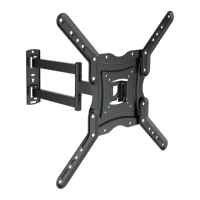

 To Next Page
 General