Overview of the main unit
PHILIPS
d)
4
5
13
14
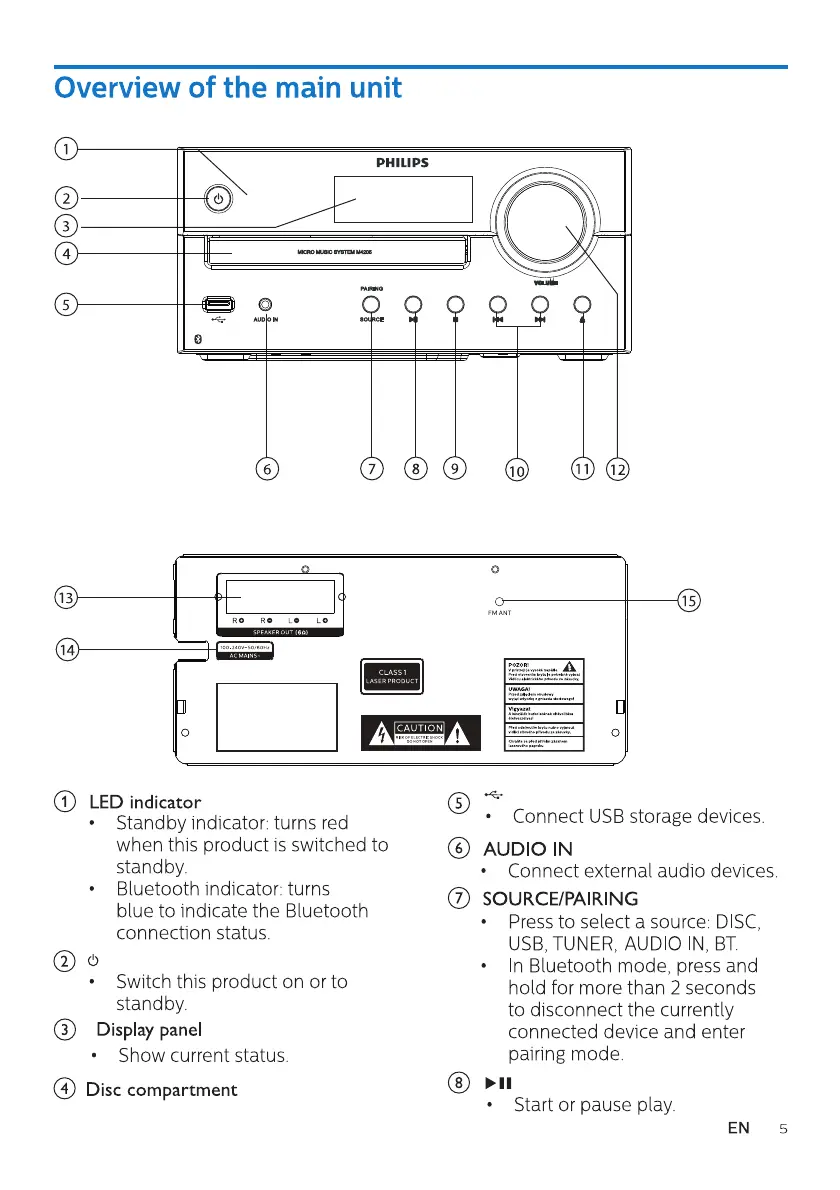
O LEDindicator
o
6
7 8
9
10
o
FM ANT
11
12
15
CLASS I
Standby indicator: turns red
when this product is switched to
standby.
Bluetooth indicator: turns
blue to indicate the Bluetooth
connection status.
• Switch this product on or to
standby.
@ Displaypanel
Show current status.
@ Disccompartment
Connect USB storage devices.
AUDIO IN
Connect external audio devices.
SOURCE/PAIRING
Press to select a source: DISC
USB, TUNER, AUDIO IN, BT
n Bluetooth mode, press and
hold for more than 2 seconds
to disconnect the currently
connected device and enter
pairing mode.
Start or pause play.
EN
5


 To Next Page