A "list" or series of previously
viewed channels can be select-
ed with the SURF button on your
remote control. With this feature
you can easily switch between dif-
ferent TV programs that currently
interest you. The SmartSmf control
allows you set up to eight channels
in its quick viewing "list".
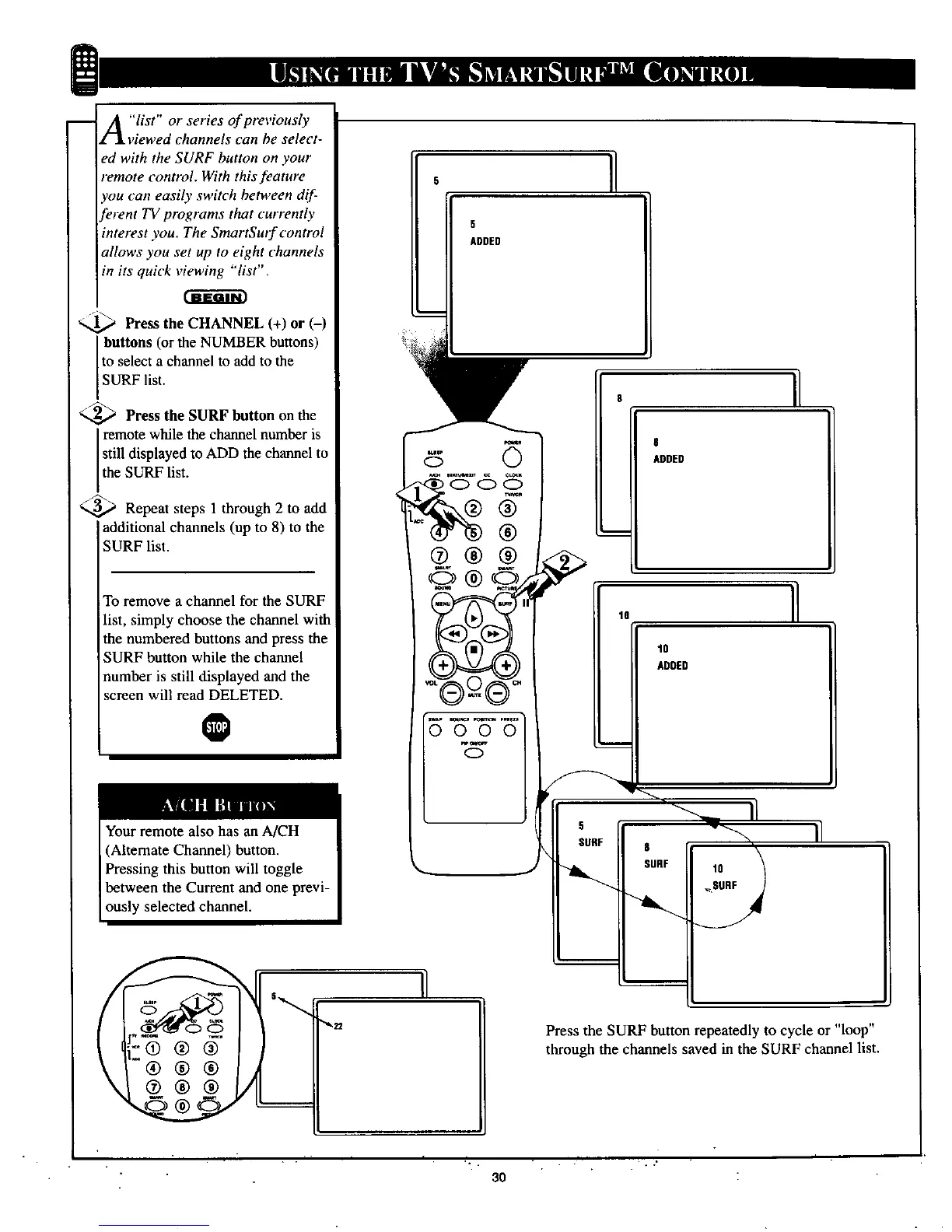
Press the CHANNEL (+) or (-)
buttons (or the NUMBER buttons)
to select a channel to add to the
SURF list.
<._ Press the SURF button on the
remote while the channel number is
still displayed to ADD the channel to
the SURF list.
_.._ Repeat steps 1 through 2 to add
additional channels (up to 8) to the
SURF list.
To remove a channel for the SURF
list, simply choose the channel with
the numbered buttons and press the
SURF button while the channel
number is still displayed and the
screen will read DELETED.
O
5 I
5
ADDED
@®®
O®
10
000
/
, L_
8
ADDED
11
10
ADDED
S.DE,
II
Press the SURF button repeatedly to cycle or "loop"
through the channels saved in the SURF channel list.
r. i .
.... . . . • . • ."
30



 To Next Page