EasyManua.ls Logo

Philips Videopac Computer G7000 - Videopac G7000 Setup Instructions; Connecting Peripherals and Power; Connecting to Television and Mains; TV Activation and Channel Selection

Philips Videopac Computer G7000
5 pages
Print Icon
To Next Page IconTo Next Page
To Previous Page IconTo Previous Page
Loading...
Instructions
for
Use
in
/
I
S
^
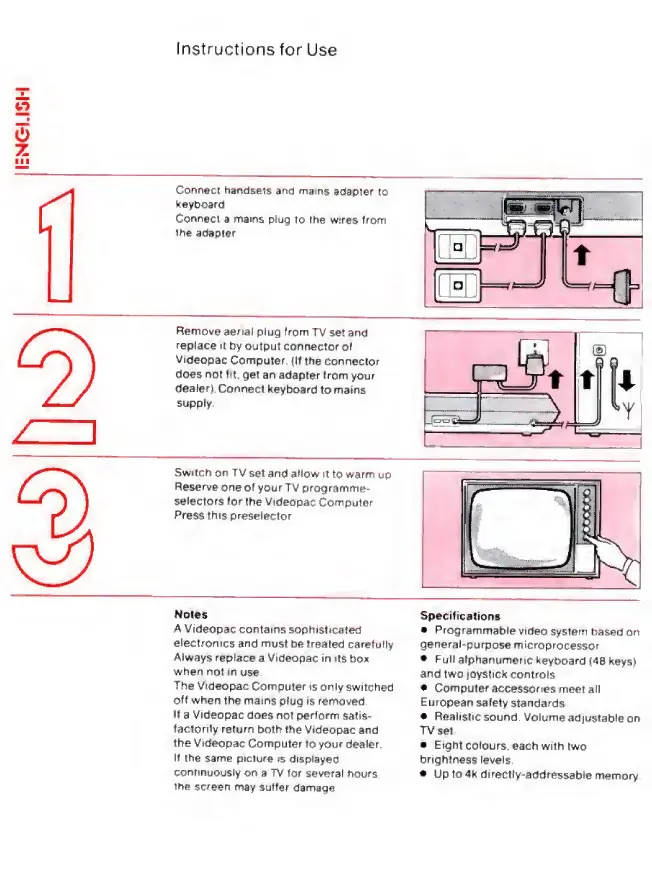
Connect
handsels
and
mains
adapter
to
keyboard
Cor»nect
a
mams
plug
to the w^es Itom
the adapter
Remove
aenal plug
from TV
set and
replace it
by
output
cor^nectorol
Videopac
Computer
(It the
connector
does not tit. get
an
adapter from
your
dealer)
ConneeI
keyboard
to mains
supply
Switcti
on TV
set and allow
it
to
warm
up
Reserve
one
o(
your
TV programme-
selectors
(or
the Videopac
Computer
Press this
preselector
Notes
A
Videopac contains
sophisticated
electronics
and must
be treated
carefully
Always
replace
a
Videopac
in
its
box
when no!
in
use
The
Videopac
Computer
is only
switched
olf when
the
mams
plug is removed
It
a
Videopac
does not perform
satis-
factorily
return both
the
Videopac and
the
Videopac
Computer
to your
dealer.
It
the
same picture
is
displayed
continuously
on a TV for
several
hours
the screen
may suffer
damage
Specifications
Programmable
video
system based
on
general-purpose
microprocessor
Full
alphanumeric
keyboard
(48 keys)
and
two loystick
controls
Computer
accessories
meet
all
European
safety standards
Realistic
sound.
Volume
adjustable
on
TV set
E ight
colours,
each with
two
brightness
levels.
Up to 4k
directly-addressable
memory.

Related product manuals