—
8
—
S
ANT. IN
AV1 (L-1)
AV2 (L-2)
RF OUT
ANTENNE
LP20916-003B
IN/OUT
ENTREE/SORTIE
IN/DECODER
ENTREE/SORTIE
SORTIE
ANTENNE
ENTREE
SAT CONTROL
CONTROLEUR SAT
OUT
LP20916-003B
L
OUT
SORTIE
R
SORTIE
PAUSE
TELEC.
S
AUDIO
ANT. IN
RF OUT
ANTENNE
SORTIE
ANTENNE
ENTREE
SAT CONTROL
CONTROLEUR SAT
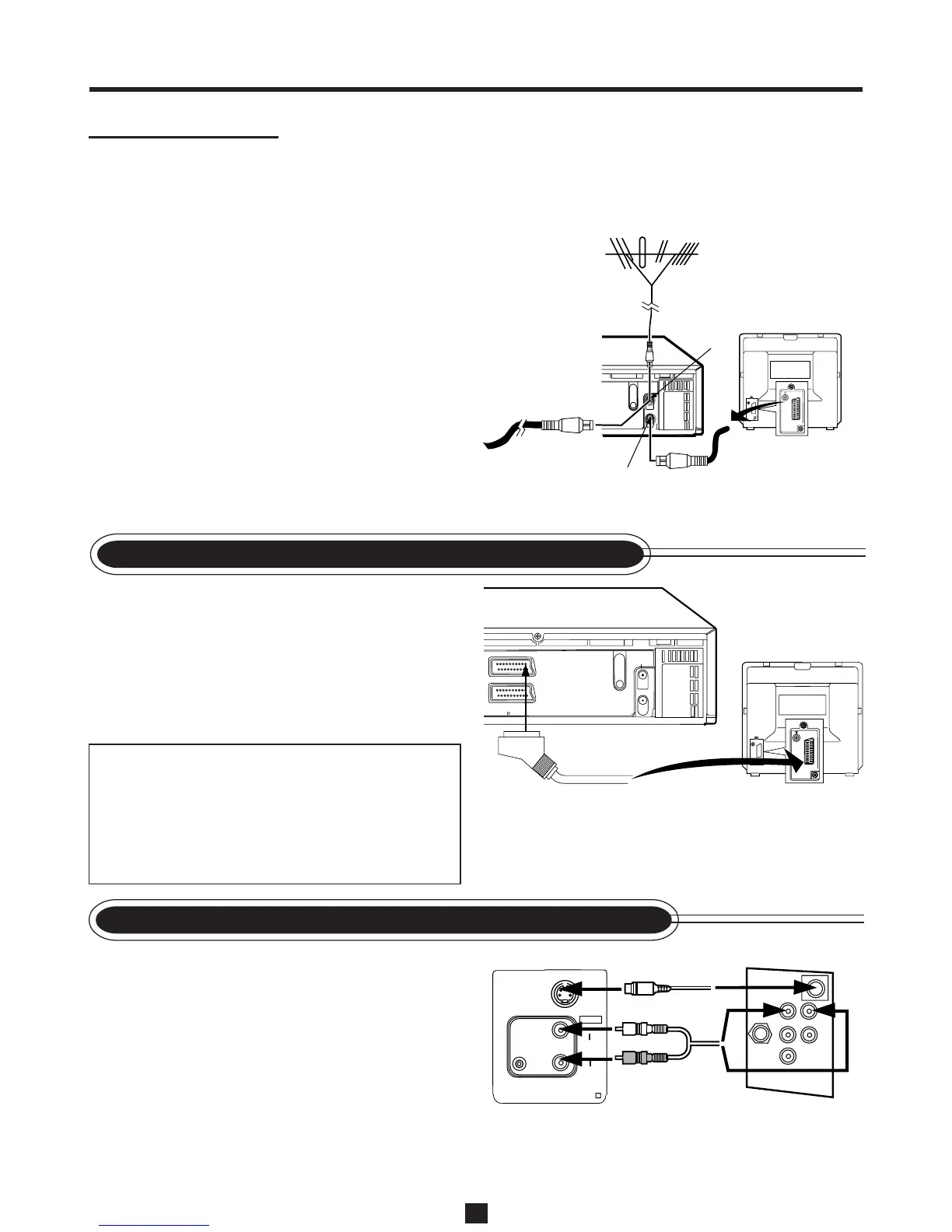
1 Complete the steps above.
2 Connect the scart cable between the AV1 (L- 1)
IN/OUT connector of the VCR and the TV’s
21-pin AV input connector (SCART).
3 Plug the AC power cords of the VCR and TV
into the AC outlets.
ATTENTION
If no colour appears on the TV screen when
performing Auto Set Up or Follow TV (✈P.9),
set “A/V1 OUTPUT” to appropriate setting on
the Menu screen (✈P.37) after completing Auto
Set Up or Follow TV.
1 Complete the steps above.
2 Connect an S-Video/Audio cable between the
S-OUT/AUDIO OUT jacks on the VCR and
an S-Video/Audio input jacks on a TV.
3 Plug the AC power cords of the VCR and TV
into the AC outlets.
S-Video Cable
Audio Cable
Outdoor antenna
Back of VCR
RF coaxial cable
(supplied)
ANT. IN
RF OUT
Cable
G
ETTING
ETTINGETTING
C
ONNECTED
ONNECTEDONNECTED
U
P
PP
21-pin
SCART cable
CConnection DDiagram
Before connecting VCR to TV using
SCART connection or S-Video
Connection, complete the steps below.
• Disconnect the antenna or cable from the TV
and the AC power cord of the TV from the AC
outlet.
• Connect the indoor or outdoor antenna or
cable to the VCR.
• Connect the VCR to the TV using the RF
coaxial cable.
VCR to AV TV Connection using the SCART Connection
VCR to AV TV Connection using the S-Video Connection
To TV’s 21-pin
input connector
(SCART)
Back of TV
Back of TV
TV


 To Next Page