EasyManua.ls Logo

Philips VR355/50 - Page 11

Philips VR355/50
29 pages
Print Icon
To Next Page IconTo Next Page
To Previous Page IconTo Previous Page
Loading...
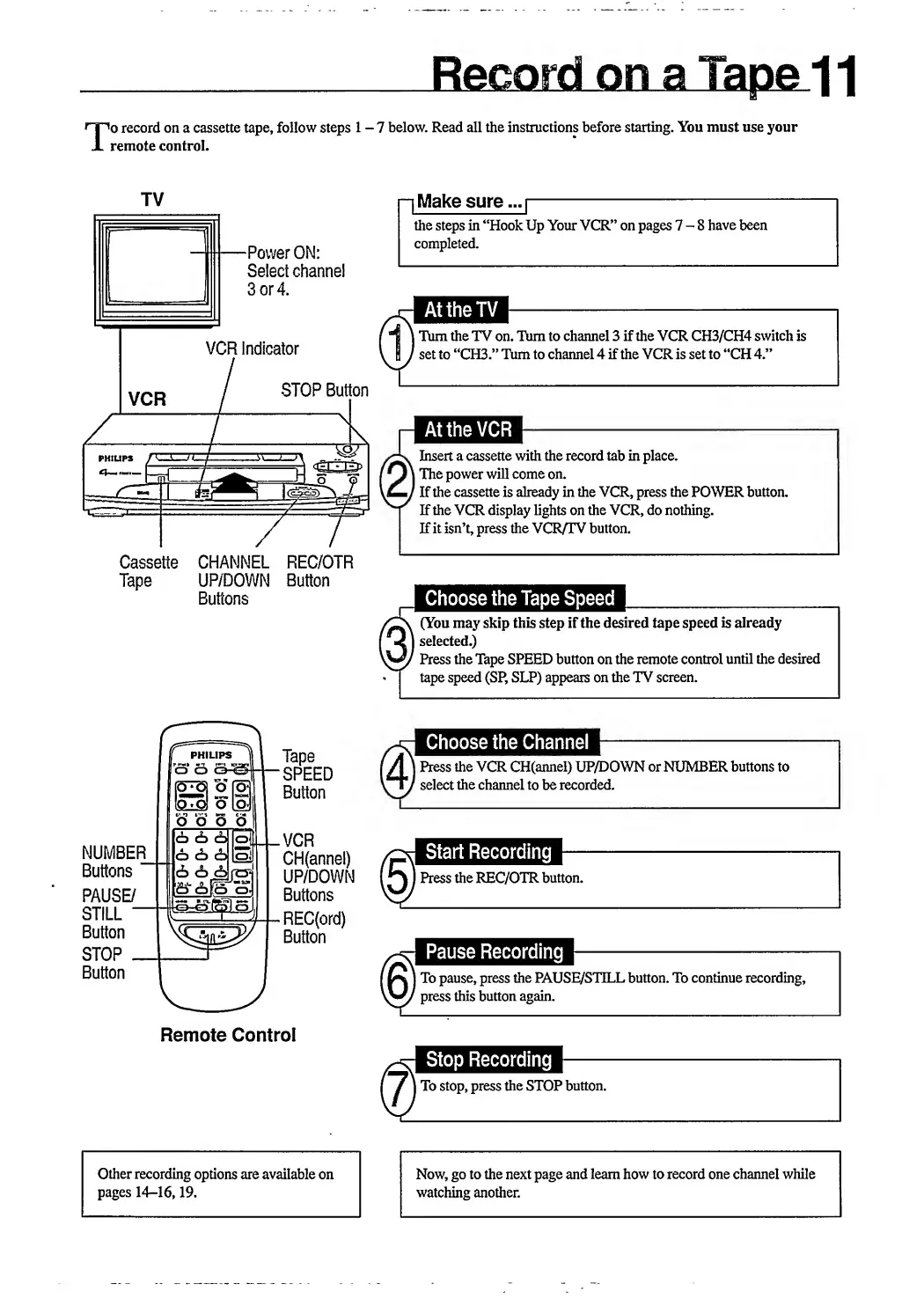
T
o
record
on
a
cassette
tape,
follow
steps
1-7
below.
Read
all
the
instructions
before
starting.
You
must
use
your
remote
control.
TV
Cassette
CHANNEL
REC/OTR
Tape
UP/DOWN
Button
Buttons
~
l
Make
sure...
|
-
the
steps
in
“Hook
Up
Your
VCR”
on
pages
7-8
have
been
completed.
At
the
TV
Tbm
the
TV
on.
T\im
to
channel
3
if
the
VCR
CH3/CH4
switch
is
set
to
“CH3.”
Turn
to
channel
4
if
the
VCR
is
set
to
“CH
4.”
At
the
VCR
Insert
a
cassette
with
the
record
tab
in
place.
I
The
power
will
come
on.
'
If
the
cassette
is
already
in
the
VCR,
press
the
POWER
button.
If
the
VCR
display
lights
on
the
VCR,
do
nothing.
If
it
isn’t,
press
the
VCR/TV
button.
Choose
the
Tape
Speed
(You
may
skip
this
step
if
the
desired
tape
speed
is
already
|
selected.)
Press
the
Tape
SPEED
button
on
the
remote
control
until
the
desired
tape
speed
(SP,
SLP)
appears
on
the
TV
screen.
Tape
SPEED
Button
VCR
CH(annel)
UP/DOWN
Buttons
REC(ord)
Button
Remote
Control
Choose
the
Channel
J
Press
the
VCR
CH(annel)
UP/DOWN
or
NUMBER
buttons
to
select
the
channel
to
be
recorded.
Start
Recording
Press
the
REC/OTR
button.
Pause
Recording
To
pause,
press
the
PAUSE/STILL
button.
To
continue
recording,
press
this
button
again.
Stop
Recording
To
stop,
press
the
STOP
button.
r
Other
recording
options
are
available
on
pages
14-16,19.
Now,
go
to
the
next
page
and
learn
how
to
record
one
channel
while
watching
another.

Related product manuals