EasyManua.ls Logo

Philips VR355/50 - Page 12

Philips VR355/50
29 pages
Print Icon
To Next Page IconTo Next Page
To Previous Page IconTo Previous Page
Loading...
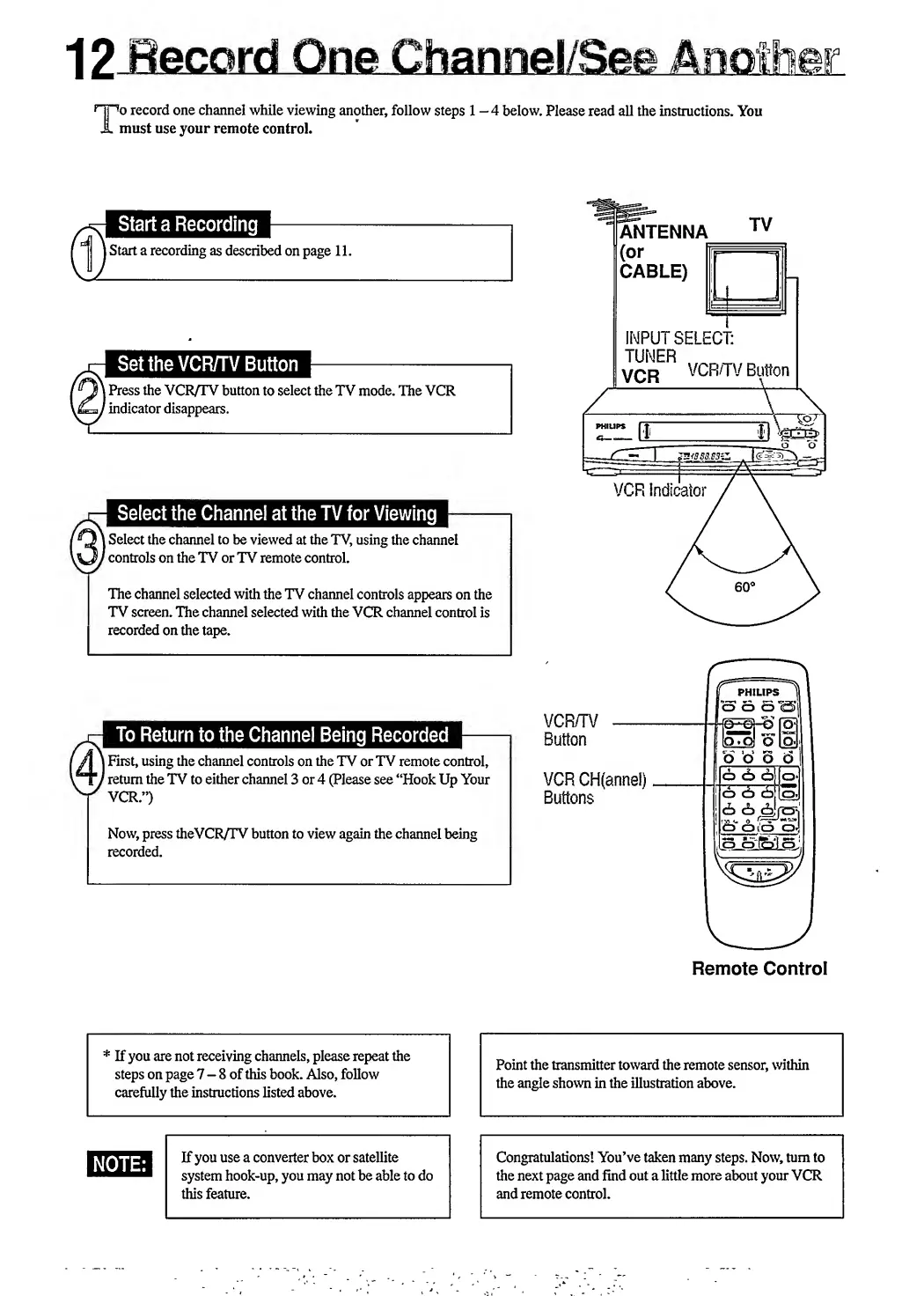
o
record
one
channel
while
viewing
another,
follow
steps
1
-4
below.
Please
read
all
the
instructions.
You
must
use
your
remote
control.
Start
a
Recording
)
Start
a
recording
as
described
on
page
11.
ANTENNA
(or
If
CABLE)
|
Set
the
VCR/TV
Button
\
Press
the
VCR/TV
button
to
select
the
TV
mode.
The
VCR
/
indicator
disappears.
INPUT
SELECT:
TUNER
VCR/TV
Button
Select
the
Channel
at
the
TV
for
Viewing
\
Select
the
channel
to
be
viewed
at
the
TV,
using
the
channel
I
controls
on
the
TV
or
TV
remote
control.
The
channel
selected
with
the
TV
channel
controls
appears
on
the
TV
screen.
The
channel
selected
with
the
VCR
channel
control
is
recorded
on
the
tape.
VCR
Indicator
\
First,
using
the
channel
controls
on
the
TV
or
TV
remote
control,
I
return
the
TV
to
either
channel
3
or
4
(Please
see
“Hook
Up
Your
VCR.”)
Now,
press
theVCR/TV
button
to
view
again
the
channel
being
recorded.
vcr/tv
Button
VCR
CH(annel)
Buttons
/
PHILIPS
|
66
6*<2>|
(Ojl
lo.d
o
loj
o
o
So
l
I
o
d>
i
o~5~5
(S
cb
cb
Are*
IS_oj£iiS,
i
Remote
Control

Related product manuals