EasyManua.ls Logo

Philips VR355/50 - Page 17

Philips VR355/50
29 pages
Print Icon
To Next Page IconTo Next Page
To Previous Page IconTo Previous Page
Loading...
Features.
17
I
s
your
VCR
(Video
Cassette
Recorder)
connected
to
your
TV
(see
“Hook
Up
Your
VCR”)?
Are
you
familiar
with
tape
playback
(see
“Play
a
Tape”)?
If
so,
you
are
ready
to
enjoy
the
special
playback
features
described
on
this
page.
These
features
work
best
in
the
SP
(Standard
Play)
or
SLP
(Super
Long
Play)
mode.
You
must
use
your
remote
control.
1
?
3
o
o
o
-
'\s
2
4
5
$
o
o
o
<b
<hA
s-.oi
Or/
uissmsiu
*-
Vrr
.
.t
50ZJ
j
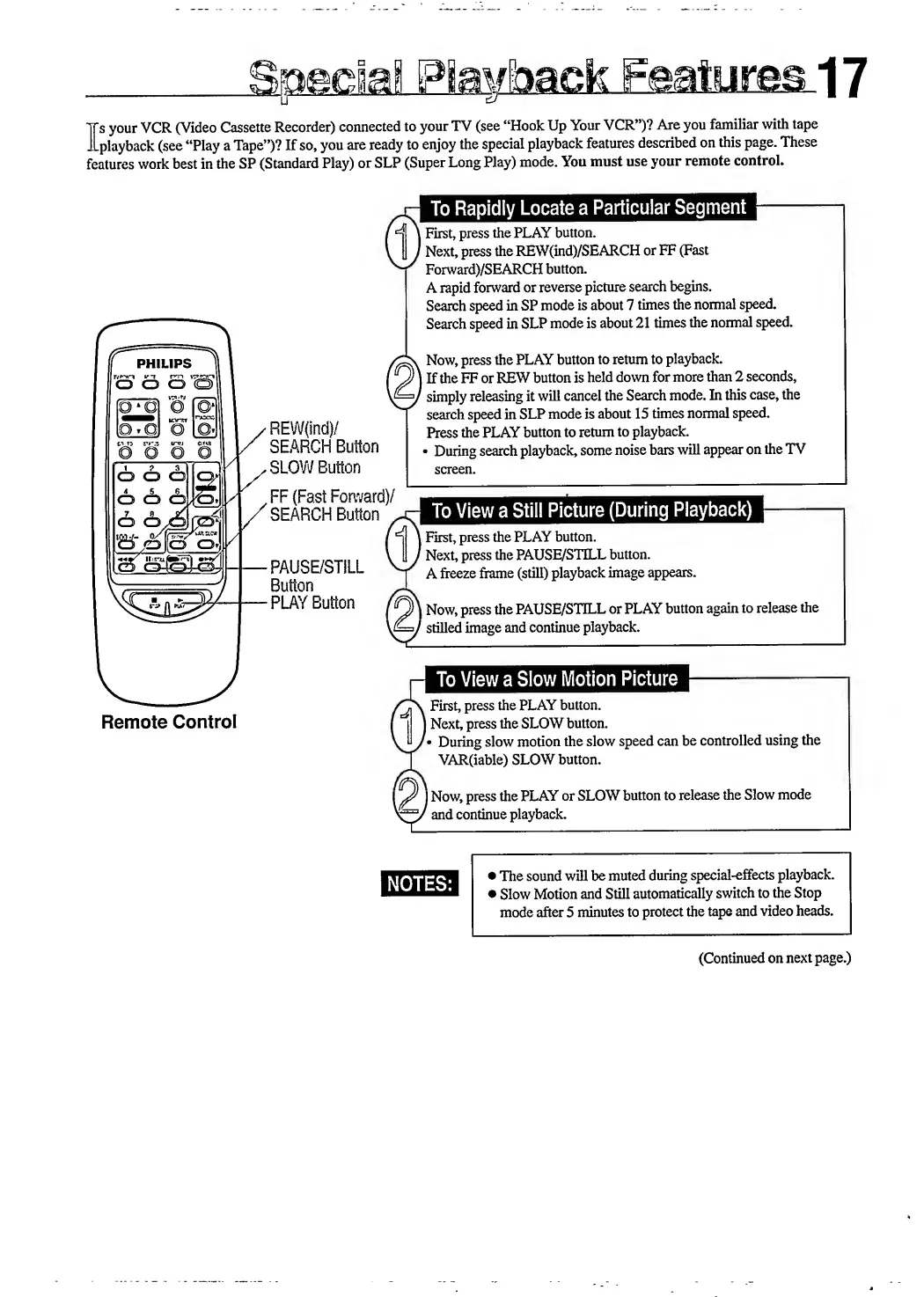
Remote
Control
'REW(ind)/
SEARCH
Button
.
SLOW
Button
FF
(Fast
Forward)/
SEARCH
Button
PAUSE/STILL
Button
-
PLAY
Button
To
Rapidly
Locate
a
Particular
Segment
l
First,
press
the
PLAY
button.
'
Next,
press
the
REW(ind)/SEARCH
or
FF
(Fast
Forward)/SEARCH
button.
A
rapid
forward
or
reverse
picture
search
begins.
Search
speed
in
SP
mode
is
about
7
times
the
normal
speed.
Search
speed
in
SLP
mode
is
about
21
times
the
normal
speed.
Now,
press
the
PLAY
button
to
return
to
playback.
I
If
the
FF
or
REW
button
is
held
down
for
more
than
2
seconds,
simply
releasing
it
will
cancel
the
Search
mode.
In
this
case,
the
search
speed
in
SLP
mode
is
about
15
times
normal
speed.
Press
the
PLAY
button
to
return
to
playback.
During
search
playback,
some
noise
bars
will
appear
on
the
TV
screen.
car
To
View
a
Still
Picture
(During
Playback)
|
First,
press
the
PLAY
button.
'
Next,
press
the
PAUSE/STELL
button.
A
freeze
frame
(still)
playback
image
appears.
I
Now,
press
the
PAUSE/STILL
or
PLAY
button
again
to
release
the
'
stilled
image
and
continue
playback.
To
View
a
Slow
Motion
Picture
fn
\
First,
press
the
PLAY
button.
]
Next,
press
the
SLOW
button.
During
slow
motion
the
slow
speed
can
be
controlled
using
the
VAR(iable)
SLOW
button.
I
J
Now,
press
the
PLAY
or
SLOW
button
to
release
the
Slow
mode
^
Conans
playback.
NOTES:
The
sound
will
be
muted
during
special-effects
playback.
Slow
Motion
and
Still
automatically
switch
to
the
Stop
mode
after
5
minutes
to
protect
the
tape
and
video
heads.
(Continued
on
next
page.)

Related product manuals