EasyManua.ls Logo

Philips VR355/50 - Page 16

Philips VR355/50
29 pages
Print Icon
To Next Page IconTo Next Page
To Previous Page IconTo Previous Page
Loading...
Select
the
“TIME
ON”
NORMALPROGRAM
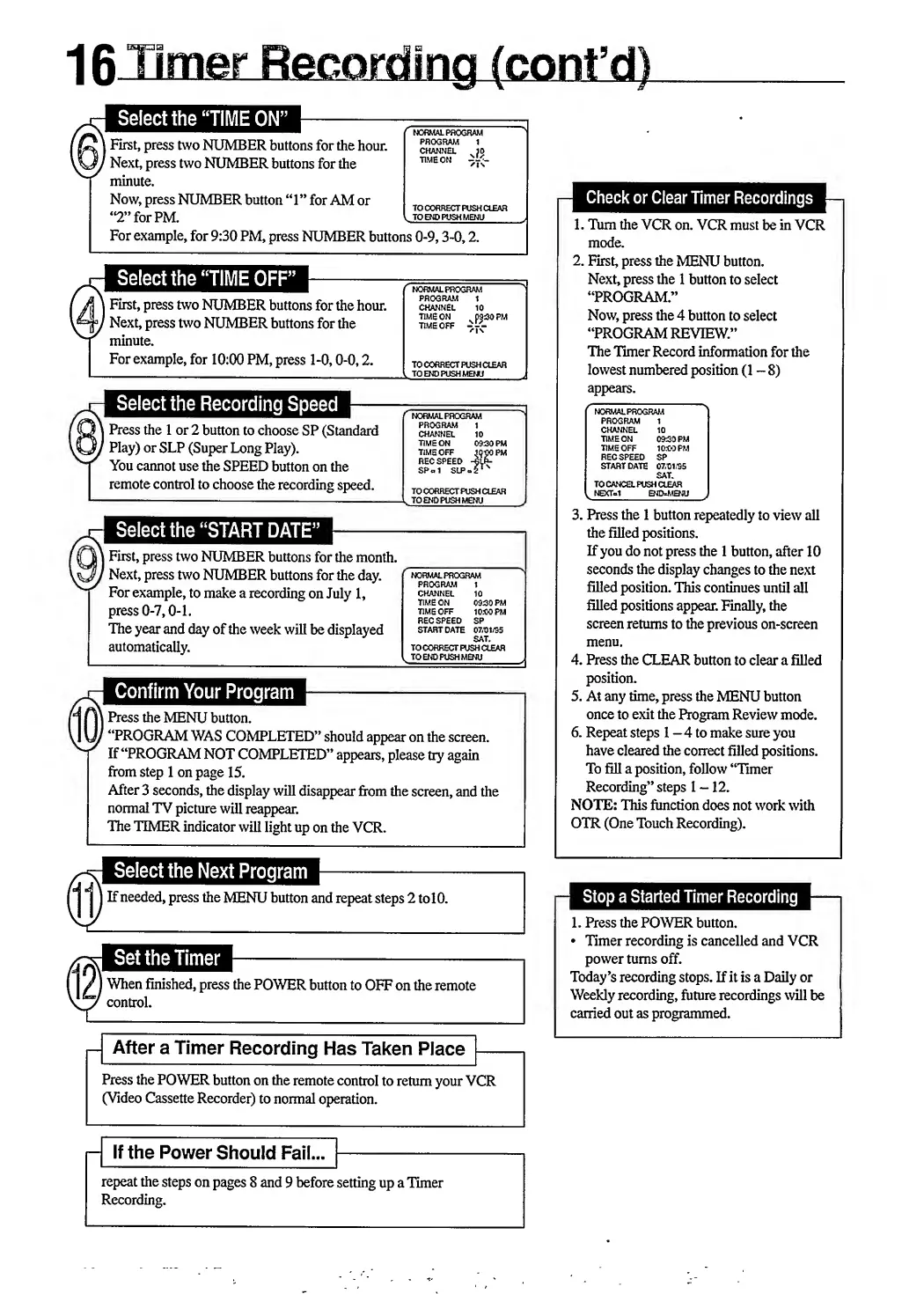
First,
press
two
NUMBER
buttons
for
the
hour.
channel
1
jo
Next,
press
two
NUMBER
buttons
for
the
TlME
0N
^Tv-
minute.
Now,
press
NUMBER
button
“1”
for
AM
or
2
for
PM.
I
TOENDPUSHMENU
For
example,
for
9:30
PM,
press
NUMBER
buttons
0-9,3-0,2.
|
First,
press
two
NUMBER
buttons
for
the
hour.
Next,
press
two
NUMBER
buttons
for
the
minute.
For
example,
for
10:00
PM,
press
1-0,0-0,2.
I
f
NORMAL
PROGRAM
S
PROGRAM
1
CHANNEL
10
TIME
ON
n
p930
PM
TIME
OFF
”7“
TO
CORRECT
PUSH
CLEAR
^
TO
END
PUSH
MENU
X
Select
the
Recording
Speed
Press
the
1
or
2
button
to
choose
SP
(Standard
Play)
or
SLP
(Super
Long
Play).
You
cannot
use
the
SPEED
button
on
the
remote
control
to
choose
the
recording
speed.
I
First,
press
two
NUMBER
buttons
for
the
month.
'
Next,
press
two
NUMBER
buttons
for
the
day.
For
example,
to
make
a
recording
on
July
1,
press
0-7,0-1.
The
year
and
day
of
the
week
will
be
displayed
automatically.
NORMALPROGRAM
PROGRAM
1
CHANNEL
10
TIME
ON
0930
PM
TIME
OFF
JO-00
PM
REC
SPEED
-6LR-
SPol
SIP
-
2
1
TO
CORRECT
PUSH
CLEAR
TO
END
PUSH
MENU
NORMAL
PROGRAM
PROGRAM
1
CHANNEL
10
TIME
ON
0930
PM
TIME
OFF
1030
PM
REC
SPEED
SP
START
DATE
07/01/95
SAT.
TO
CORRECT
PUSH
CLEAR
TO
END
PUSH
MENU
Confirm
Your
Program
\
Press
the
MENU
button.
/
“PROGRAM
WAS
COMPLETED”
should
appear
on
the
screen.
If
“PROGRAM
NOT
COMPLETED”
appears,
please
try
again
from
step
1
on
page
15.
After
3
seconds,
the
display
will
disappear
from
the
screen,
and
the
normal
TV
picture
will
reappear.
The
TIMER
indicator
will
light
up
on
the
VCR.
Check
or
Clear
Timer
Recordings
1.
Turn
the
VCR
on.
VCR
must
be
in
VCR
mode.
2.
First,
press
the
MENU
button.
Next,
press
the
1
button
to
select
“PROGRAM.”
Now,
press
the
4
button
to
select
“PROGRAM
REVIEW.”
The
Timer
Record
information
for
the
lowest
numbered
position
(1-8)
appears.
r
NORMALPROGRAM
PROGRAM
1
CHANNEL
10
TIME
ON
0930
PM
TIME
OFF
1030
PM
REC
SPEED
SP
START
DATE
07/01/95
SAT.
TO
CANCEL
PUSH
CLEAR
l
NSCTol
END=MENU
3.
Press
the
1
button
repeatedly
to
view
all
the
filled
positions.
If
you
do
not
press
the
1
button,
after
10
seconds
the
display
changes
to
the
next
filled
position.
This
continues
until
all
filled
positions
appear.
Finally,
the
screen
returns
to
the
previous
on-screen
menu.
4.
Press
the
CLEAR
button
to
clear
a
filled
position.
5.
At
any
time,
press
the
MENU
button
once
to
exit
the
Program
Review
mode.
6.
Repeat
steps
1
-
4
to
make
sure
you
have
cleared
the
correct
filled
positions.
To
fill
a
position,
follow
“Timer
Recording”
steps
1-12.
NOTE:
This
function
does
not
work
with
OTR
(One
Touch
Recording).
Select
the
Next
Program
If
needed,
press
the
MENU
button
and
repeat
steps
2
to
10.
H
Set
the
Timer
When
finished,
press
the
POWER
button
to
OFF
on
the
remote
control.
After
a
Timer
Recording
Has
Taken
Place
Press
the
POWER
button
on
the
remote
control
to
return
your
VCR
(Video
Cassette
Recorder)
to
normal
operation.
Stop
a
Started
Timer
Recording
1.
Press
the
POWER
button.
Timer
recording
is
cancelled
and
VCR
power
turns
off.
Today’s
recording
stops.
If
it
is
a
Daily
or
Weekly
recording,
future
recordings
will
be
carried
out
as
programmed.
If
the
Power
Should
Fail...
repeat
the
steps
on
pages
8
and
9
before
setting
up
a
Timer
Recording.

Related product manuals