EasyManua.ls Logo

Philips VR355/50 - Page 19

Philips VR355/50
29 pages
Print Icon
To Next Page IconTo Next Page
To Previous Page IconTo Previous Page
Loading...
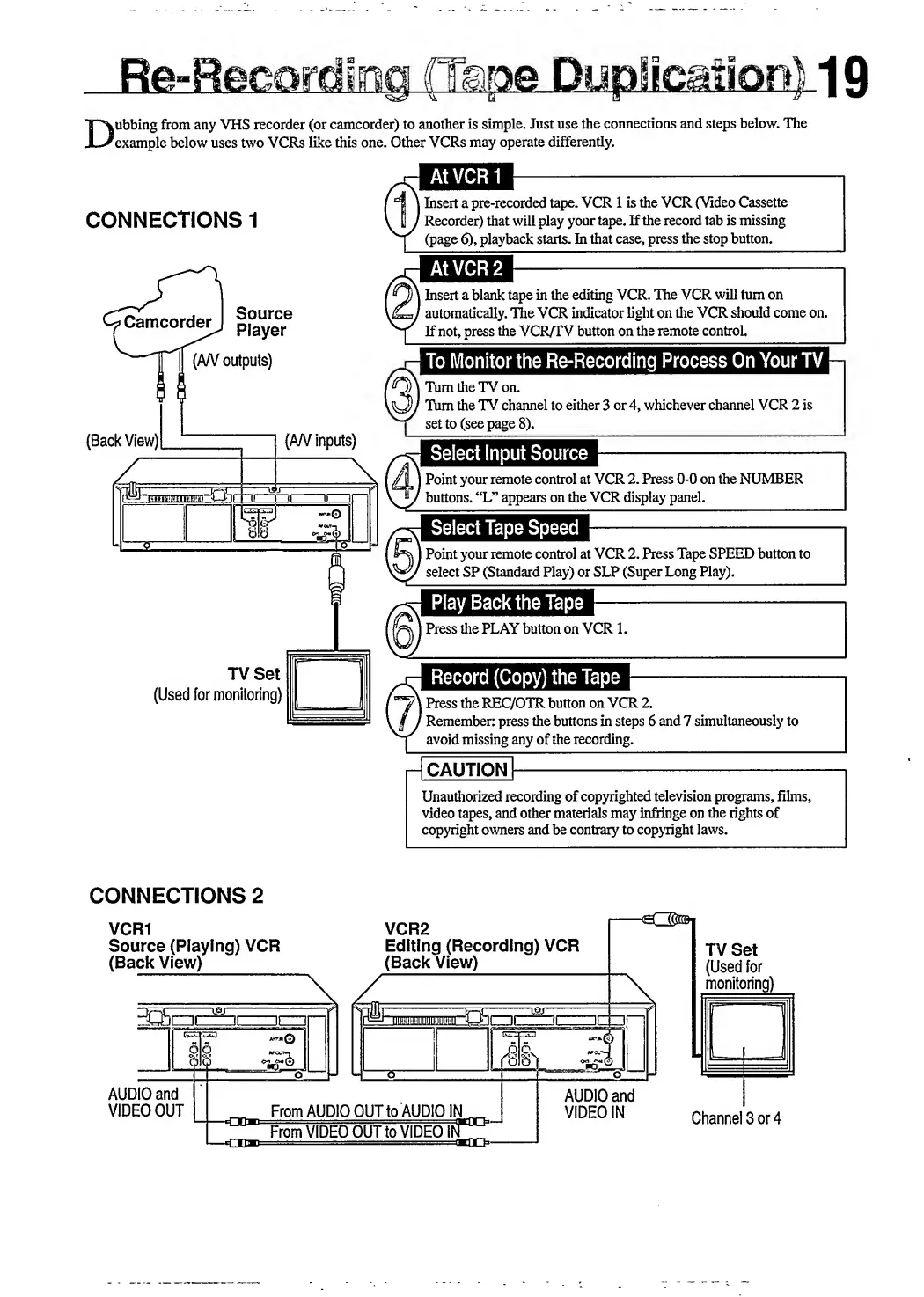
ubbing
from
any
VHS
recorder
(or
camcorder)
to
another
is
simple.
Just
use
the
connections
and
steps
below.
The
example
below
uses
two
VCRs
like
this
one.
Other
VCRs
may
operate
differently.
CONNECTIONS
1
l
Insert
a
pre-recorded
tape.
VCR
1
is
the
VCR
(Video
Cassette
'
Recorder)
that
will
play
your
tape.
If
the
record
tab
is
missing
(page
6),
playback
starts.
In
that
case,
press
the
stop
button.
>
Camcorder
Source
Player
(AN
outputs)
(Back
View)[
(AN
inputs)
TV
Set
(Used
for
monitoring)
i
Insert
a
blank
tape
in
the
editing
VCR.
The
VCR
will
turn
on
'
automatically.
The
VCR
indicator
light
on
the
VCR
should
come
on.
If
not,
press
the
VCR/TV
button
on
the
remote
control.
To
Monitor
the
Re-Recording
Process
On
Your
TV
Turn
the
TV
on.
Turn
the
TV
channel
to
either
3
or
4,
whichever
channel
VCR
2
is
set
to
(see
page
8).
Select
Input
Source
Point
your
remote
control
at
VCR
2.
Press
0-0
on
the
NUMBER
buttons.
“L”
appears
on
the
VCR
display
panel.
Select
Tape
Speed
)
Point
your
remote
control
at
VCR
2.
Press
Tape
SPEED
button
to
select
SP
(Standard
Play)
or
SLP
(Super
Long
Play).
Press
the
PLAY
button
on
VCR
1.
Record
(Copy)
the
Tape
\
Press
the
REC/OTR
button
on
VCR
2.
/
Remember:
press
the
buttons
in
steps
6
and
7
simultaneously
to
avoid
missing
any
of
the
recording.
-
I
caution
I
-
Unauthorized
recording
of
copyrighted
television
programs,
films,
video
tapes,
and
other
materials
may
infringe
on
the
rights
of
copyright
owners
and
be
contrary
to
copyright
laws.
CONNECTIONS
2
VCR1
Source
(Playing)
VCR
(Back
View)
VCR2
Editing
(Recording)
VCR
(Back
View)
TV
Set
(Used
for
monitoring)

Related product manuals