EasyManua.ls Logo

Philips VR355/50 - Page 20

Philips VR355/50
29 pages
Print Icon
To Next Page IconTo Next Page
To Previous Page IconTo Previous Page
Loading...
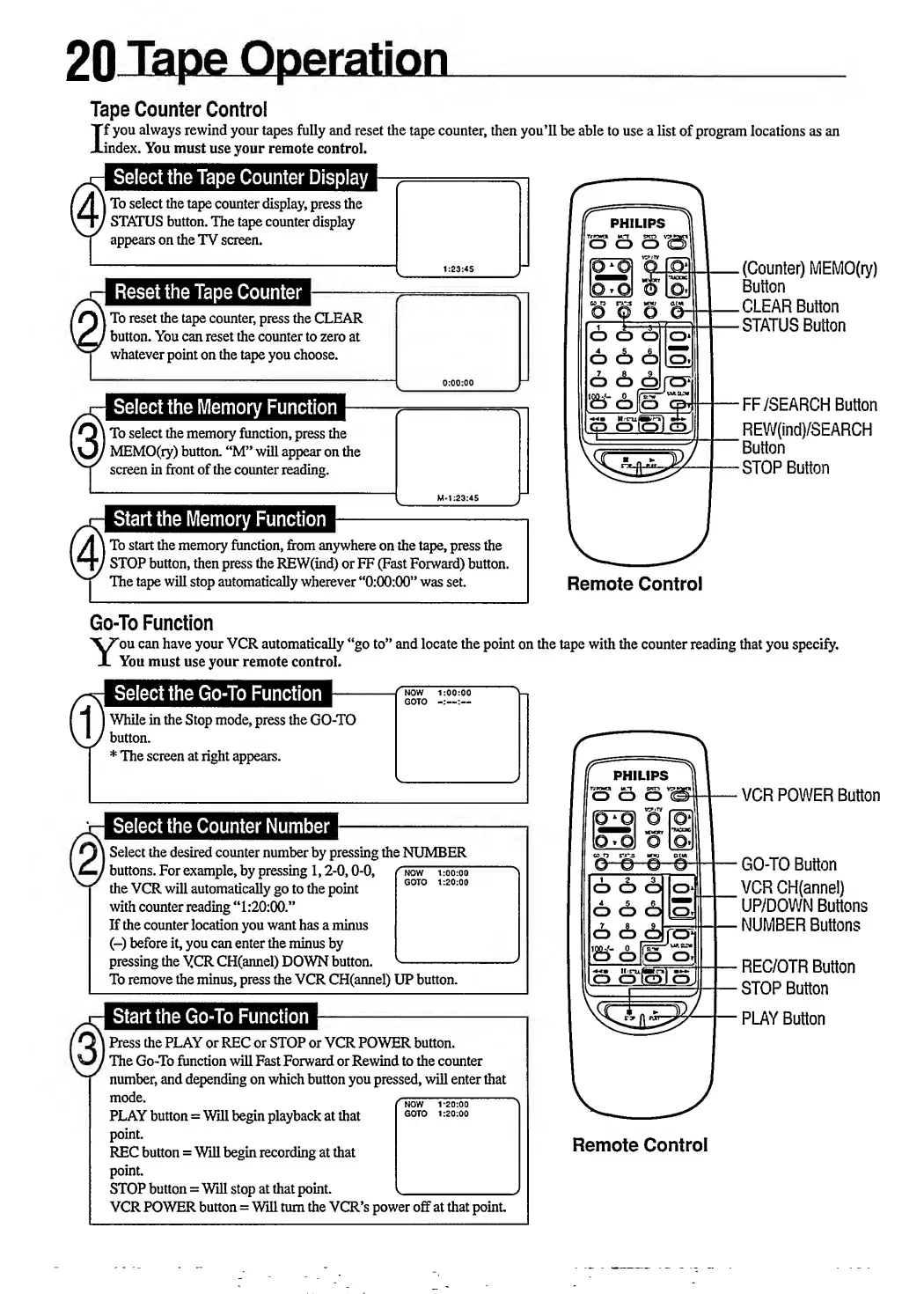
Tape
Counter
Control
I
f
you
always
rewind
your
tapes
fully
and
reset
the
tape
counter,
then
you’ll
be
able
to
use
a
list
of
program
locations
as
an
index.
You
must
use
your
remote
control.
f
Al
To
select
the
tape
counter
display,
press
the
f
1
\Hy
STATUS
button.
The
tape
counter
display
I
if
PHILIPS
1
j
7
appears
on
the
TV
screen.
|
t
q
q
£3'I2>
1
|
To
reset
the
tape
counter,
press
the
CLEAR
'
button.
You
can
reset
the
counter
to
zero
at
whatever
point
on
the
tape
you
choose.
f
<
|
select
the
memory
function,
press
the
MEMO(ry)
button.
“M”
will
appear
on
the
screen
in
front
of
the
counter
reading.
o
cb
|o»
o
<!>
grey
•a-aHa
^
lo
olo)
oJ
.
(Counter)
MEMO(ry)
Button
.CLEAR
Button
•STATUS
Button
F
F
/
SEARCH
Button
REW(ind)/SEARCH
'
Button
•STOP
Button
[
A
\
To
start
the
memory
function,
from
anywhere
on
the
tape,
press
the
\~tJ
STOP
button,
then
press
the
REW(ind)
or
FF
(Fast
Forward)
button.
The
tape
will
stop
automatically
wherever
‘*0:00:00”
was
set
Remote
Control
Go-To
Function
Y
ou
can
have
your
VCR
automatically
“go
to”
and
locate
the
point
on
the
tape
with
the
counter
reading
that
you
specify.
You
must
use
your
remote
control.
!
Select
the
Go-To
Function
^^9
''now
1:00:00
^
GOTO
)
While
in
the
Stop
mode,
press
the
GO-TO
/
button.
*
The
screen
at
right
appears.
Select
the
Counter
Number
|
Select
the
desired
counter
number
by
pressing
the
NUMBER
'
buttons.
For
example,
by
pressing
1,2-0,0-0,
^now
T7ooToo“
the
VCR
will
automatically
go
to
the
point
b0K
1
0
00
with
counter
reading
“1:20:00.”
If
the
counter
location
you
want
has
a
minus
(-)
before
it,
you
can
enter
the
minus
by
pressing
the
YCR
CH(annel)
DOWN
button.
-
To
remove
the
minus,
press
the
VCR
CH(annel)
UP
button.
|
Press
the
PLAY
or
REC
or
STOP
or
VCR
POWER
button.
'
The
Go-To
function
will
Fast
Forward
or
Rewind
to
the
counter
number,
and
depending
on
which
button
you
pressed,
will
enter
that
mode.
r
N0W
t
-
20:00
PLAY
button
=
Will
begin
playback
at
that
G0T0
1:20:00
point.
REC
button
=
Will
begin
recording
at
that
point.
STOP
button
=
Will
stop
at
that
point.
,_
VCR
POWER
button
=
Will
turn
the
VCR’s
power
off
at
that
point.
PHILIPS
T
VWCT
m
t*r>
Y?
o
o
o
<s
o
o
o
o
666
IS
o
cS
grey
o
cajolo)
Remote
Control
V
CR
POWER
Button
GO-TO
Button
VCR
GH(annel)
UP/DOWN
Buttons
NUMBER
Buttons
REC/OTR
Button
STOP
Button
PLAY
Button

Related product manuals