EasyManua.ls Logo

Philips VR355/50 - Page 21

Philips VR355/50
29 pages
Print Icon
To Next Page IconTo Next Page
To Previous Page IconTo Previous Page
Loading...
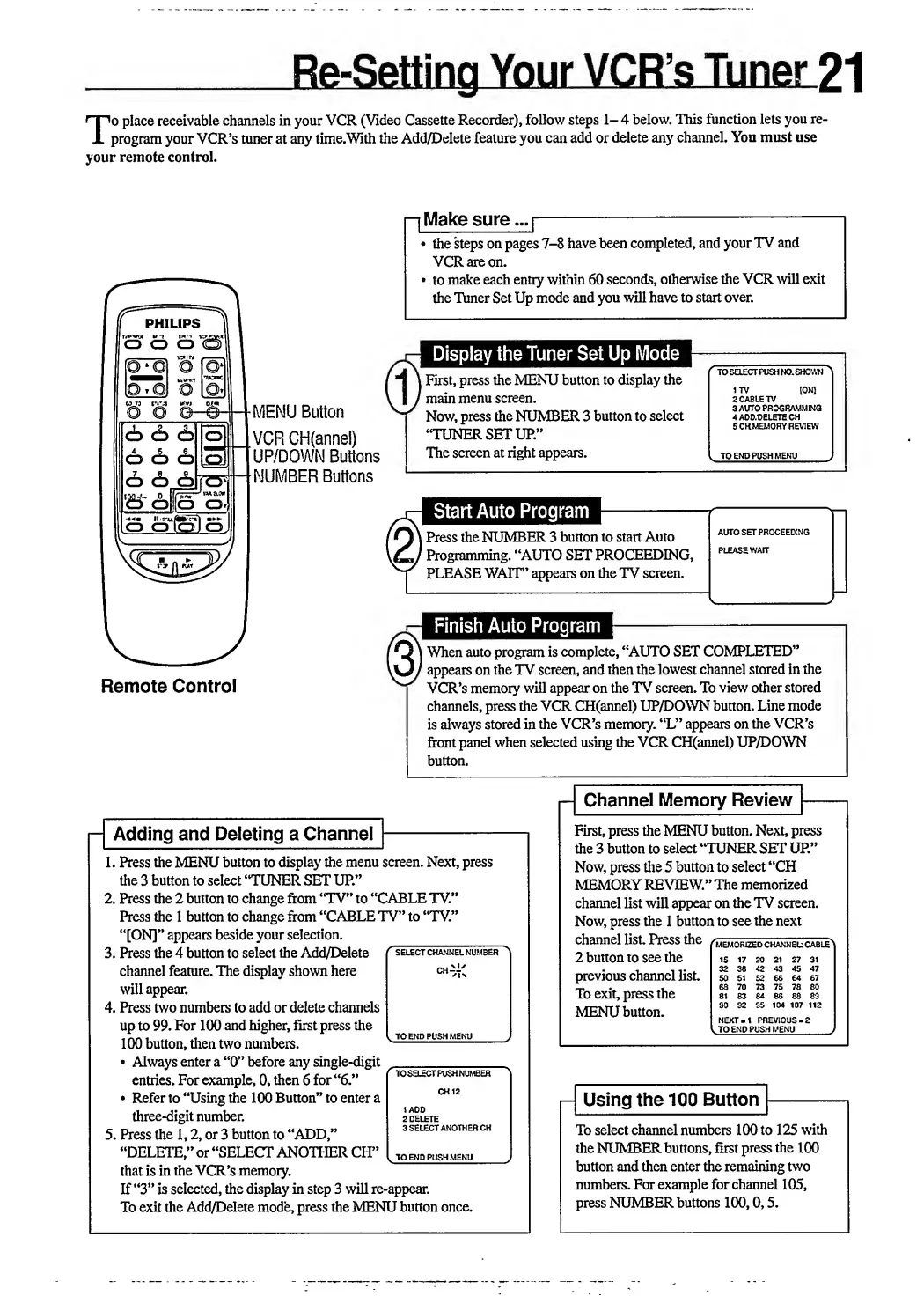
T
o
place
receivable
channels
in
your
VCR
(Video
Cassette
Recorder),
follow
steps
1-4
below.
This
function
lets
you
re¬
program
your
VCR’s
tuner
at
any
time.With
the
Add/Delete
feature
you
can
add
or
delete
any
channel.
You
must
use
your
remote
control.
[Make
sure...]
-
the
steps
on
pages
7-8
have
been
completed,
and
your
TV
and
VCR
are
on.
to
make
each
entry
within
60
seconds,
otherwise
the
VCR
will
exit
the
Tuner
Set
Up
mode
and
you
will
have
to
start
over.
CD
O
O
6
6
6
S
<h
c6]
n<=>
w
o
o
O
O
O
\CD\
OJ
M
E
NU
Button
VCR
CH(annel)
UP/DOWN
Buttons
NUMBER
Buttons
|
First,
press
the
MENU
button
to
display
the
'
main
menu
screen.
Now,
press
the
NUMBER
3
button
to
select
“TUNER
SET
UR”
The
screen
at
right
appears.
Start
Auto
Program
l
Press
the
NUMBER
3
button
to
start
Auto
'
Programming.
“AUTO
SET
PROCEEDING,
PLEASE
WAIT”
appears
on
the
TV
screen.
TO
SELECT
PUSH
NO.
SHOWN
17V
[ON]
2
CABLE
TV
3
AUTO
PROGRAMMING
4
ADD/DELETE
CH
5
CHMEMORY
REVIEW
TO
END
PUSH
MENU
AUTO
SET
PROCEEDING
Remote
Control
|
When
auto
program
is
complete,
“AUTO
SET
COMPLETED”
'
appears
on
the
TV
screen,
and
then
the
lowest
channel
stored
in
the
VCR’s
memory
will
appear
on
the
TV
screen.
To
view
other
stored
channels,
press
the
VCR
CH(annel)
UP/DOWN
button.
Line
mode
is
always
stored
in
the
VCR’s
memory.
“L”
appears
on
the
VCR’s
front
panel
when
selected
using
the
VCR
CH(annel)
UP/DOWN
button.
Adding
and
Deleting
a
Channel
1.
Press
the
MENU
button
to
display
the
menu
screen.
Next,
press
the
3
button
to
select
“TUNER
SET
UP.”
2.
Press
the
2
button
to
change
from
“TV”
to
“CABLE
TV.”
Press
the
1
button
to
change
from
“CABLE
TV”
to
“TV.”
“[ON]”
appears
beside
your
selection.
3.
Press
the
4
button
to
select
the
Add/Delete
f
select
channel
number
channel
feature.
The
display
shown
here
ch
will
appear.
4.
Press
two
numbers
to
add
or
delete
channels
up
to
99.
For
100
and
higher,
first
press
the
.
.
*
l
TO
END
PUSH
MENU
100
button,
then
two
numbers.
-
Always
enter
a
“0”
before
any
single-digit
_
_
.
~
1
n
.U
/r
^
»
(
T
O
SELECT
PUSH
NUMBER
entries.
For
example,
0,
then
6
for
6.
Refer
to
“Using
the
100
Button”
to
enter
a
0H
three-digit
number.
I
delete
cn-
,
o
0
v
..
*
it
A
nrvi
3
SELECT
ANOTHER
CH
5.
Press
the
1,2,
or
3
button
to
ADD,
“DELETE,”
or
“SELECT
ANOTHER
CEP’
[
toendpushmenu
that
is
in
the
VCR’s
memory.
If
“3”
is
selected,
the
display
in
step
3
will
re-appear.
To
exit
the
Add/Delete
mode,
press
the
MENU
button
once.
.
TO
END
PUSH
MENU
TO
SELECT
PUSH
NUMBER
1
ADD
2
DELETE
3
SELECT
ANOTHER
CH
,
TOENDPUSHMENU
-
Channel
Memory
Review
First,
press
the
MENU
button.
Next,
press
the
3
button
to
select
“TUNER
SET
UP.”
Now,
press
the
5
button
to
select
“CH
MEMORY
REVIEW.”
The
memorized
channel
list
will
appear
on
the
TV
screen.
Now,
press
the
1
button
to
see
the
next
channel
list.
Press
the
r
WEWO
rize
D
channel*
cable
^
2
button
to
see
the
is
i?
20
21
27
31
previous
channel
list.
50
51
52
66
&
67
m
•.
.
63
70
73
75
78
80
To
exit,
press
the
si
83
84
es
es
so
»
yrr’XTT
T
t.
..
90
92
95
104
107
112
MENU
button.
NEXT-1
PREVIOUS-2
l
TO
END
PUSH
MENU_
Using
the
100
Button
To
select
channel
numbers
100
to
125
with
the
NUMBER
buttons,
first
press
the
100
button
and
then
enter
the
remaining
two
numbers.
For
example
for
channel
105,
press
NUMBER
buttons
100,0,5.

Related product manuals