EasyManua.ls Logo

Philips VR355/50 - Page 24

Philips VR355/50
29 pages
Print Icon
To Next Page IconTo Next Page
To Previous Page IconTo Previous Page
Loading...
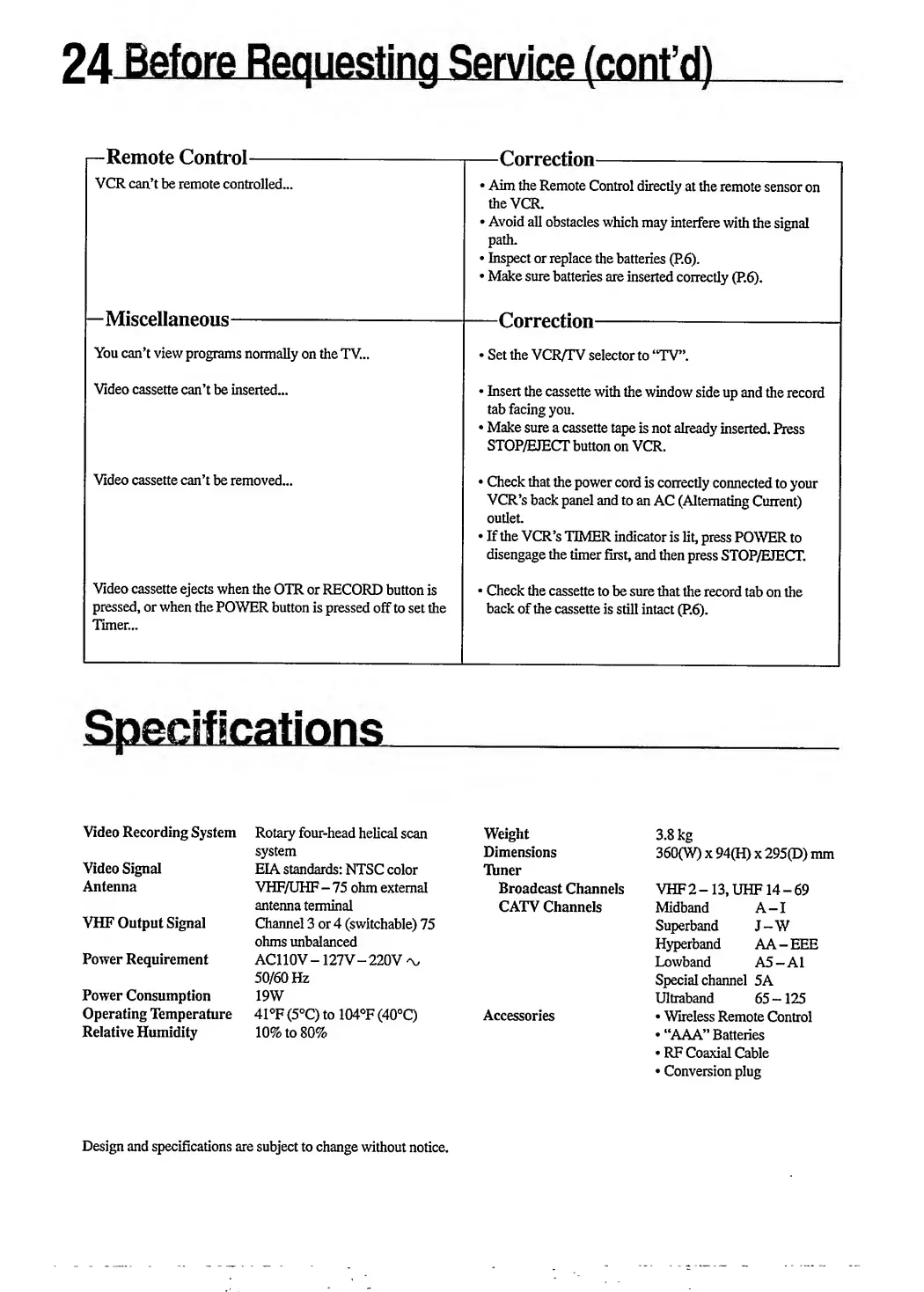
—Remote
Control-
VCR
can’t
be
remote
controlled...
—Correction-
Aim
the
Remote
Control
directly
at
the
remote
sensor
on
the
VCR.
Avoid
all
obstacles
which
may
interfere
with
the
signal
path.
Inspect
or
replace
the
batteries
(P.6).
Make
sure
batteries
are
inserted
correctly
(P.6).
—Miscellaneous-
You
can’t
view
programs
normally
on
the
TV...
—Correction-
*
Set
the
VCR/TV
selector
to
“TV”.
Video
cassette
can’t
be
inserted...
Insert
the
cassette
with
the
window
side
up
and
the
record
tab
facing
you.
Make
sure
a
cassette
tape
is
not
already
inserted.
Press
STOP/HJECT
button
on
VCR.
Video
cassette
can’t
be
removed...
Video
cassette
ejects
when
the
OTR
or
RECORD
button
is
pressed,
or
when
the
POWER
button
is
pressed
off
to
set
the
Timer...
Check
that
the
power
cord
is
correctly
connected
to
your
VCR’s
back
panel
and
to
an
AC
(Alternating
Current)
outlet.
If
the
VCR’s
TIMER
indicator
is
lit,
press
POWER
to
disengage
the
timer
first,
and
then
press
STOP/EJECT.
*
Check
the
cassette
to
be
sure
that
the
record
tab
on
the
back
of
the
cassette
is
still
intact
(P.6).
Video
Recording
System
Video
Signal
Antenna
VHF
Output
Signal
Power
Requirement
Power
Consumption
Operating
Temperature
Relative
Humidity
Rotary
four-head
helical
scan
system
EIA
standards:
NTSC
color
VHF/UHF
-
75
ohm
external
antenna
terminal
Channel
3
or
4
(switchable)
75
ohms
unbalanced
AC110V
127
V—220V
'v
50/60
Hz
19W
41°F
(5°C)
to
104°F
(40°C)
10
%
to
80%
Weight
Dimensions
Timer
Broadcast
Channels
CATV
Channels
Accessories
3.8
kg
360(W)
x
94(H)
x
295(D)
mm
VHF
2
-
13,
UHF14
-
69
Midband
A-I
Superband
J-W
Hyperband
AA
-
EEE
Lowband
A5
-
A1
Special
channel
5A
Ultraband
65-125
Wireless
Remote
Control
“AAA”
Batteries
RF
Coaxial
Cable
Conversion
plug
Design
and
specifications
are
subject
to
change
without
notice.

Related product manuals