EasyManua.ls Logo

Philips VR355/50 - Page 3

Philips VR355/50
29 pages
Print Icon
To Next Page IconTo Next Page
To Previous Page IconTo Previous Page
Loading...
_
Description
of
Controls
3
Front
Panel
VCR
Display
Panel
1
2
3
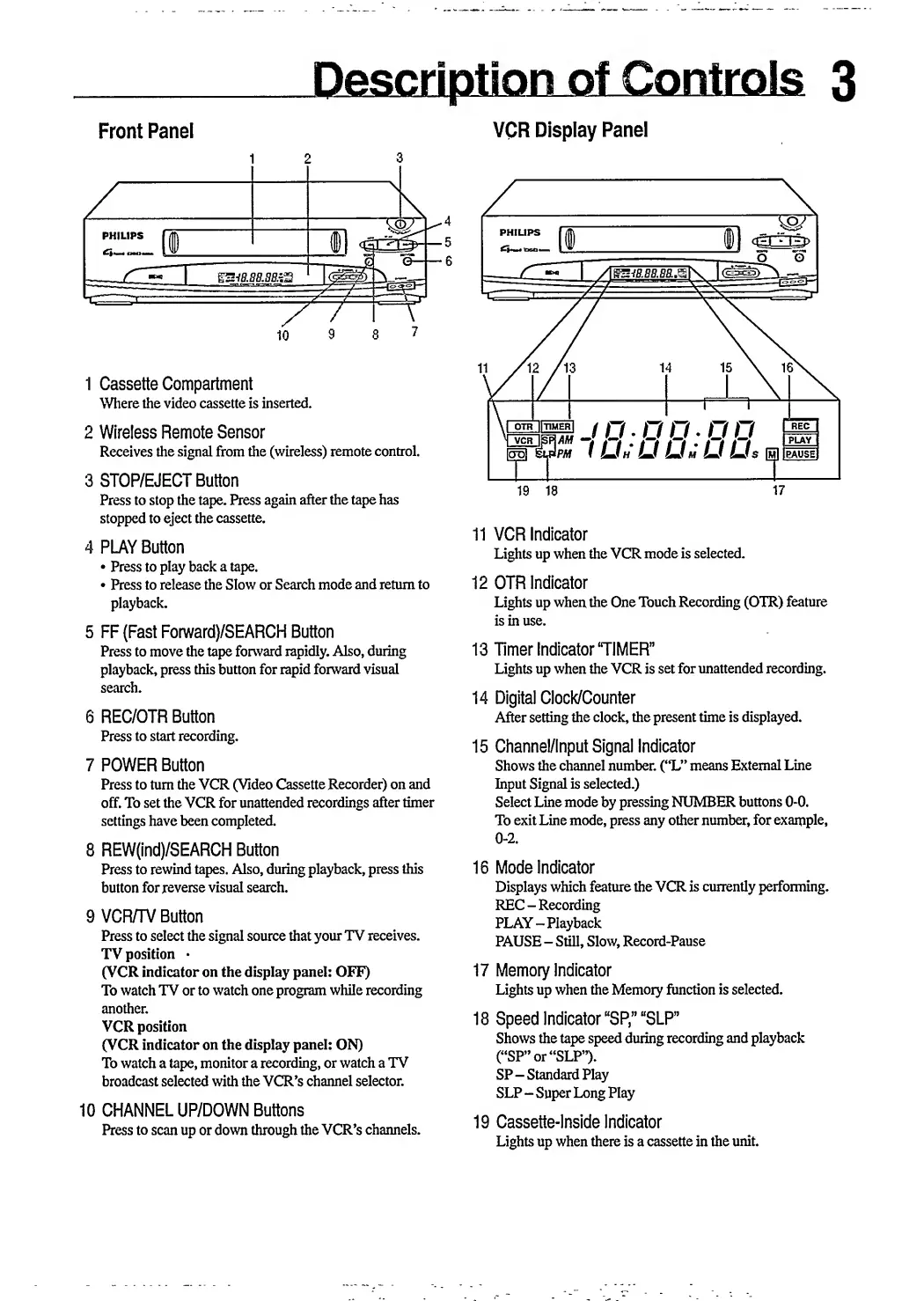
1
Cassette
Compartment
Where
the
video
cassette
is
inserted.
2
Wireless
Remote
Sensor
Receives
the
signal
from
the
(wireless)
remote
control.
3
STOP/EJECT
Button
Press
to
stop
the
tape.
Press
again
after
the
tape
has
stopped
to
eject
the
cassette.
4
PLAY
Button
Press
to
play
back
a
tape.
Press
to
release
the
Slow
or
Search
mode
and
return
to
playback.
5
FF
(Fast
Forward)/SEARCH
Button
Press
to
move
the
tape
forward
rapidly.
Also,
during
playback,
press
this
button
for
rapid
forward
visual
search.
6
REC/OTR
Button
Press
to
start
recording.
7
POWER
Button
Press
to
turn
the
VCR
(Video
Cassette
Recorder)
on
and
off.
To
set
the
VCR
for
unattended
recordings
after
timer
settings
have
been
completed.
8
REW(ind)/SEARCH
Button
Press
to
rewind
tapes.
Also,
during
playback,
press
this
button
for
reverse
visual
search.
9
VCR/TV
Button
Press
to
select
the
signal
source
that
your
TV
receives.
TV
position
(VCR
indicator
on
the
display
panel:
OFF)
To
watch
TV
or
to
watch
one
program
while
recording
another.
VCR
position
(VCR
indicator
on
the
display
panel:
ON)
To
watch
a
tape,
monitor
a
recording,
or
watch
a
TV
broadcast
selected
with
the
VCR’s
channel
selector.
10
CHANNEL
UP/DOWN
Buttons
Press
to
scan
up
or
down
through
the
VCR’s
channels.
11
VCR
Indicator
Lights
up
when
the
VCR
mode
is
selected.
12
OTR
Indicator
Lights
up
when
the
One
Touch
Recording
(OTR)
feature
is
in
use.
13
Timer
Indicator‘TIMER”
Lights
up
when
the
VCR
is
set
for
unattended
recording.
14
Digital
Clock/Counter
After
setting
the
clock,
the
present
time
is
displayed.
15
Channel/Input
Signal
Indicator
Shows
the
channel
number.
(“L”
means
External
Line
Input
Signal
is
selected.)
Select
Line
mode
by
pressing
NUMBER
buttons
0-0.
To
exit
Line
mode,
press
any
other
number,
for
example,
0-2.
16
Mode
Indicator
Displays
which
feature
the
VCR
is
currently
performing.
REC
-
Recording
PLAY-Playback
PAUSE
-
Still,
Slow,
Record-Pause
17
Memory
Indicator
Lights
up
when
the
Memory
function
is
selected.
18
Speed
Indicator
“SP”
“SLP”
Shows
the
tape
speed
during
recording
and
playback
(“SP”
or
“SLP”).
SP-
Standard
Play
SLP
-
Super
Long
Play
19
Cassette-Inside
Indicator
Lights
up
when
there
is
a
cassette
in
the
unit.

Related product manuals