EasyManua.ls Logo

Philips VR355/50 - Page 4

Philips VR355/50
29 pages
Print Icon
To Next Page IconTo Next Page
To Previous Page IconTo Previous Page
Loading...
Description
of
Controls
(cont’d)
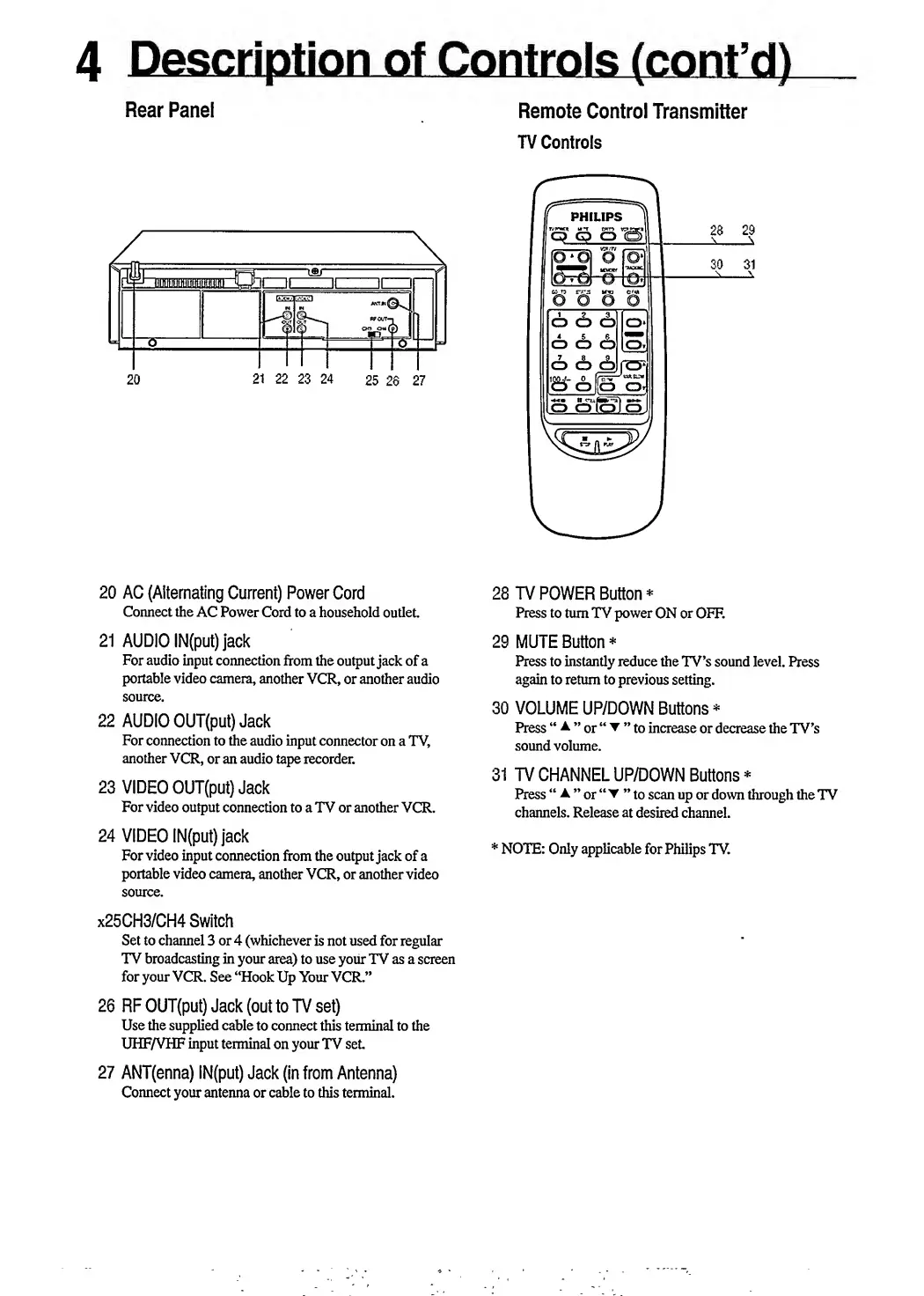
Rear
Panel
Remote
Control
Transmitter
TV
Controls
20
AC
(Alternating
Current)
Power
Cord
Connect
the
AC
Power
Cord
to
a
household
outlet.
21
AUDIO
IN(put)
jack
For
audio
input
connection
from
the
output
jack
of
a
portable
video
camera,
another
VCR,
or
another
audio
source.
22
AUDIO
OUT(put)
Jack
For
connection
to
the
audio
input
connector
on
a
TV,
another
VCR,
or
an
audio
tape
recorder.
23
VIDEO
OUT(put)
Jack
For
video
output
connection
to
a
TV
or
another
VCR.
24
VIDEO
IN(put)
jack
For
video
input
connection
from
the
output
jack
of
a
portable
video
camera,
another
VCR,
or
another
video
source.
x25CH3/CH4
Switch
Set
to
channel
3
or
4
(whichever
is
not
used
for
regular
TV
broadcasting
in
your
area)
to
use
your
TV
as
a
screen
for
your
VCR.
See
“Hook
Up
Your
VCR.”
26
RF
OUT(put)
Jack
(out
to
TV
set)
Use
the
supplied
cable
to
connect
this
terminal
to
the
UHF/VHF
input
terminal
on
your
TV
set
27
ANT(enna)
IN(put)
Jack
(in
from
Antenna)
Connect
your
antenna
or
cable
to
this
terminal.
28
TV
POWER
Button*
Press
to
turn
TV
power
ON
or
OFF.
29
MUTE
Button
*
Press
to
instantly
reduce
the
TV’s
sound
level.
Press
again
to
return
to
previous
setting.
30
VOLUME
UP/DOWN
Buttons
*
Press
A
or
to
increase
or
decrease
the
TV’s
sound
volume.
31
TV
CHANNEL
UP/DOWN
Buttons
*
Press
A
or
to
scan
up
or
down
through
the
TV
channels.
Release
at
desired
channel.
*
NOTE:
Only
applicable
for
Philips
TV.

Related product manuals