EasyManua.ls Logo

Philips VR355/50 - Page 5

Philips VR355/50
29 pages
Print Icon
To Next Page IconTo Next Page
To Previous Page IconTo Previous Page
Loading...
Description
of
Controls
(cont’d)
5
Remote
Control
Transmitter
VCR
Controls
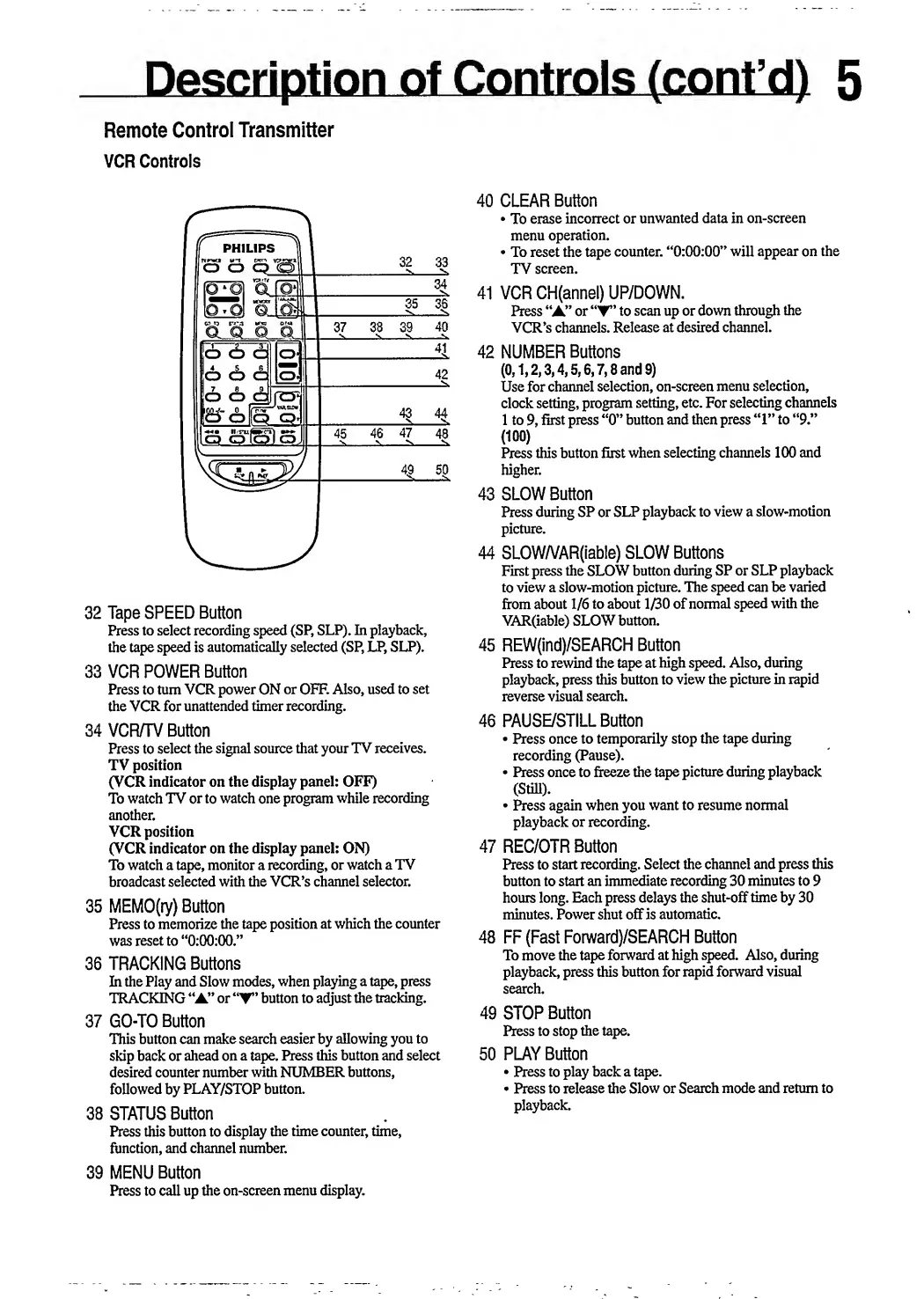
32
Tape
SPEED
Button
Press
to
select
recording
speed
(SP,
SLP).
In
playback,
the
tape
speed
is
automatically
selected
(SP,
LP,
SLP).
33
VCR
POWER
Button
Press
to
turn
VCR
power
ON
or
OFF.
Also,
used
to
set
the
VCR
for
unattended
timer
recording.
34
VCR/TV
Button
Press
to
select
the
signal
source
that
your
TV
receives.
TV
position
(VCR
indicator
on
the
display
panel:
OFF)
To
watch
TV
or
to
watch
one
program
while
recording
another.
VCR
position
(VCR
indicator
on
the
display
panel:
ON)
To
watch
a
tape,
monitor
a
recording,
or
watch
a
TV
broadcast
selected
with
the
VCR’s
channel
selector.
35
MEMO(ry)
Button
Press
to
memorize
the
tape
position
at
which
the
counter
was
reset
to
“0:00:00.”
36
TRACKING
Buttons
In
the
Play
and
Slow
modes,
when
playing
a
tape,
press
TRACKING
“A”
or
button
to
adjust
the
tracking.
37
GO-TO
Button
This
button
can
make
search
easier
by
allowing
you
to
skip
back
or
ahead
on
a
tape.
Press
this
button
and
select
desired
counter
number
with
NUMBER
buttons,
followed
by
PLAY/STOP
button.
38
STATUS
Button
Press
this
button
to
display
the
time
counter,
time,
function,
and
channel
number.
39
MENU
Button
Press
to
call
up
the
on-screen
menu
display.
40
CLEAR
Button
To
erase
incorrect
or
unwanted
data
in
on-screen
menu
operation.
To
reset
the
tape
counter.
“0:00:00”
will
appear
on
the
TV
screen.
41
VCR
CH(annel)
UP/DOWN.
Press
“A”
or
to
scan
up
or
down
through
the
VCR’s
channels.
Release
at
desired
channel.
42
NUMBER
Buttons
(0,1,2,3,4,5,6,7,8
and
9)
Use
for
channel
selection,
on-screen
menu
selection,
clock
setting,
program
setting,
etc.
For
selecting
channels
1
to
9,
first
press
“0”
button
and
then
press
“1”
to
“9.”
(100)
Press
this
button
first
when
selecting
channels
100
and
higher.
43
SLOW
Button
Press
during
SP
or
SLP
playback
to
view
a
slow-motion
picture.
44
SLOW/VAR(iable)
SLOW
Buttons
First
press
the
SLOW
button
during
SP
or
SLP
playback
to
view
a
slow-motion
picture.
The
speed
can
be
varied
from
about
1/6
to
about
1/30
of
normal
speed
with
the
VAR(iable)
SLOW
button.
45
REW(ind)/SEARCH
Button
Press
to
rewind
the
tape
at
high
speed.
Also,
during
playback,
press
this
button
to
view
the
picture
in
rapid
reverse
visual
search.
46
PAUSE/STILL
Button
Press
once
to
temporarily
stop
the
tape
during
recording
(Pause).
Press
once
to
freeze
the
tape
picture
during
playback
(Still).
Press
again
when
you
want
to
resume
normal
playback
or
recording.
47
REC/OTR
Button
Press
to
start
recording.
Select
the
channel
and
press
this
button
to
start
an
immediate
recording
30
minutes
to
9
hours
long.
Each
press
delays
the
shut-off
time
by
30
minutes.
Power
shut
off
is
automatic.
48
FF
(Fast
Forward)/SEARCH
Button
To
move
the
tape
forward
at
high
speed.
Also,
during
playback,
press
this
button
for
rapid
forward
visual
search.
49
STOP
Button
Press
to
stop
the
tape.
50
PLAY
Button
Press
to
play
back
a
tape.
Press
to
release
the
Slow
or
Search
mode
and
return
to
playback.

Related product manuals