EasyManua.ls Logo

Philips VR355/50 - Page 6

Philips VR355/50
29 pages
Print Icon
To Next Page IconTo Next Page
To Previous Page IconTo Previous Page
Loading...
6
Before
Using
Your
VCR
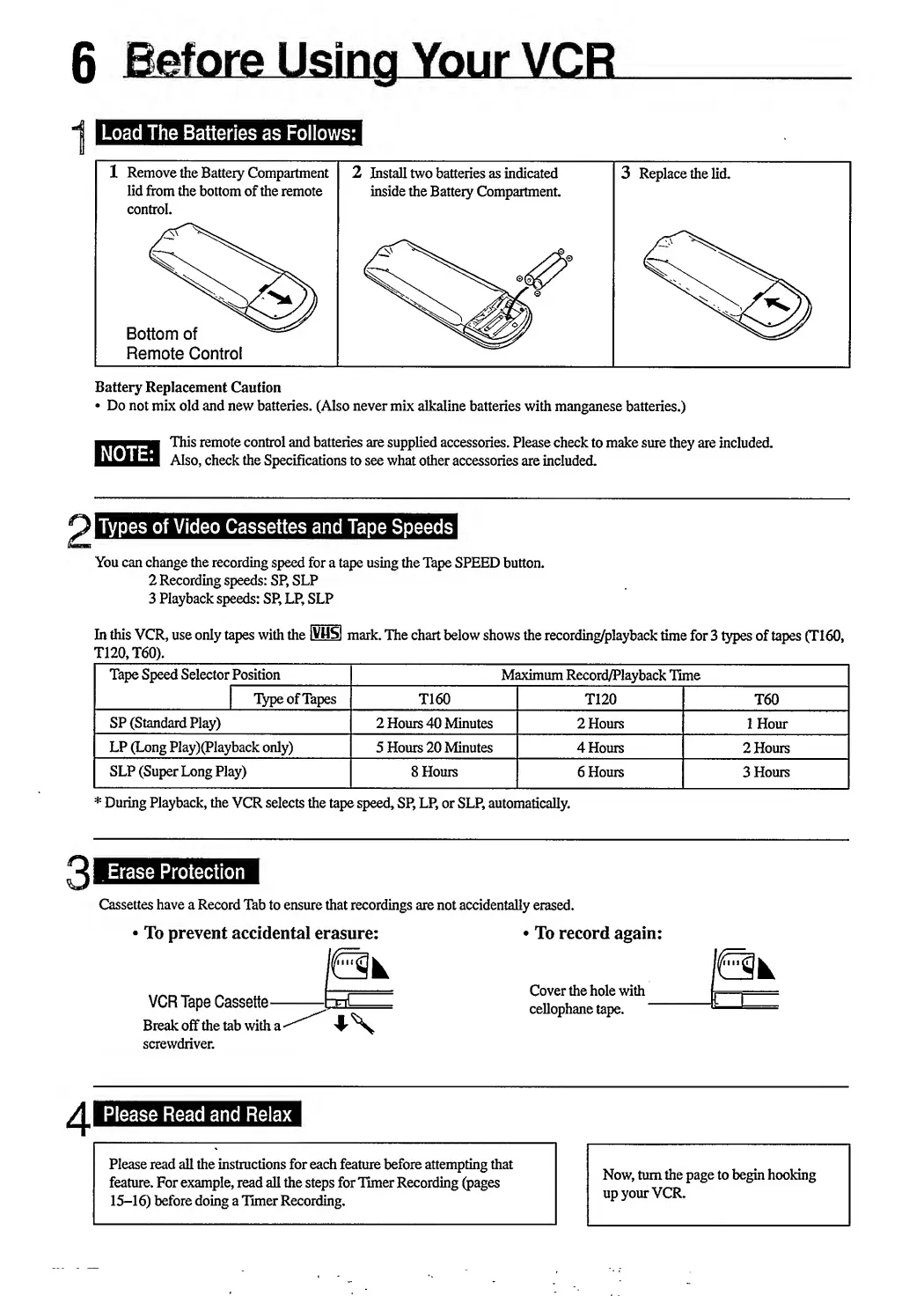
Load
The
Batteries
as
Follows:
Battery
Replacement
Caution
Do
not
mix
old
and
new
batteries.
(Also
never
mix
alkaline
batteries
with
manganese
batteries.)
NOTE:
This
remote
control
and
batteries
are
supplied
accessories.
Please
check
to
make
sure
they
are
included.
Also,
check
the
Specifications
to
see
what
other
accessories
are
included.
Types
of
Video
Cassettes
and
Tape
Speeds
You
can
change
the
recording
speed
for
a
tape
using
the
Tape
SPEED
button.
2
Recording
speeds:
SP,
SLP
3
Playback
speeds:
SP,
LP,
SLP
In
this
VCR,
use
only
tapes
with
the
[VHSJ
mark.
The
chart
below
shows
the
recording/playback
time
for
3
types
of
tapes
(T160,
T120,
T60).
Tape
Speed
Selector
Position
Maximum
Record/Playback
Time
Type
of
Tapes
T160
T120
T60
SP
(Standard
Play)
2
Hours
40
Minutes
2
Hours
1
Hour
LP
(Long
Play)(Playback
only)
5
Hours
20
Minutes
4
Hours
2
Hours
SLP
(Super
Long
Play)
8
Hours
6
Hours
3
Hours
*
During
Playback,
the
VCR
selects
the
tape
speed,
SP,
LP,
or
SLP,
automatically.
3
Erase
Protection
Cassettes
have
a
Record
Tab
to
ensure
that
recordings
are
not
accidentally
erased.
To
prevent
accidental
erasure:
VCR
Tape
Cassette—
Break
off
the
tab
with
a
screwdriver.
To
record
again:
Cover
the
hole
with
cellophane
tape.
Please
Read
and
Relax
r
i
r
Please
read
all
the
instructions
for
each
feature
before
attempting
that
feature.
For
example,
read
all
the
steps
for
Timer
Recording
(pages
15-16)
before
doing
a
Timer
Recording.
Now,
turn
the
page
to
begin
hooking
up
your
VCR.

Related product manuals