EasyManua.ls Logo

Philips VR355/50 - Page 8

Philips VR355/50
29 pages
Print Icon
To Next Page IconTo Next Page
To Previous Page IconTo Previous Page
Loading...
-|
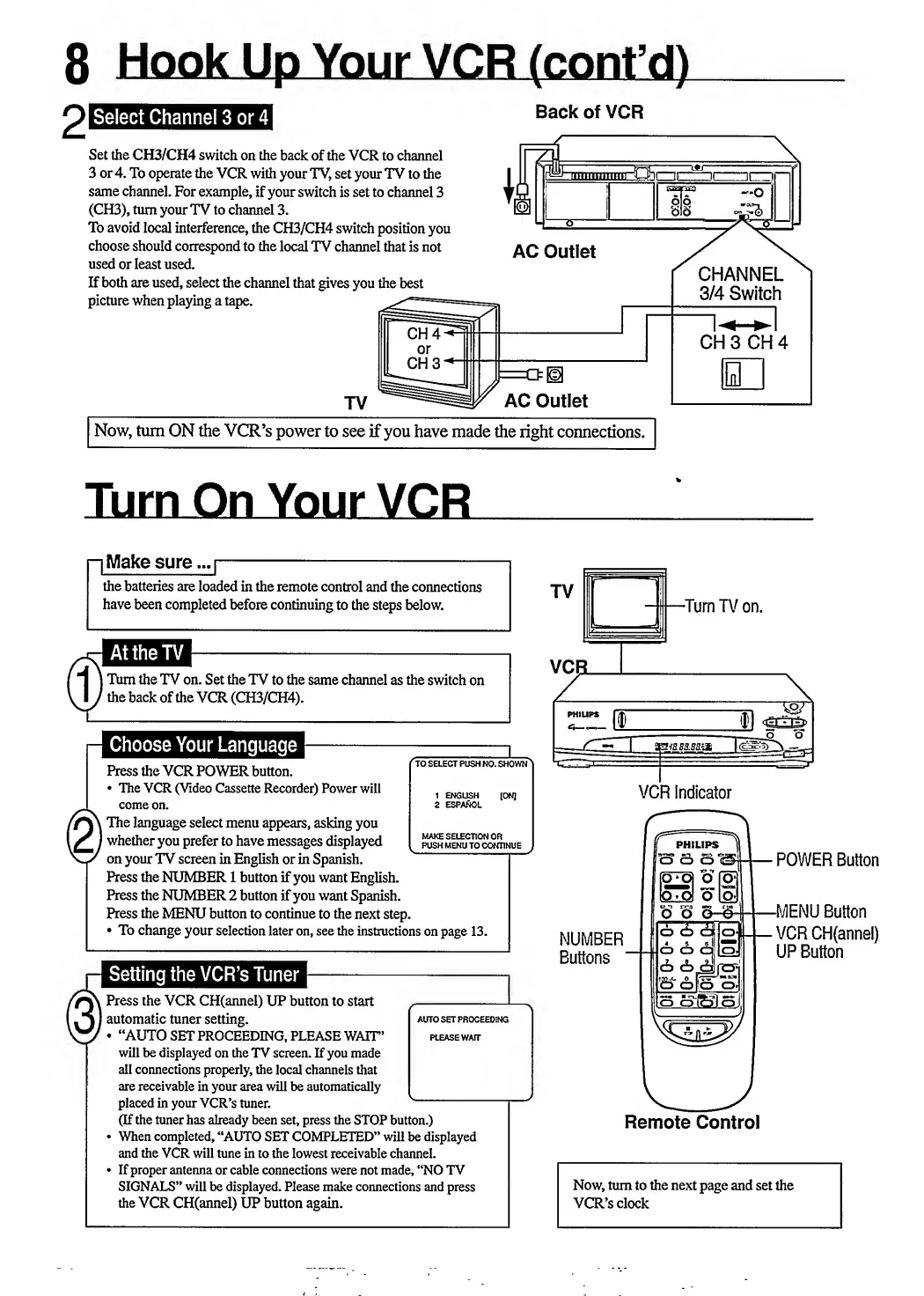
Make
sure...
|-
the
batteries
are
loaded
in
the
remote
control
and
the
connections
have
been
completed
before
continuing
to
the
steps
below.
TV
1
\
-Turn
TV
on.
|
Turn
the
TV
on.
Set
the
TV
to
the
same
channel
as
the
switch
on
f
the
back
of
the
VCR
(CH3/CH4).
-Q
°
(TO
SELECT
PUSH
NO.
SHOWN
l
MAKE
SELECTION
OR
PUSH
MENU
TO
CONTINUE
Press
the
VCR
POWER
button.
*
The
VCR
(Video
Cassette
Recorder)
Power
will
1
(0fq
come
on.
2
espanol
k
The
language
select
menu
appears,
asking
you
I
whether
you
prefer
to
have
messages
displayed
pushmemjtoc!
on
your
TV
screen
in
English
or
in
Spanish.
——
Press
the
NUMBER
1
button
if
you
want
English.
Press
the
NUMBER
2
button
if
you
want
Spanish.
Press
the
MENU
button
to
continue
to
the
next
step.
To
change
your
selection
later
on,
see
the
instructions
on
page
13.
NUMBER
Buttons
'
Press
the
VCR
CH(annel)
UP
button
to
start
-
|
automatic
tuner
setting.
auto
set
proceeding
“AUTO
SET
PROCEEDING,
PLEASE
WAIT’
please
wait
will
be
displayed
on
the
TV
screen.
If
you
made
all
connections
properly,
the
local
channels
that
are
receivable
in
your
area
will
be
automatically
placed
in
your
VCR’s
tuner.
v
(If
the
tuner
has
already
been
set,
press
the
STOP
button.)
When
completed,
“AUTO
SET
COMPLETED”
will
be
displayed
and
the
VCR
will
tune
in
to
the
lowest
receivable
channel.
If
proper
antenna
or
cable
connections
were
not
made,
“NO
TV
SIGNALS”
will
be
displayed.
Please
make
connections
and
press
the
VCR
CH(annel)
UP
button
again.
VCR
Indicator
(
P
HILIPS
OOO^
.od»cS|oJi
cb
tb
d»l|
o
i
B-&K5
oj
|
[S
cjf&lg
l
,
POWER
Button
-MENU
Button
VCR
CH(annel)
UP
Button
Remote
Control
Now,
turn
to
the
next
page
and
set
the
VCR’s
clock

Related product manuals