EasyManua.ls Logo

Philips VR355/50 - Page 9

Philips VR355/50
29 pages
Print Icon
To Next Page IconTo Next Page
To Previous Page IconTo Previous Page
Loading...
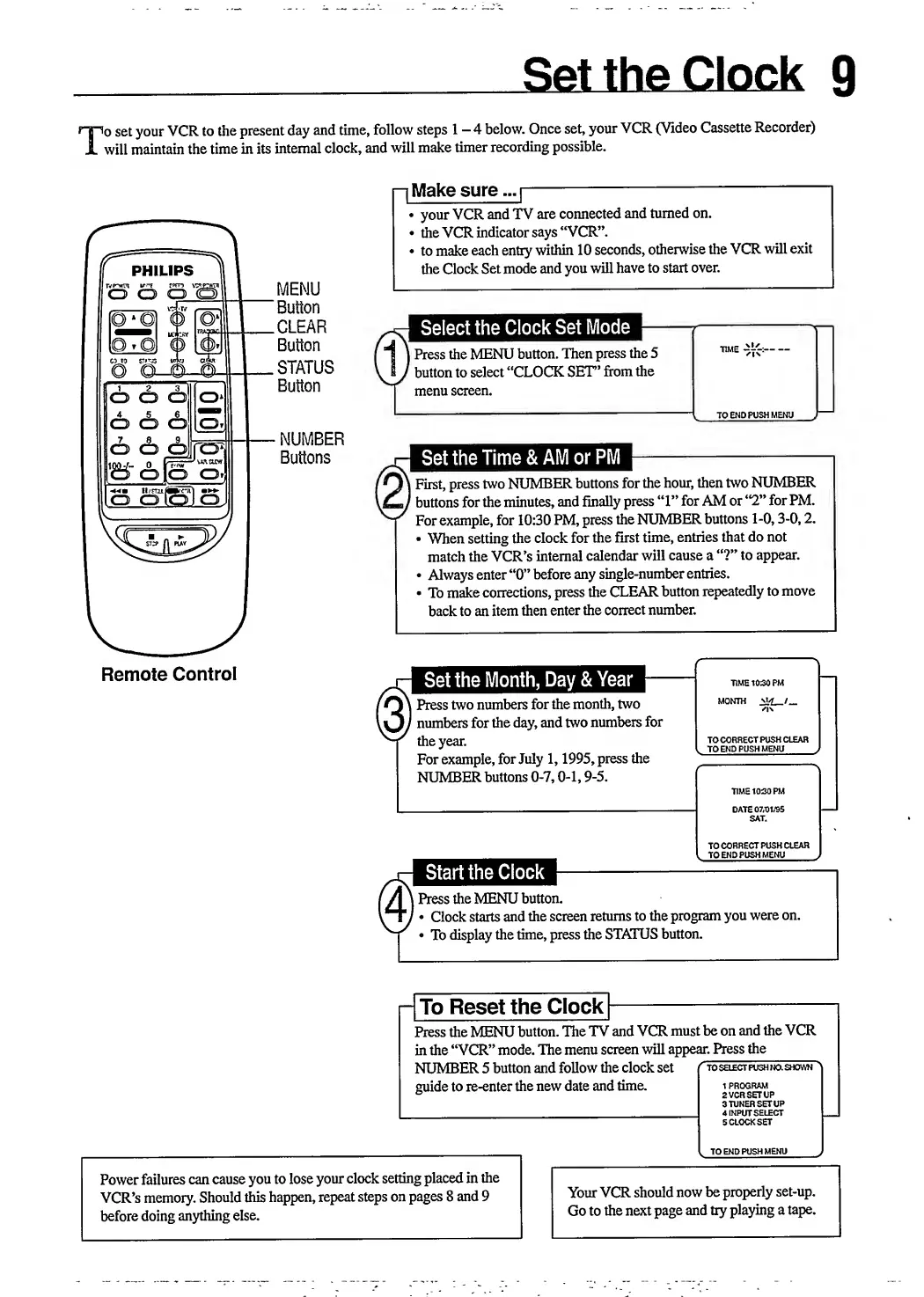
I
set
your
VCR
to
the
present
day
and
time,
follow
steps
1-4
below.
Once
set,
your
VCR
(Video
Cassette
Recorder)
will
maintain
the
time
in
its
internal
clock,
and
will
make
timer
recording
possible.
PHILIPS
rvp“wn
wne
rfm
v?
O
O
O
(
MENU
O
O
O
O
l
4
5
6
O
O
O
[Of
o
cb
dp
'Mii-
O
Q|Q
O’
)
fagf^loJ
NUMBER
Buttons
I
Make
sure...
|
-
your
VCR
and
TV
are
connected
and
turned
on.
the
VCR
indicator
says
“VCR”.
to
make
each
entry
within
10
seconds,
otherwise
the
VCR
will
exit
the
Clock
Set
mode
and
you
will
have
to
start
over.
Select
the
Clock
Set
Mode
I
Press
the
MENU
button.
Then
press
the
5
button
to
select
“CLOCK
SET’
from
the
menu
screen.
TO
END
PUSH
MENU
First,
press
two
NUMBER
buttons
for
the
hour,
then
two
NUMBER
buttons
for
the
minutes,
and
finally
press
“1”
for
AM
or
“2”
for
PM.
For
example,
for
10:30
PM,
press
the
NUMBER
buttons
1-0,3-0,2.
When
setting
the
clock
for
the
first
time,
entries
that
do
not
match
the
VCR’s
internal
calendar
will
cause
a
“?”
to
appear.
Always
enter
“0”
before
any
single-number
entries.
To
make
corrections,
press
the
CLEAR
button
repeatedly
to
move
back
to
an
item
then
enter
the
correct
number.
Remote
Control
I
Press
two
numbers
for
the
month,
two
'
numbers
for
the
day,
and
two
numbers
for
the
year.
For
example,
for
July
1,1995,
press
the
NUMBER
buttons
0-7,0-1,9-5.
MONTH
^
/...
TO
CORRECT
PUSH
CLEAR
TO
END
PUSH
MENU
DATE
07/01/95
SAT,
TO
CORRECT
PUSH
CLEAR
TO
END
PUSH
MENU
Start
the
Clock
I
Press
the
MENU
button.
*
Clock
starts
and
the
screen
returns
to
the
program
you
were
on.
To
display
the
time,
press
the
STATUS
button.
-
To
Reset
the
Clock
-
Press
the
MENU
button.
The
TV
and
VCR
must
be
on
and
the
VCR
in
the
“VCR”
mode.
The
menu
screen
will
appear.
Press
the
NUMBER
5
button
and
follow
the
clock
set
("to
select
push
no.
shown
>
guide
to
re-enter
the
new
date
and
time.
i
program
°
9
vr.n
rpt
i
ip
1
PROGRAM
2
VCR
SETUP
3TUNER
SETUP
4
INPUT
SELECT
5
CLOCK
SET
TO
END
PUSH
MENU
Power
failures
can
cause
you
to
lose
your
clock
setting
placed
in
the
VCR’s
memory.
Should
this
happen,
repeat
steps
on
pages
8
and
9
before
doing
anything
else.
Your
VCR
should
now
be
properly
set-up.
Go
to
the
next
page
and
try
playing
a
tape.

Related product manuals