ENGLISH PROGRAMMING TIMER WITH VIDEO PLUS+
29
29
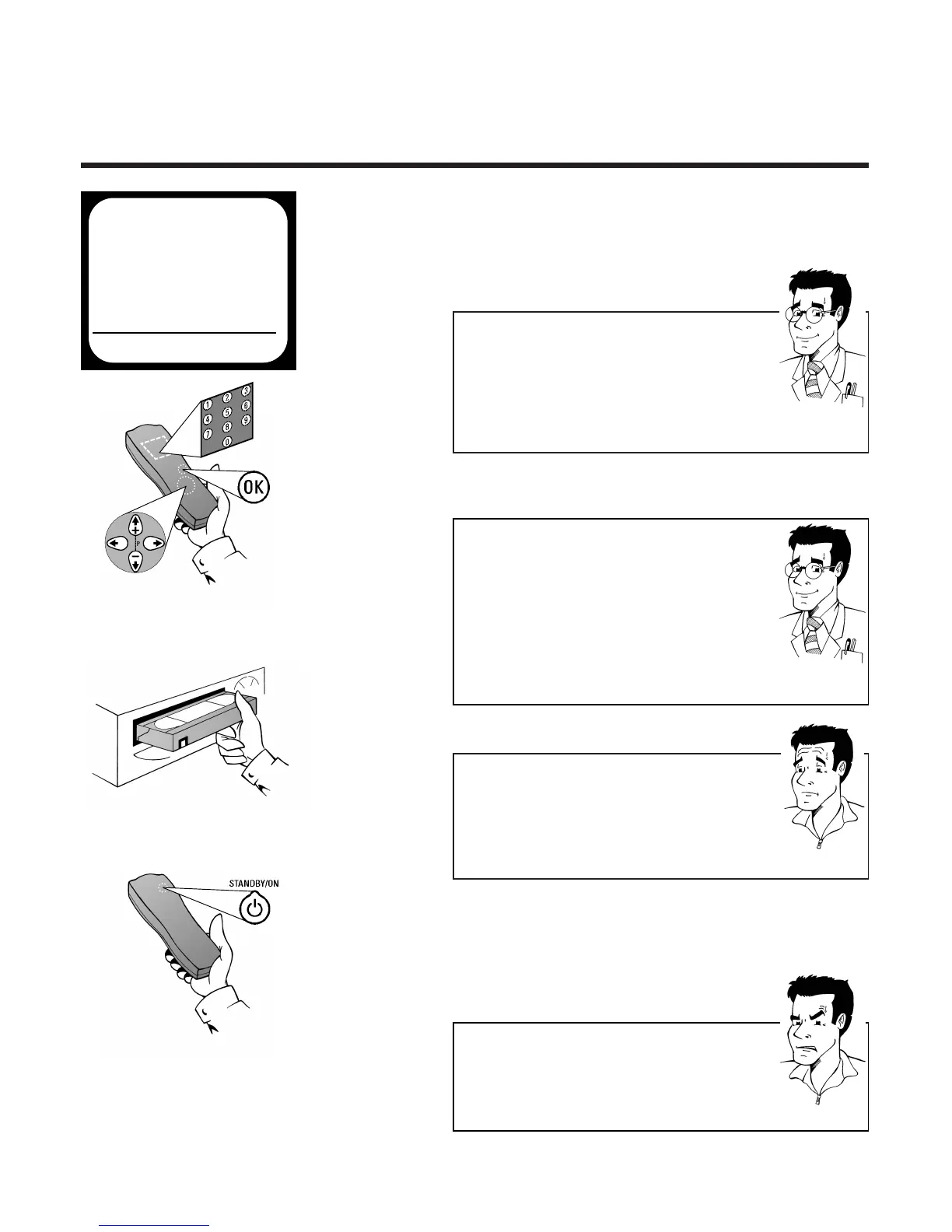
5 The data of previously entered VIDEO Plus+
recordings are displayed Switch entry field if
necessary - with
PP
or
QQ
and change the
settings with the buttons
==PP--
or
;;PP++
6 Confirm with
OOKK
.The screen will briefly
show STORED
7 Insert a cassette without erase protection
8
SS
WWIITTCCHH OOFFFF TTHHEE VVIIDDEEOO RREECCOORRDDEERR WWIITTHH TTHHEE
SSTTAANNDDBBYY//OONN
BBUUTTTTOONN
mm
.
II
FF YYOOUU DDOONN
TT DDOO
TTHHIISS
,,
TTHHEE SSEETT WWIILLLL NNOOTT RREECCOORRDD
..
The display will show k
WWhhaatt iiss eerraassee pprrootteeccttiioonn??
VHS cassettes can be protected from over-recording by
breaking off a thin strip of plastic (arrow). This erase
protection can be overridden by sticking one or more
strips of adhesive tape tightly over the gap which has
been created.
FFOORR
EEXXPPEERRTTSS
AAccttiivvaattee VVPPSS//PPDDCC
VPS (Video Programming Service) and PDC signals
(Programme Delivery Control) are transmitted by TV
channels at the start and end of transmissions and
ensure that programmes will be completely recorded,
even if they are rescheduled. In the input box START
use
SSEELLEECCTT
to switch recognition of these signals on
(*) or off ( ).
FFOORR
EEXXPPEERRTTSS
SSeelleeccttiinngg tthhee rreeccoorrddiinngg ssppeeeedd
You have the option of two playback and recording
speeds: Standard Play (SP) offers the usual first-class
picture quality, and with Long Play (LP) you can for
example (with somewhat reduced picture quality)
record about 360 minutes on a 180-minute cassette. In
Auto Long Play (AUTO), the video recorder recognizes
how much remaining playing time is available and
automatically selects SP or LP. In the entry field END
use
SSEELLEECCTT
to enter the required setting.
PP
AARRDDOONN
??
PPRROOBBLLEEMM
YY
OOUU WWIILLLL FFIINNDD TTIIPPSS FFOORR SSOOLLVVIINNGG
PPRROOBBLLEEMMSS TTOO DDOO WWIITTHH
VVIIDDEEOO PP
LLUUSS
RREECCOORRDDIINNGG OONN TTHHEE FFOOLLLLOOWWIINNGG PPAAGGEE
..
TIMER
VPS
DATE REP. PROG. START PDC END
21 ONCE 01 20:00 * 21:30
REP.PSELECT STOREPOK
ä



 To Next Page