18
Download the firmware upgrade files and store them on your PC
4
Register your Philips Wireless Music Center with www.club.philips.com
3
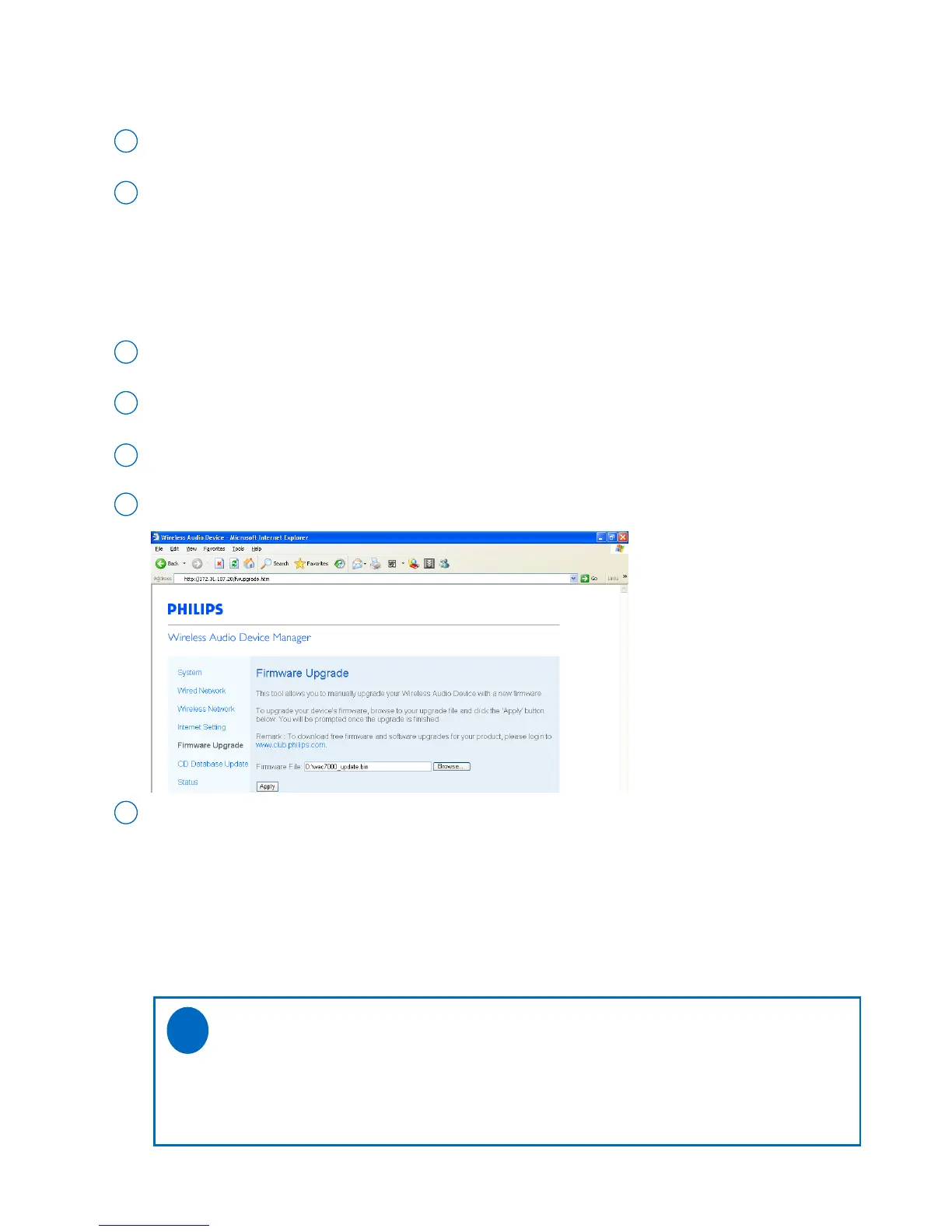
As prompted, click Browse and indicate the location where you kept the firmware upgrade files on PC
6
Click Apply to start upgrading firmware
7
• Firmware upgrade
Click to enter the Firmware upgrade sub-menu
5
On Philips Wireless Music Center/Station:
Place Center and Station(s) side by side on a flat and firm surface
1
Connect Center and Station(s) to power supply
2
➜ HD screen appears on Center
➜ HD screen appears on Station(s) when the Station is connected to Center
On your PC:
O
On Philips Wireless Music Center:
➜ The display shows “Updating firmware, please wait...”
➜ Center will reboot itself during the installation process
➜ When Center returns to HD screen, the installation is completed
Then, on Philips Wireless Music Station:
➜ Installation starts automatically
➜ When Station returns to HD screen, the installation is completed
IMPORTANT!
On Philips Wireless Music Center/Station:
- Never interrupt the firmware upgrading before its completion.
- Before finishing the installation, never operate other functions.
✔


 To Next Page
 Loading...
