WelcomeEye / Link
16
C. If the 32 GB micro SD card supplied is installed in the intercom panel, a 10-second video
is taken each time the call button is pressed, enabling you to see all visitors.
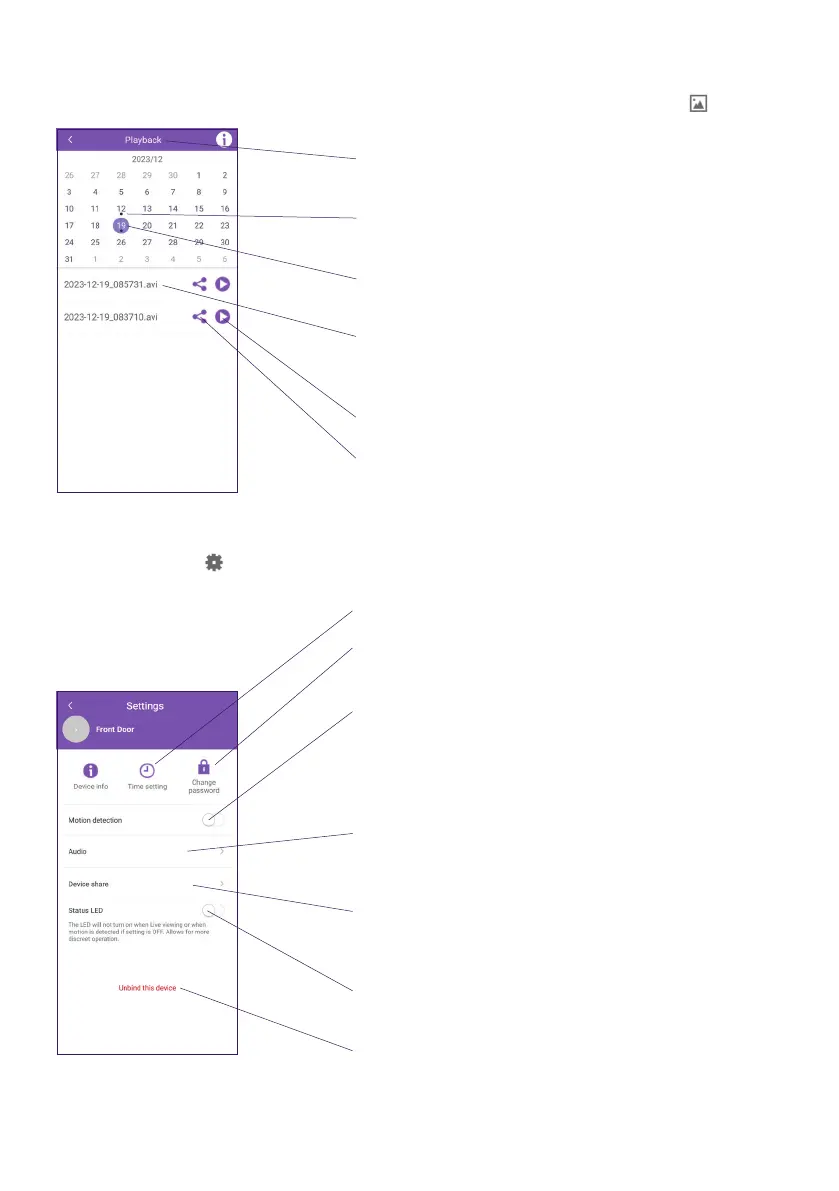
You can view videos taken from the application’s main page by clicking on the icon.
Month currently displayed on the screen: swipe left
or right to change the month displayed
The “.” under the date indicates that there are
videos recorded on this date
The day currently selected (the “.” indicates that
there are videos recorded on this date)
List of videos recorded on the selected day. Each
video is named with the date and time of recording
Start video playback
Share the video
D. You can access the intercom panel’s conguration from the main page of the application
by clicking on the icon.
Current date and time setting
Change device password (created when rst setting
up the device)
Activation of motion detection notications and
recordings
Warning: we do not recommend activating this
function, as battery life may be severely aected
Adjusting the volume of the intercom panel
loudspeaker, intercom panel chime and intercom
panel microphone
Device’s identier and QR code, which can be used
to remotely activate the product or share it with
another user
Activation/deactivation of the illuminated circle on
the front panel when the intercom panel wakes up
Removes the device from the phone. Removes the
pairing between the phone and the device but
does not reset the device and its WiFi connection.
If you set the product up again, it will already be
connected to the Internet, which will shorten the
setup process.












 To Next Page