23
The manufacturer shall not be liable for damages, especially on the battery, caused
by use other than as intended or as mentioned in this manual or if the recommendations
of the battery manufacturer are neglected. The manufacturer shall not be liable if there
has been service or repair carried out by any unauthorized person.
Liability Exclusion
Programming Your CXN
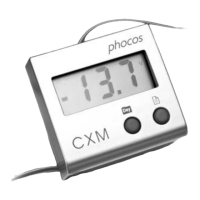
With the CXM remote display, you can program your CXN controller easily.
Your can enter programming menu by long push right button of CXM for about 5 seconds.
Short push the right button to toggle between main menus.
Long push the right button to enter programming menu, and then short push right button
to select your setting.
Short push left button to save setting and exit.
Programming menu:Please see Fig. (Page 7)
Avoid touching or short circuiting wires or terminals. Be aware that the voltages
on specific terminals or wires can be up to double the battery voltage. Use isolated
tools, stand on dry ground and keep your hands dry.
Keep children away from batteries and the charge controller.
Please observe the safety recommendations of the battery manufacturer. If in doubt,
consult your dealer or installer.
H


 To Next Page
 Loading...