Home
Phonak
Hearing Aid
Audeo L-R Series
Page 18 (6. Putting on the hearing aid)
Phonak Audeo L-R Series - 6. Putting on the hearing aid; Wearing the hearing aid
96 pages
Manual
To Next Page
To Next Page
To Previous Page
To Previous Page
Loading...
18
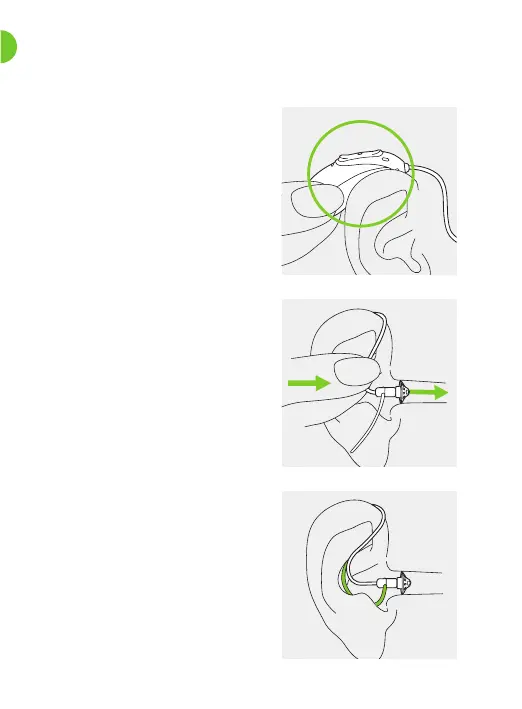
6. Putting on the hearing aid
1.
Place the hearing aid behind
your ear
.
2.
Insert the earpiece into your
ear canal.
3.
If there is an anchor attached
to the earpiece, tuck it into
the bowl of your ear to secure
your hearing aid.
17
19
Table of Contents
Main Page
Table of Contents
5
Quick Guide
7
Parts of the Hearing Aid and Charger
9
Preparing the Charger
12
Charging the Hearing Aids
13
Left and Right Hearing Aid Markings
17
Putting on the Hearing Aid
18
Removing the Hearing Aid
19
Multi-Function Button
20
On/Off
21
Tap Control
22
Connectivity Overview
23
Initial Pairing
24
Phone Calls
26
Flight Mode
31
Rebooting Your Hearing Aid
34
Myphonak App Overview
35
Roger™ Overview
36
Listening in Public Places (Optional)
37
Operating, Transport and Storage Conditions
38
Care and Maintenance
40
Exchanging the Earwax Protection
43
Service and Warranty
54
Compliance Information
56
Information and Description of Symbols
63
Troubleshooting
70
Important Safety Information
76
Related product manuals
Phonak Audeo L-RL Trial
100 pages
Phonak Audeo L-RL Series
100 pages
Phonak Audeo L90-R
96 pages
Phonak Audeo L70-R
96 pages
Phonak Audeo L50-R
96 pages
Phonak Audeo L30-R
96 pages
Phonak Audeo L90-RT
96 pages
Phonak Audeo L90-RL
100 pages
Phonak Audeo L50-RL
100 pages
Phonak Audeo
32 pages
Phonak Audeo P30
40 pages
Phonak Audeo P90
40 pages



 To Next Page