Home
Phonak
Hearing Aid
Audeo P Series
Page 35
Phonak Audeo P Series - Page 35
64 pages
Manual
Save Page as PDF
To Next Page
To Next Page
To Previous Page
To Previous Page
Loading...
35
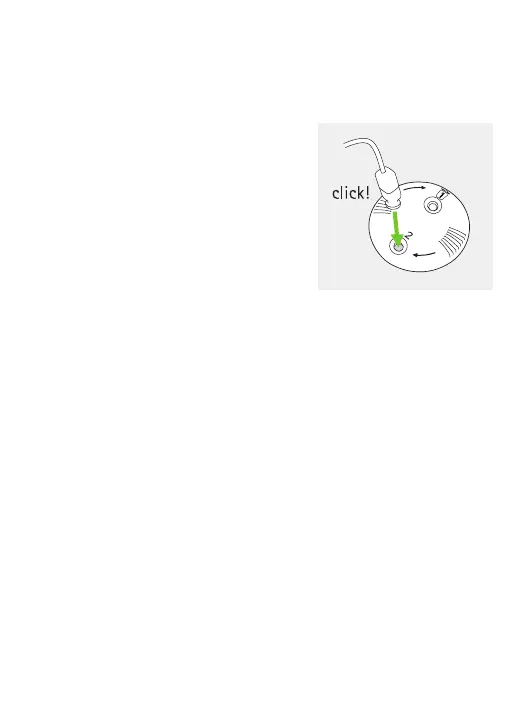
To insert a new earwax protector
carefully insert the speaker into
the opening where the new
earwax protector is visible
(opposite the bin icon) until it
clicks. After the click you will see
the new earwax protector is now
inside the speaker
.
3.
34
36
Table of Contents
Main Page
Table of Contents
6
Quick Guide
8
Parts of the Hearing Aid
10
Left & Right Hearing Aid Markings
11
On/Off
12
Batteries
13
Putting on the Hearing Aid
15
Removing the Hearing Aid
16
Multi-Function Button
17
Connectivity Overview
18
Initial Pairing
19
Phone Calls
22
Flight Mode
26
Operating, Transport and Storage Conditions
28
Care and Maintenance
29
Exchanging the Earwax Protection
32
Service and Warranty
37
Compliance Information
39
Information and Description of Symbols
45
Troubleshooting
50
Important Safety Information
52
Related product manuals
Phonak Audeo P-RL
45 pages
Phonak Audeo P-312/13T
64 pages
Phonak Audeo P-R Series
40 pages
Phonak Audeo
32 pages
Phonak Audeo P30
40 pages
Phonak Audeo P90
40 pages
Phonak Audeo P70
40 pages
Phonak Audeo P50
40 pages
Phonak Audeo V30
44 pages
Phonak Audeo B50-R
32 pages
Phonak Audeo P90-R
104 pages
Phonak Audeo B90-R
32 pages


 To Next Page
 Loading...