EasyManua.ls Logo

Phonemo P3200 - Page 2

Default Icon
10 pages
Print Icon
To Next Page IconTo Next Page
To Previous Page IconTo Previous Page
Loading...
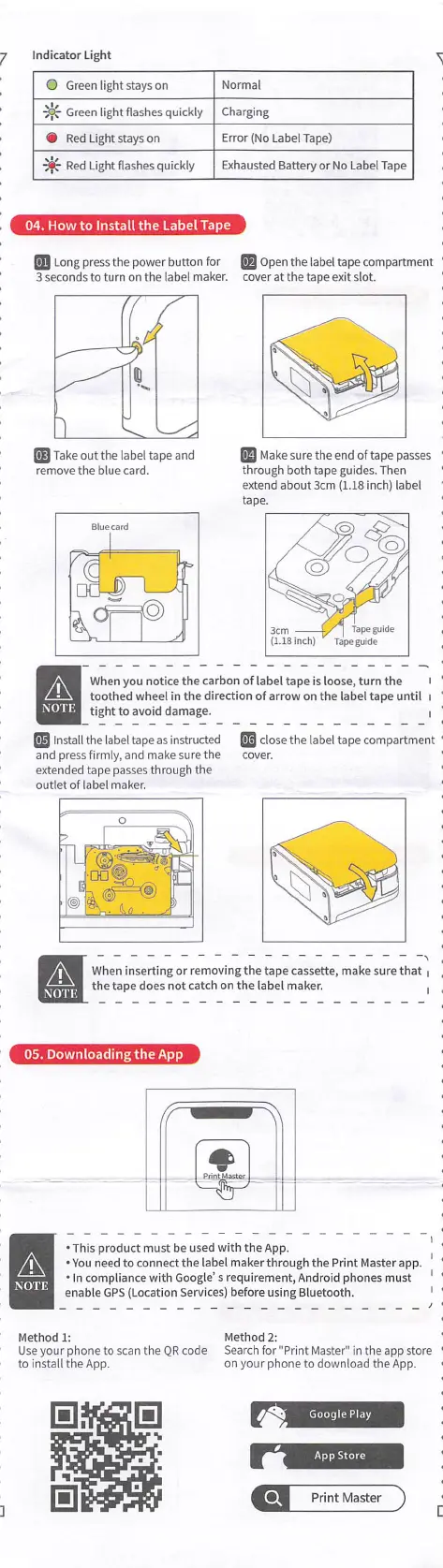
Indicator
ligtit
О
Green
light
stays
on
Normal
٠
Green
light
flashes quickly
Charging
٠
Red
Light stays
on
Error
(No
label Tape)
٠
Red
light
flashes
quickly
Exhausted
Battery
or
No
label
Tape
[ 04.
How
to
Install
the
Labet
Tape
ل
_
Long
press
the
power
button
for
3
seconds
to
turn
on
the
اabeا
maker.
_
Open
the
!abe!
tape
compartment
cover
at
the
tape
exit
slot.
_
Make
sure
the
end
of
tape
passes
through both
tape
guides.
Then
extend
about
3cm
(1.18 inch) label
tape.
Take out
the
label
tape and
remove
the
blue
card.
Blue
card
When
you
notice
the
carbon
of
label
tape
is
loose,
turn
the
toothed
wheel
In
the
direction
of
arrow
on
the
label
tape
until
I
tight
to
avoid
damage.
Δ
NOTE
_
Installthelabeltapeasln^ructed
and
press
firmly,
and
make
sure
the
extended
tape
passes
through
the
outlet
of
label
maker.
close
the
label
tape
compartment
cover.
Δ
When
Inserting
or
removing
the tape
cassette,
make
sure
that
the tape
does
not
catch
on
the
label
maker.
NOTE
[ 05.
DownloadingtheApp
ل
.This
product
must
be used
with
the
App.
.You need
to
connect
the
label
makerthrough
the
Print
Master
app.
٠
In
compliance
with
Google's requirement. Android
pilones
must
enable
GPS
(location
Services)
before
using
Bluetootli.
Δ
ΝΟΤ.Ε
Method
2:
Search
for
"Print
Master"
in
the
app
store
on your
phone
to
download
the
App.
Method
1:
Use your
phone
to
scan
the
QR
code
toinstalltheApp.
Google
Play
AppStore
Q
Print
Master
]