EasyManua.ls Logo

Phonemo P3200 - Page 3

Default Icon
10 pages
Print Icon
To Next Page IconTo Next Page
To Previous Page IconTo Previous Page
Loading...
L
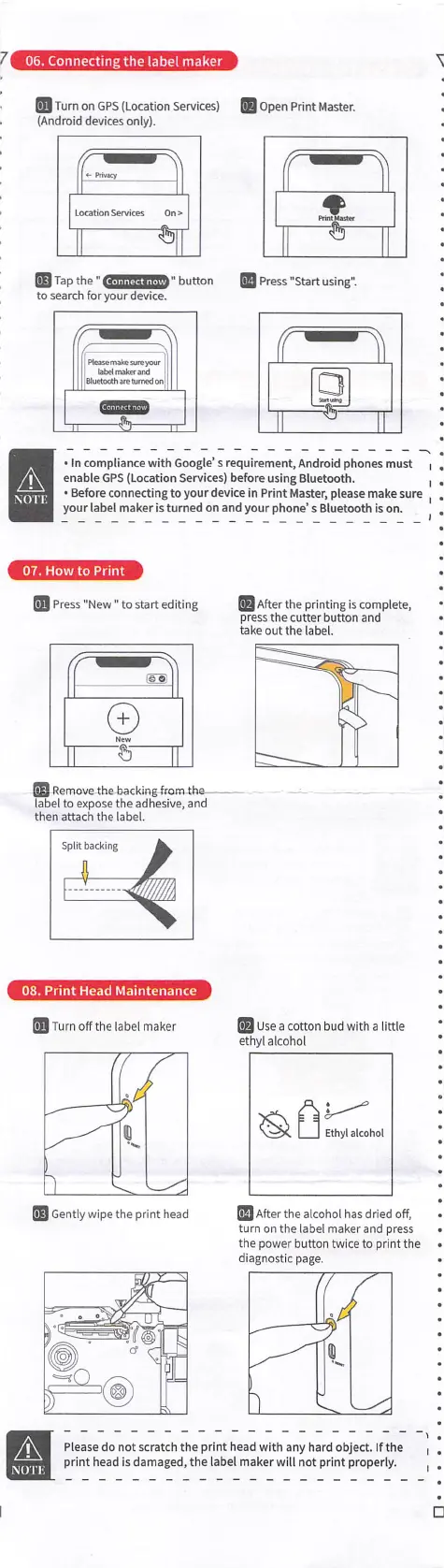
06.
Connecting
the
label
maker
ل
_
Turn on
GPS
(location
Services)
(Android
devices
only).
open
Print
Master.
Tap the"
-
to
search
for
your
device.
ا"
button
Press
"Start
using".
.Connect
now'
:
Mease
make
sire
iwr
ا
labet
maker and
ا
Bluetooih
are
turned
ont
٠
In
compliance
with
Google's
requirement.
Android
phones
must
enable
GPS
(Location
Se^lces)
before
using
Bluetooth.
٠
Before
connertlng
to
yourdevlce
In
Print
Master,
please
make
sure
your
label
maker
Is
turned on
and
your
phone’s
Bluetooth
Is
on.
A
NOTE
07.
How
to Print
'
After
the
printing
Is
complete,
press
the cutter
button
and
take
out the
label.
Press
"New
"
to
start
editing
-
Remove
the
backing from
the-
label
to
expose
the
adhesive,
and
then
attach the
label.
08.
Print
Head
Maintenance
Turn
off
the
label
maker
Use
a
cotton
bud
with
a
little
ethyl
alcohol
؛/
Ethyl
alcohol
Gently
wipe
the
print
head
_
After
the
alcohol
has
dried
off,
turn
on
the
label
maker
and
press
ttie
power
button
twice
to
print
the
diagnostic page.
A
Please do
not
scratch
the
print
head
with any
tiard
object.
If
the
print
head
is
damaged,
the
label
maker
will
not
print
properly.
NOTE
I