Before Getting Started
Note: The booster can work well only if your cell phone works
on same frequency band as the booster.
Installation Overview
NOTE: Do not connect the booster to power until the system is
fully installed.
Installation
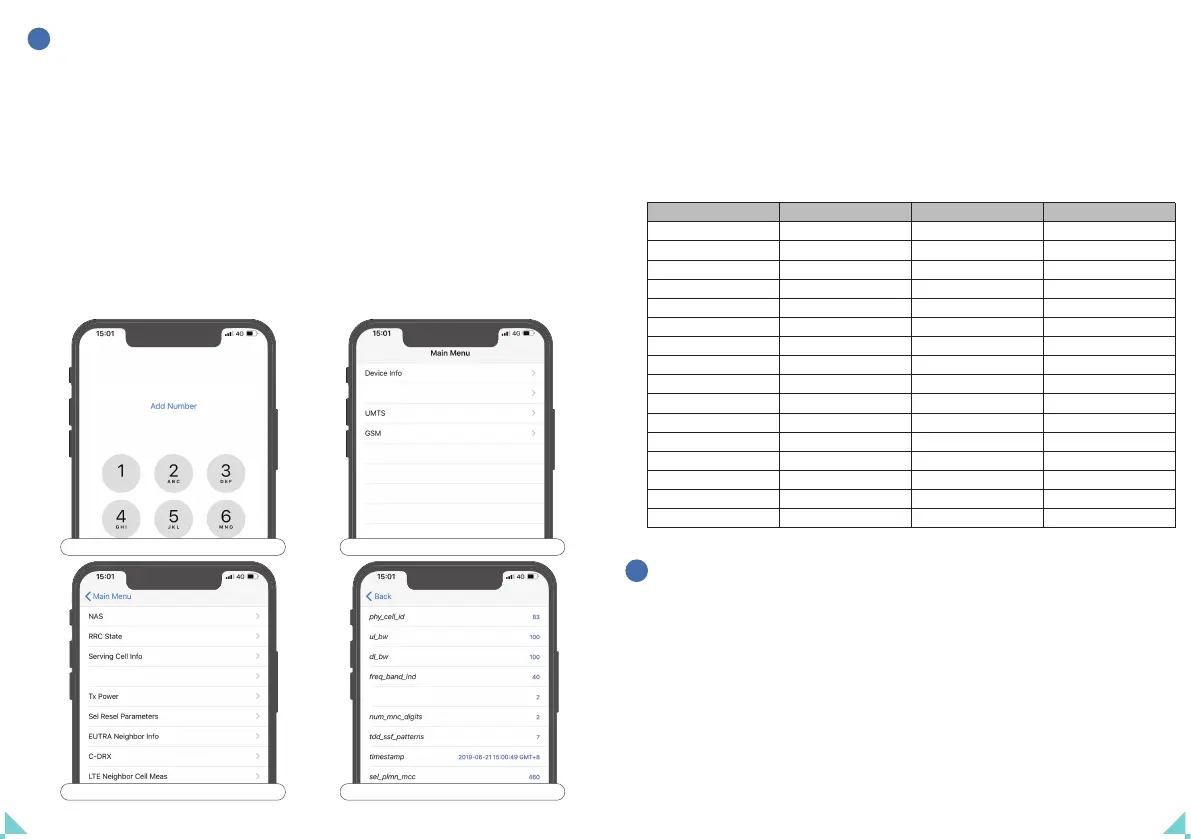
Steps to check frequency band on iPhone
1
*3001#12345#*
2
LT E
3
Serving Cell Info
4
freq_band_ind
Model
PTE-C980D
PTE-B66-65
AN-L65V
AN-L65A
AN-L65AV
AN-C80
AN-A65
AN-P65
AN-CA65
AN-CP65
AN-L45AV
AN-CA45
AN-CP45
AN-B66-70 Plus
AN-L70V Plus
AN-L70A Plus
Band Number
5
66
13
12, 17
12, 13, 17
5
4
2
4, 5
2, 5
12, 13, 17
4, 5
2, 5
66
13
12, 17
Model
AN-L70AV Plus
AN-C70 Plus
AN-A70 Plus
AN-P70 Plus
AN-L45AV Plus
AN-CA70 Plus
AN-CP70 Plus
AN-CA45 Plus
AN-CP45 Plus
AN-CPA70 Plus
AN-CPL70V Plus
AN-CPL70A Plus
AN-CL70AV Plus
AN-CPAL45 PLUS
AN-CPAL70 PLUS
Band Number
12, 13, 17
5
4
2
12, 13, 17
4, 5
2, 5
4, 5
2, 5
2, 4, 5
2, 5, 13
2, 5, 12, 17
5, 12, 13, 17
2, 4, 5, 12, 13, 17
2, 4, 5, 12, 13, 17


 To Next Page