The PhoneWatch Smart Alarm System is a comprehensive security solution designed for home safety, offering a range of devices and features to protect your property. The system is managed through a central hub, a keypad, and a remote control, with additional components like motion detectors, door/window sensors, and smoke detectors.
Function Description
The PhoneWatch Smart Alarm System provides robust security through a network of interconnected devices. Its primary function is to detect intrusions, fires, and other emergencies, and then alert the user and, if necessary, the Alarm Receiving Centre. The system supports full arming (entire system), part arming (part of the alarm), and deactivation. Users can manage the system via a physical keypad, a remote control, or the PhoneWatch App.
Key Components and Their Functions:
- Keypad: This is the central interface for arming, disarming, and managing the alarm system. It features a numerical keypad (0-9), dedicated buttons for "SOS" (panic alarm), "Full Arm," "Part Arm," and a "System Error" indicator. The keypad uses a PIN code or keytag for authentication. It also provides visual feedback through signal lights indicating alarm status (triggered, system error, tamper, door/window open).
- Remote Control: A portable device used to quickly arm (full or part) and disarm the system. It typically has buttons for "Full Arm," "Part Arm," and "Deactivate."
- Security Gateway: The central hub of the system, connecting all components to the PhoneWatch secure cloud service. It utilizes 4G, WiFi, and Ethernet for communication, ensuring reliable connectivity. It supports up to 200 Zigbee devices and includes a backup battery.
- Portable Voice Unit: A two-way voice unit that allows hands-free communication with the Alarm Receiving Centre during an emergency. It can also be used to call family members.
- Camera Motion Detector: This device detects movement and captures images or video during an active alarm event. It can differentiate between humans and pets to reduce false alarms. The images/videos are sent to the Alarm Receiving Centre for verification.
- Water Leakage Detector: Alerts users to water leaks, helping to prevent significant damage to the home.
- Keytags: Small, convenient devices used to quickly arm and disarm the system by placing them on the keypad.
- Contact and Shock Detector: Detects if a door or window is opened or if there is an attempt to break it through shock or vibration.
- Optical Smoke Detector: Detects smoke and triggers an alarm in case of fire. It is designed to minimize false alarms and is monitored by the Alarm Receiving Centre.
- Smart Plug: Allows control of lights and other domestic appliances, which can be used to simulate occupancy and deter potential intruders.
Usage Features
The PhoneWatch system is designed for ease of use with multiple ways to interact with it:
- Arming the System:
- Full Arm Mode: Activates the entire alarm system. Press and hold the button for 2 seconds on the remote control or keypad. The full arm button will blink to confirm activation.
- Part Arm Mode: Activates only a part of the alarm system (e.g., perimeter sensors while occupants are home). Press and hold the button for 2 seconds on the remote control or keypad. The part arm button will blink to confirm activation.
- Deactivating the System:
- Enter your personal code or place the keytag over the keypad reader symbol.
- Press and hold the button for 2 seconds on the remote control to deactivate.
- SOS Function: Triggers a panic alarm in an emergency. Press the "SOS" button on the keypad or remote control, and a signal will be sent to the Alarm Receiving Centre.
- System Status Indicators: The keypad features signal lights to provide immediate feedback:
- Signal light 1 (Alarm triggered): Indicates an alarm has been triggered.
- Signal light 2 (System error): Indicates a problem with the battery or the power supply. Persistent errors may require customer service.
- Signal light 3 (Tamper alarm): Indicates a tamper event on the system.
- Signal light 4 (Door/window open): Indicates an open door or window.
- Resetting the System: If multiple failed PIN code or keytag attempts occur, the keypad may lock for a period. To reset, enter your system PIN code or use a keytag.
- Remote Control Activation/Deactivation: The remote control allows for quick arming and disarming from a distance. The buttons will blink to confirm the action.
- PhoneWatch App: The system can be controlled and monitored via the PhoneWatch App, available on Google Play Store and Apple App Store, or through the web application MyPages.phonewatch.ie. This provides remote access and management capabilities.
Important Technical Specifications
- Connectivity: The Security Gateway supports 4G, WiFi, and Ethernet for robust communication.
- Device Support: The Security Gateway can manage up to 200 Zigbee-compliant devices.
- Power: The Security Gateway includes a backup battery to ensure continuous operation during power outages.
- Camera Motion Detector: Utilizes infrared motion detection and can take photos/videos during an alarm event. It can distinguish between humans and pets.
- Two-Way Voice Unit: Provides hands-free communication with the Alarm Receiving Centre.
- Zigbee Compliant: The system is Zigbee compliant, allowing for integration with a wide range of smart home devices.
Maintenance Features
Regular maintenance is crucial for ensuring the optimal performance and reliability of your PhoneWatch Smart Alarm System.
- System Supervision: The system is remotely supervised by PhoneWatch 24/7/365.
- Periodic System Test: PhoneWatch recommends performing a local system test every third month. Contact PhoneWatch customer service for further information on how to perform a local system test.
- Component Integrity: Ensure that none of the components have been damaged and are free from dirt, dust, cobwebs, etc.
- Cleaning: Clean the keypad with a dry cloth.
- Component Placement: If you are carrying out renovations or moving furniture, make sure that you do not block or cover the components or the components’ line of sight.
- Painting/Wallpapering: If you are painting, wallpapering, or sanding, it may be necessary to temporarily remove part of the alarm system to prevent damage or false activations. Contact PhoneWatch customer service before you do this.
- Battery Replacement: If a system error indicates a battery issue, contact customer service for assistance.
- Alarm Siren Maintenance: The alarm siren(s) are designed to wake a person sleeping heavily and to deter/disturb intruders. Prolonged exposure to the siren for long periods of time should be avoided. In the event that the system is accidentally activated while you are on the premises, ensure you turn the alarm off (see page 10). If unable to do so, please leave the premises. When testing the system, it is recommended to protect your ears.
The PhoneWatch Smart Alarm System offers a comprehensive and user-friendly approach to home security, combining advanced technology with straightforward operation and dedicated customer support.

 Need help?
 General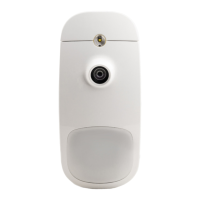

 To Next Page