5
GB
·
When switched on, the 06820 will be visible to nearby Bluetooth devices.
·
Activate Bluetooth on your mobile phone.
·
Search for available Bluetooth devices.
·
The device will be displayed with the name of 06820.
·
At this point the phone will be connected to the 06820.
Make a call
·
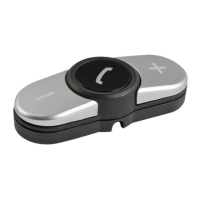
Dial a number on your paired mobile phone or select a contact from your phonebook, you can start a call of the
last called number by pressing 2 times quickly
on the kepyad.
·
The conversation will automatically switch to 06820, if paired correctly.
Receive a call
·
Briey press on the keypad to answer a call.
· Hold 2 seconds the key
of the 06820 for rejecting the call.
·
Briey press on the keypad during the conversation to hang up.
Conversation volume
·
To adjust the volume during the conversation, press - and + on the keypad.
IT
·
All’accensione il 06820 sarà visibile ai dispositivi bluetooth nelle vicinanze.
·
Attivare il bluetooth sul proprio telefono cellulare.
·
Eettuare la ricerca dei dispositivi bluetooth disponibili.
·
Il dispositivo verrà visualizzato con il nome di 06820
·
A questo punto il telefono sarà connesso con il 06820
Eettuare una chiamata:
·
Comporre un numero sul proprio telefono cellulare accoppiato o selezionare un contatto dalla propria rubrica,
è possibile far partire una chiamata dell’ultimo numero chiamato premendo 2 volte velocemente il tasto
del
tastierino.
·
La conversazione passerà automaticamente al 06820 se accoppiato correttamente.
Ricevere una chiamata:
·
Premere brevemente il tasto del tastierino per rispondere ad una chiamata.
·
Premere per 2 secondi il tasto del 06820 per riutare la chiamata.
·
Premere brevemente il tasto del tastierino durante la conversazione per riagganciare.
Volume comunicazione:
·
Per regolare il volume durante la comunicazione premere i tasti - e + del tastierino.
Utilizzo • Use • Utilisation • Nutzung • Utilizo


 To Next Page
 Loading...