16 17
GB
Important Notices & Warnings ......................................................................................................................17
Electrical Connection Scheme ......................................................................................................................18
Installation .....................................................................................................................................................19
Display lay-out and CD-introduction ...........................................................................................................20
Front-panel Functions ...................................................................................................................................21
Remote-Control Functions ............................................................................................................................22
Set-up DVD / VCD / CD / CD-MP3 ...............................................................................................................23
InstructionsforDVD/VCD/CD ..................................................................................................................24
InstructionsforAUDIO/VIDEO....................................................................................................................25
InstructionsforRADIO ..................................................................................................................................26
InstructionsforBluetooth ..............................................................................................................................27
InstructionsforTV-TUNER ............................................................................................................................28
Problem Solving ...................................................................................................................................... 29-30
Specification ..................................................................................................................................................31
ImportantNotices
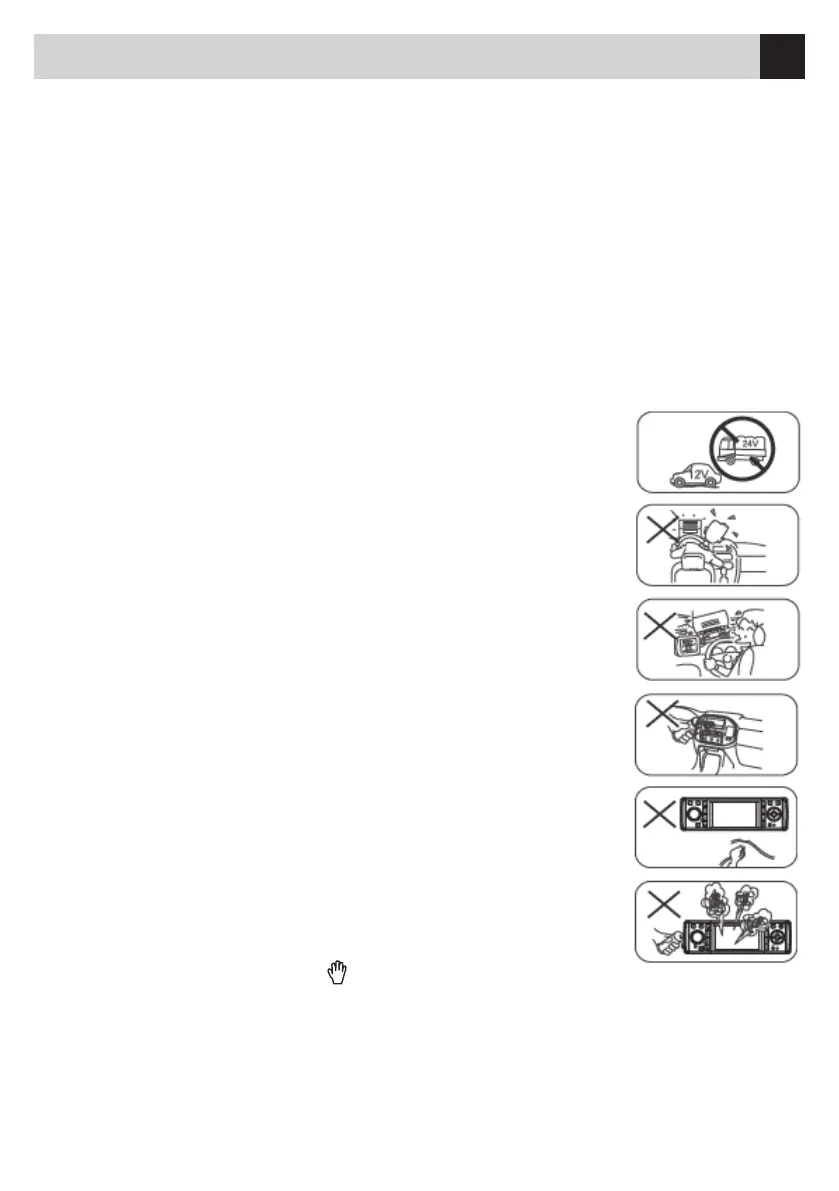
•ConnecttheUnittoa12V-supportandtoanegativeGround.DoNOT
use24V-supports,eventhoughfrequentlyavailableoncertainvehicles.
•DoNOTwatchlmswhiledriving,asthisisillegalandmayprovoke
car-accidents. You may only use the rear-camera while driving the car.
•DoNOTreplacethefuseofthesupply-cablewithouttheassistanceofa
technicalexpert.Infact,theimproperuseoffusesmaydamagetheUnit
or even cause fire.
•ChooseacomfortablemediumVolume-level.AnexcessivelyhighVolume
maydamageyourearsorkeeptheDriverfromhearingthesirensofPolice
or emergency vehicles.
Warnings
•NeveropenandnevertrytorepairtheUnitwithoutaskingatechnicalexpert.
•Wheneverthefront-panel,DisplayorCDsshouldneedsomecleaning,always
useasofttissue
andaneutraldetergent.Roughtissuesandstrongdetergents(exampleAlcohol)
would damage the Unit.
•Afterhavingparkedinaparticularlyhotorcoldenvironmentforalongtime,you
should WAIT until
thein-cartemperaturereturnsnormal,beforeoperatingtheUnit.
•Thein-carheatingmayproducecondensationinsidetheUnitandontheCD.In
such case, remove
and clean the CD. Then start reproduction again.
•Should,aftersomehourswaiting,reproductionstillnotwork,switch-offtheUnit
and contact your Dealer.
•TheDisplayismotorizedsothatyoushouldneverpush,dragorturntheDisplay
manually, in order not to damage the Display-mechanism.
•Whenever,duringoperationtheicon" "shouldappear,thismeanstheFunc-
tion is NOT available.
•WARRANTYdoesNOTcovertheproblems/damagecausedthroughimproperuseoftheUnit.
Index


 To Next Page