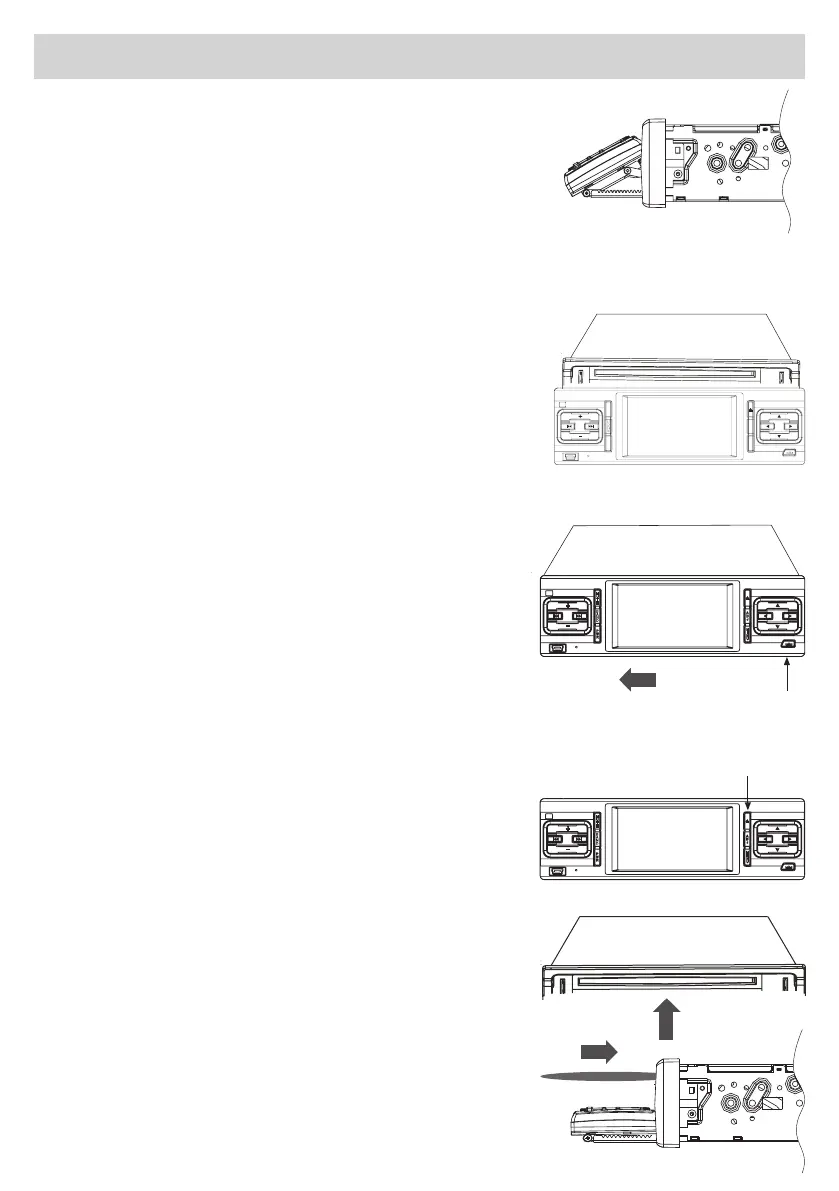
Display-Positioning
•UsePWR-keytoswitch-ontheUnit.
•PressADJ-keytoregulatetheDisplay-inclination.
•TheUnitoffers3viewing-angles:eachtimeyoupressthekey,the
viewing-angle increases. The viewing-angles will come the other way
roundwhenthepositioning-operationstartsfromthebeginning.The
viewing-angle will be maintained when the Unit is switched OFF and ON
again.
•KeepingtheADJ-keypressed,theDisplaywillreturntoitsorig- i-
nal position.
ATTENTION!
•NeverputanythingontotheDisplayandneverpushtheDisplay
withforce.
•NeverremovetheDisplaywithviolence.
•TheDisplaymovement-areacouldberestricted,dependingon
the car-model, installation-position etc.
REMOVINGTHEFRONT-PANEL
1.Switch-offtheUnit
2. Press the Expulsion-Key
3.Movethefront-paneltotheleft
INSERTINGTHECD's
1.PresstheIntroduction/Expulsion-key(90°rotationof
front-panel)
2. Introduce the CD into the related opening
AfterhavingintroducedtheCD,thefront-panelwillautomatically
shutitself.
Expulsion-Key
CD Introduction/Expulsion-key
A
D
J
M
E
N
U
P
W
R
M
U
T
E
A
D
J
M
E
N
U
P
W
R
M
U
T
E
A
D
J
M
E
N
U
P
W
R
M
U
T
E


 To Next Page