4
IT/GB
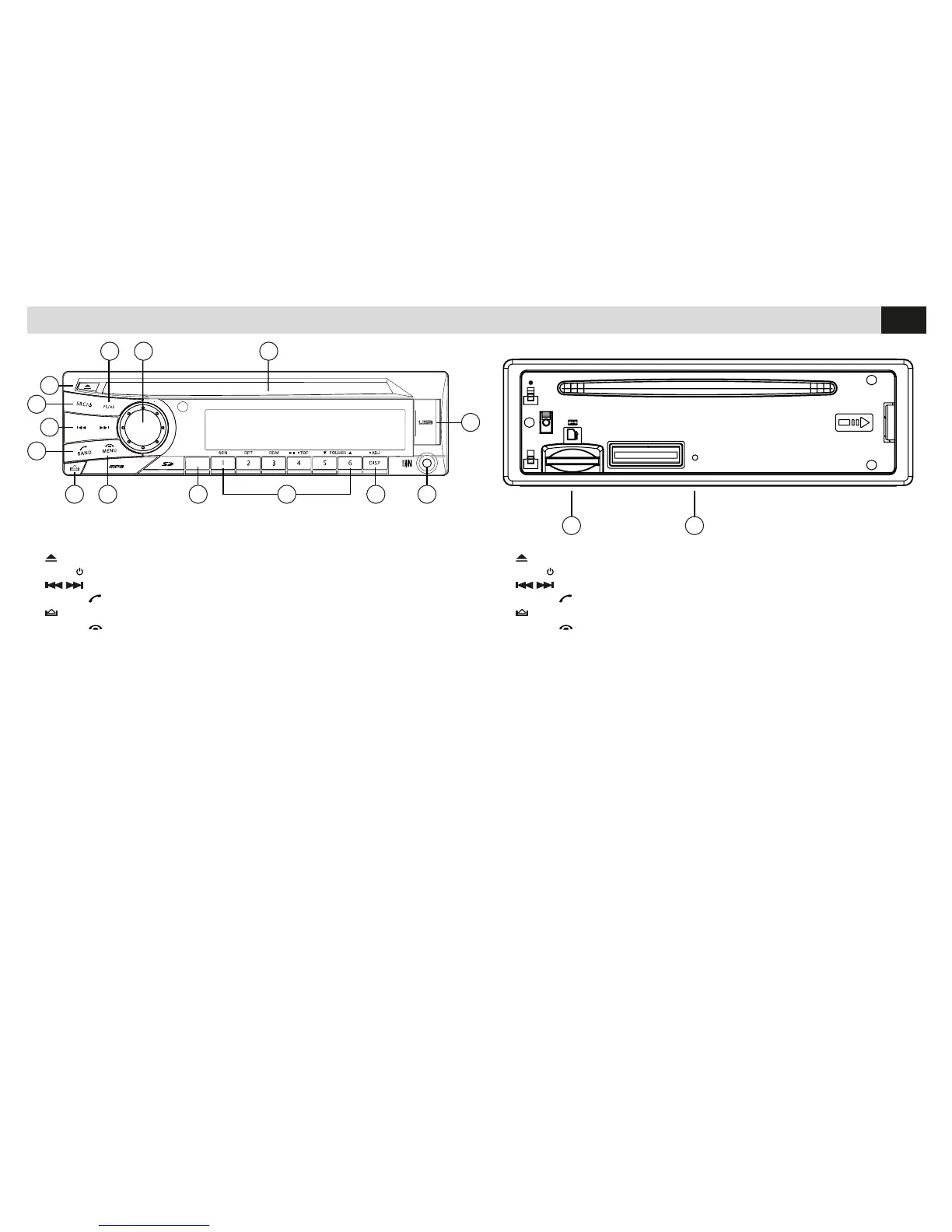
1. Espulsione disco
2.
src Accensione / Spegnimento - Seleziona le sorgenti
3. Brano successivo/precedente
4.
band Seleziona banda di Frequenza radio / Chiama-Rispondi chiamate
5.
Sgancia il frontalino
6. MENU Termina chiamata
7.
MUTE Volume azzerato - Equalizzatore (Tenere premuto)
8. Tasto 1 Avvia scansione stazioni radio - Memoria radio 1
Tasto 2 Ripetizione - Memoria radio 2
Tasto 3 Riproduzione casuale - Memoria radio 3
Tasto 4 Riproduci/Pausa - Riproduci primo brano (Tenere premuto)
Memoria radio 4
Tasto 5 Cartella precedente - Memoria radio 5 - Avanza di 10 brani
Tasto 6 Cartella seguente - Memoria radio 6 - Retrocede di 10 brani
9.
Disp Seleziona PTY - Orario
10. Ingresso jack AUX-IN
11. Porta USB
12. Feritoia introduzione CD
13. Ruotare il pomello per regolare il volume
Tasto conferma
14.
AS/PS Avvia scansione frequenze - Memorizzazione automatica stazioni
Imposta scansione
15. Slot SD Card
16. Reset
FUNZIONI • FUNCTIONS
65
4
3
2
1
87 9
12
11
10
1314
15 16
MUTE
EQ
1. Eject Disc
2.
src ON / OFF – Select Source
3.
Track after/before
4.
band Select radio Frequency-band / Effect/Answer call
5.
Lift front-panel
6.
MENU End call
7.
MUTE Mute Audio - Equalizer (keep pressed)
8. Key 1 Start scrolling radio-stations - Memory Radio 1
Key 2 Repetition - Memory Radio 2
Key 3 Random Reproduction - Memory Radio 3
Key 4 Reproduction/Pause – Reproduce first track (keep pressed)
Memory Radio 4
Key 5 Folder before - Memory Radio 5 - Jump 10 Tracks forward
Key 6 Folder after - Memory Radio 6 – Jump 10 Tracks backward
9.
Disp Select PTY - Time
10. Input jack AUX-IN
11. USB-port
12. CD-port
13. Rotate knob to set Volume
Confirmation-key
14.
AS/PS Start Frequency-scrolling – autom. stations-memorization
Set scrolling
15. SD-port
16. Reset



 To Next Page