14
IT/GB
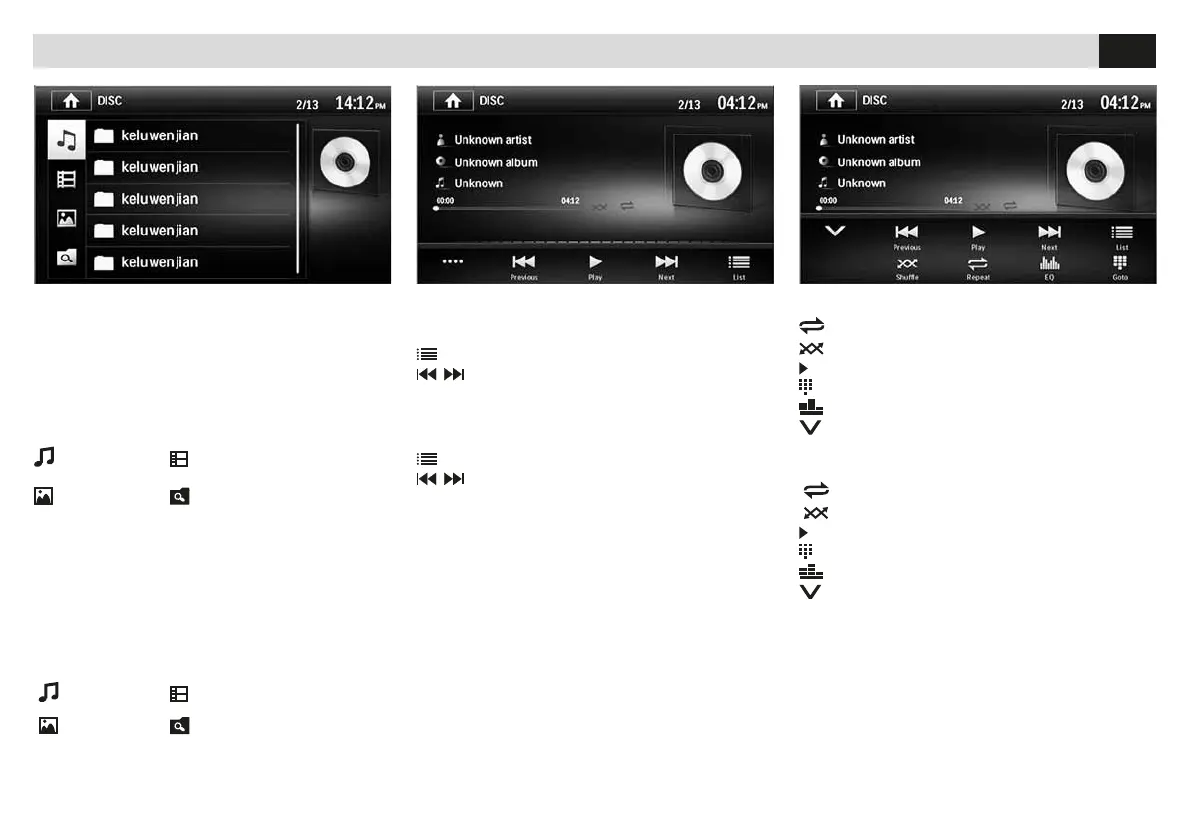
RIPRODUZIONE • PLAYBACK DVD-CD-USB-SD CARD
RIPRODUZIONE MUSICA
•••• Estende il menù
LIST Torna all’elenco le.
Traccia successsiva/precedente.
MUSIC-REPRODUCTION
•••• Extend Menu
LIST Back to Files-List
Track after/before
RIPRODUZIONE MUSICA
REPEAT Ripete traccia/cartella/disco.
SHUFFLE Riproduzione casuale.
Avvia/Interrompe la riproduzione.
GOTO Inserisce il numero traccia da riprodurre.
EQ Equalizzatore.
Ricompatta menù.
MUSIC-REPRODUCTION
REPEAT Repeat Track//Folder/CD.
SHUFFLE Random-Reproduction.
Start/Interrupt Reproduction.
GOTO Introduce Track-number for Reproduction.
EQ Equalizer.
Recompact Menu.
FUNZIONI USB/SDCARD
All’inserimento del supporto USB/SD verrà visua-
lizzato il contenuto sullo schermo.
Se sono presenti brani musicali la riproduzione
partirà automaticamente.
Selezionare il tipo di le da riprodurre tramite
l’icona relativa.
MUSICA VIDEO
IMMAGINI TUTTI I FILE
USB/SD-FUNCTIONS
When introducing the USB/SD-support, the con-
tents will be visualized on the screen.
In the presence of musical files, reproduction will
start automatically.
Select Reproduction-File by clicking the related
files-icon.
MUSIC VIDEO
PICTURES ALL FILES


 To Next Page