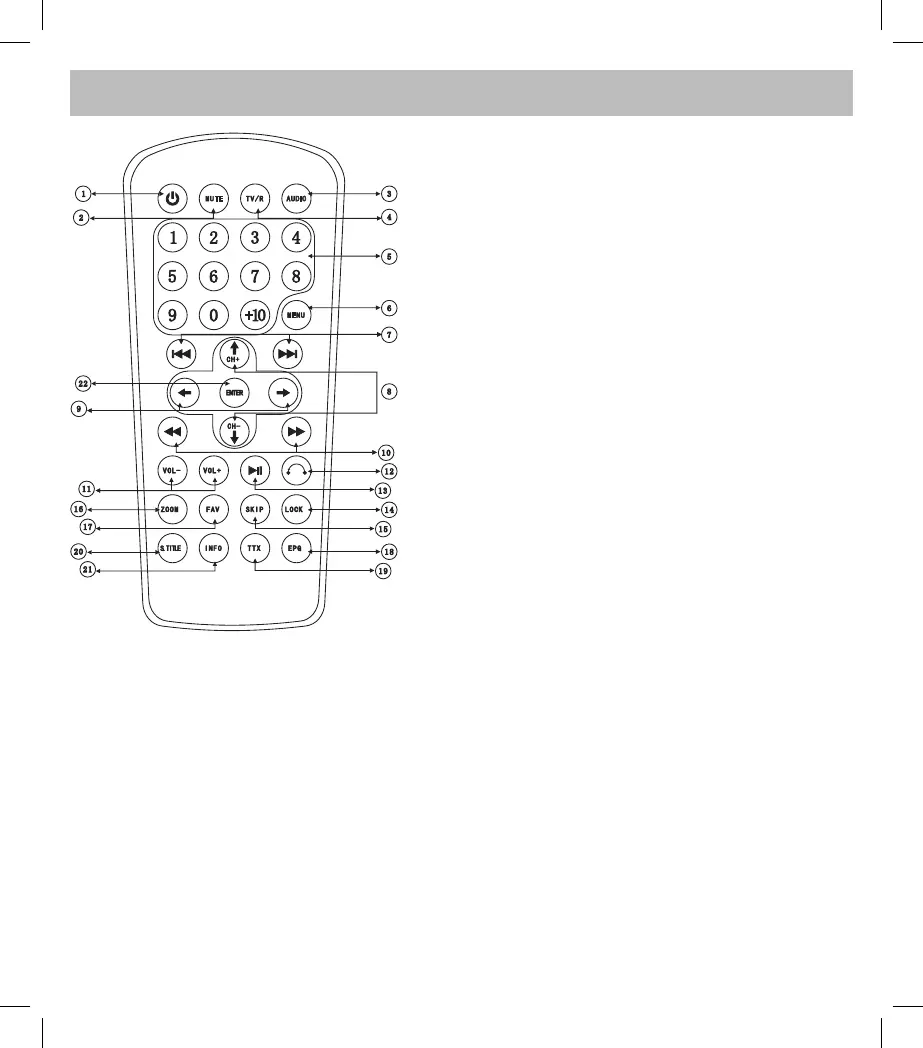
POWER: After connecting the DVB-T, press this button
1.
to turn on/off the unit. (While the Power Indicator shines,
it is turned off)
MUTE: To mute the sound
2.
AUDIO: To change the Left or Right channel
3.
TV/R: To change the TV mode
4.
Number Pad: To select the stations or setup the date or
5.
time
MENU: To enter and to go out of the menù
6.
NEXT/PREVIOUS SONG
7.
CH+/CH-: To select the channel and to move the pointer
8.
UP/DOWN/LEFT/RIGHT: To move the pointer
9.
FAST FORWARD/BACKWARD
10.
VOL+/VOL-: To increase/reduce the volume while audio
11.
playback
: Go back to the channel last time
12.
PLAY/PAUSE: To play or pause the playback
13.
LOCK: To set up the lock
14.
SKIP: To enter the interface of searching station
15.
ZOOM: In the JPEG playback, press this button to enlarge
16.
or reduce the size of the image according to 4:3 / 16:9
FAV: To set up the favorite channels
17.
EPG: To display the detail list of the program
18.
TTX
19.
S.TITLE: To set up the subtitle
20.
INFO: To display the information of the play file
21.
ENTER: To confirm the parameter
22.



 To Next Page