EasyManua.ls Logo

Phonocar VM 207 - Menu Settings - Configuration: Wake Up Timer; Timer Programming

Phonocar VM 207
Print Icon
To Next Page IconTo Next Page
To Previous Page IconTo Previous Page
Loading...
20
21
Menu Setting
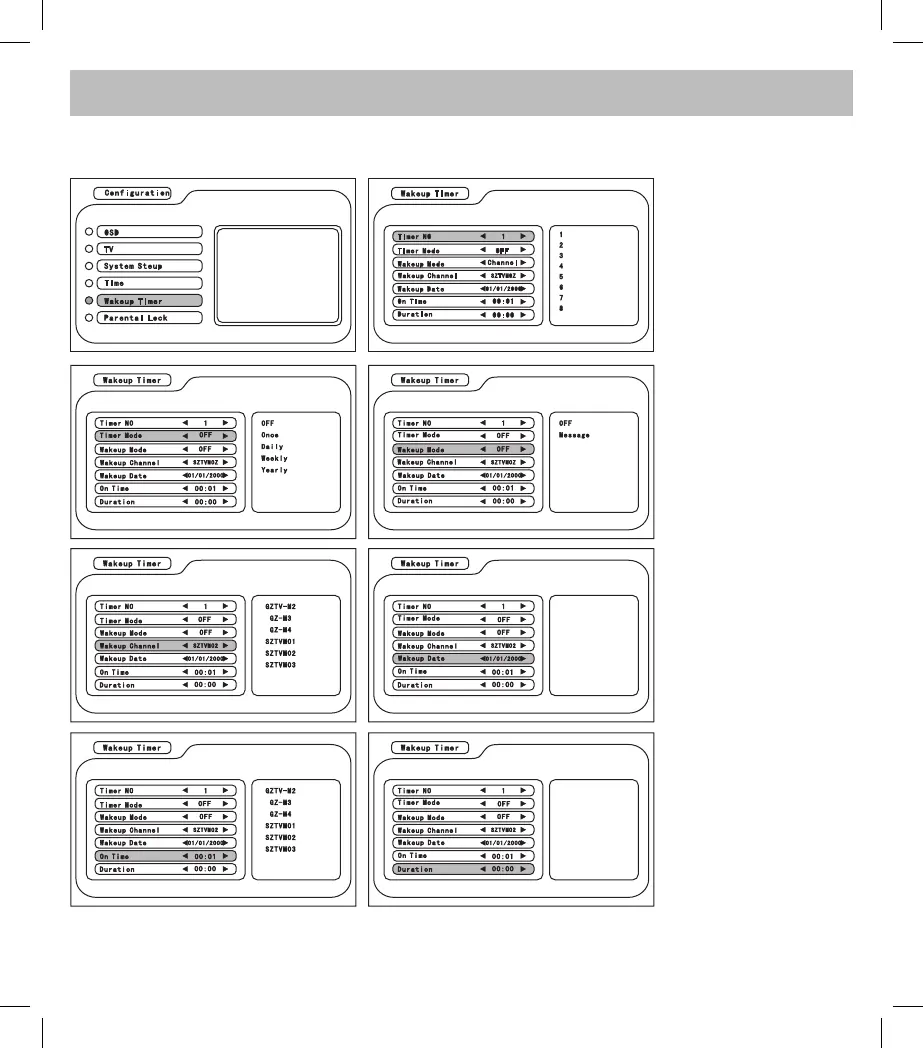
In the Configuration menu, enter Wake up Timer and press UP/DOWN/LEFT/RIGHT to select the item and
adjust the parameter.
1. Timer No:
2. Timer Mode: select to
turn off the unit Once/
Daily/ Weekly/ Yearly
3. Wake up Mode: set
to turn on the unit (it
functions when Timer
Mode is not set as OFF)
4. Wake up Channel: it
functions when Timer
Mode is not set as OFF
5. Wake up Date: it
functions when Timer
Mode is not set as OFF
6. On Time: enter the
exact time of turning on/
off the unit (it functions
when Timer Mode is not
set as OFF)
7. Duration: enter the
duration directly (it
functions when Timer
Mode is not set as OFF)

Related product manuals