15
IT-EN
Impostazioni Bluetooth • Bluetooth-settings
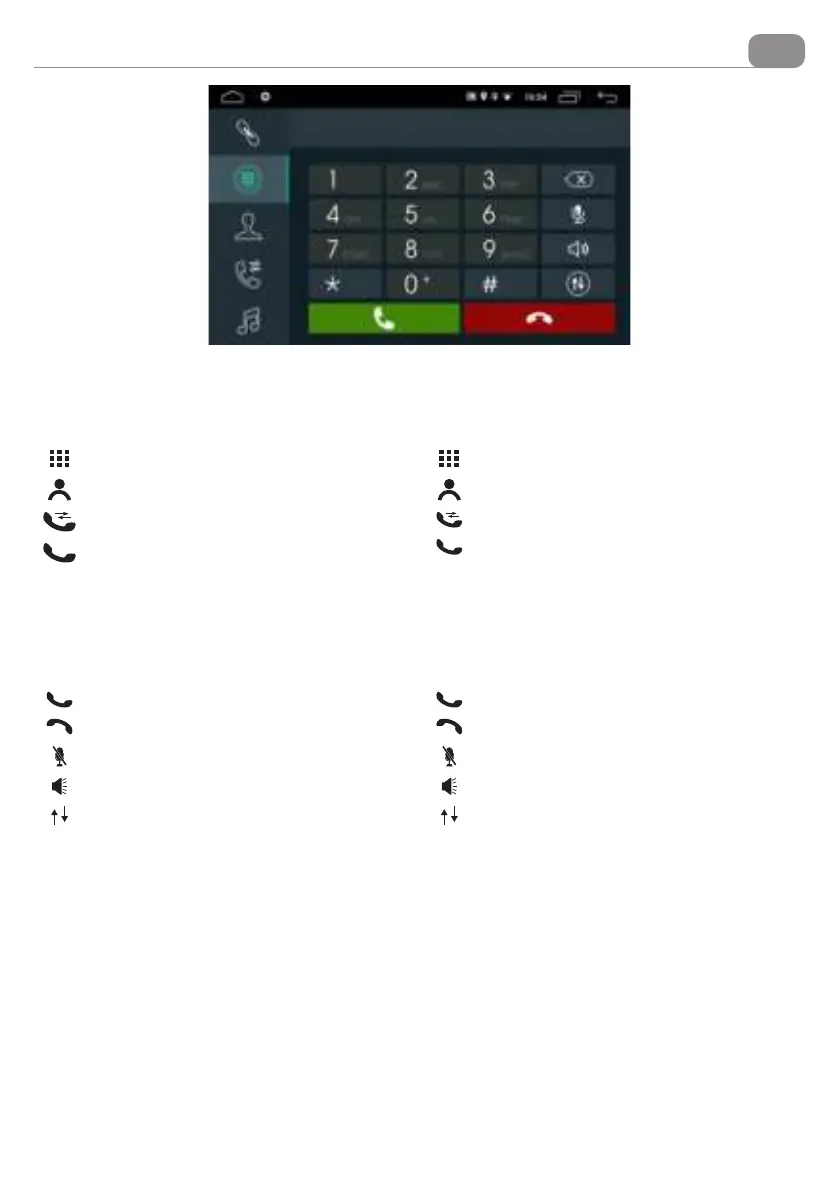
EFFETTUARE UNA CHIAMATA: Premere una delle
icone presenti sullo schermo per chiamare da uno degli
elenchi.
RICEVERE UNA CHIAMATA: All’arrivo di una chiamata
lo schermo passa in modalità Bluetooth visualizzando il
numero del chiamante e il nominativo se memorizzato
in rubrica.
MAKE A CALLING: Press one of the icons on the screen
to call from one of the lists.
ANSWERING A PHONE-CALL: When phone-call arrives,
screen switches to Bluetooth- mode and visualizes
the caller’s phone-number and name, if phone-list has
previously been synchronized.
IT EN
Chiamata da tastierino numerico
Seleziona un contatto presente nella rubrica
Chiamate perse-ricevute-effettuate
Inviare la chiamata
Numeric keypad calling
Select a contact in the phonebook
LOST-RECEIVED-CALLED
To start a calling.
Rispondere la chiamata
Rifiutare la chiamata.
Attiva / Disattiva microfono
Apre la barra di selezione valore volume
Mette in pausa / riprende una conversazione.
Press to answer
Press to reject the call.
Activates/Deactivates microphone
Opens the volume value selection bar
Pause / Continue a conversation


 To Next Page