QUICK START GUIDE
VM012
9
IT COMANDI AL VOLANTE RESISTIVI / EN RESISTIVE SWC CONNECTIONS / FR COMMANDES AU VOLANT RESISTIVES / DE LENKRADSTEUERUNGEN
RESISTIVE / ES MANDOS DE VOLANTE RESISTIVOS.
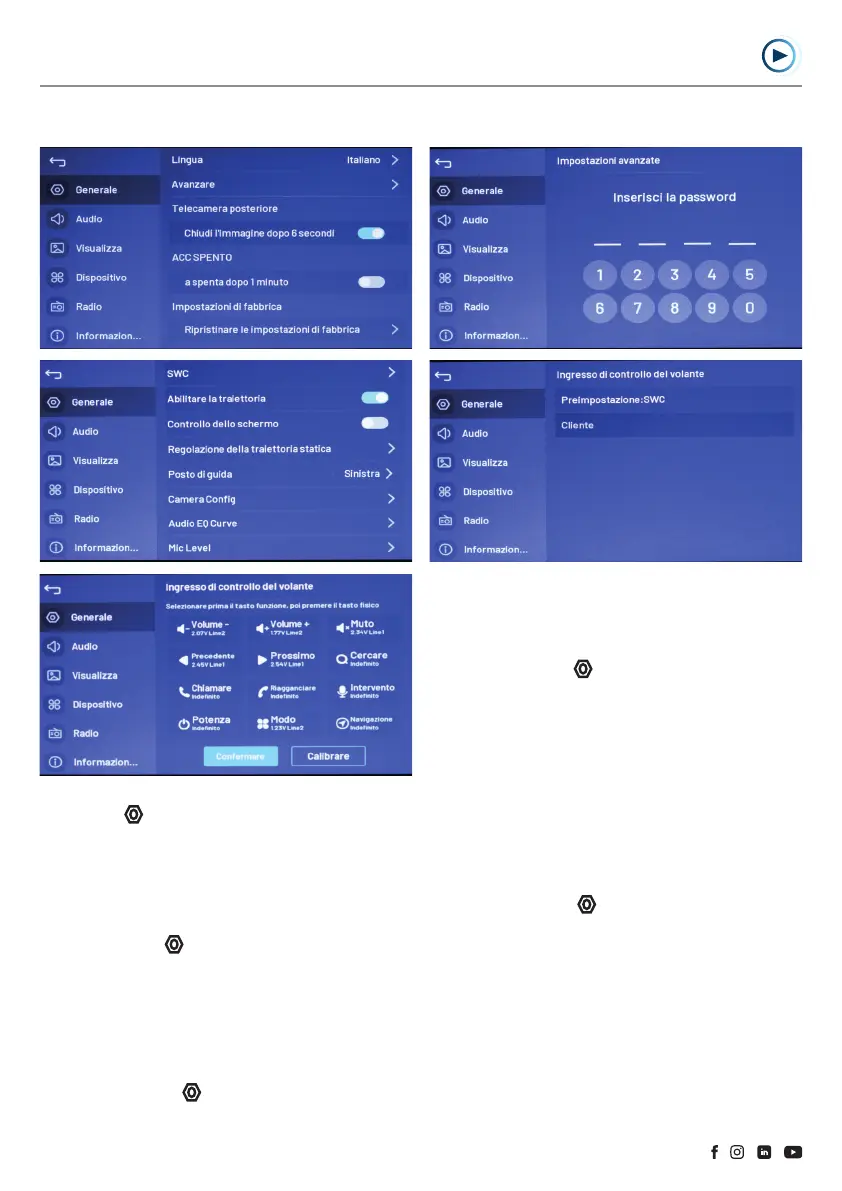
EN Steering wheel control customisation:
Select Settings
-> General -> Advance.
Enter the password "0000".
Enter the SWC menu and select the "customer" option to configure
the steering wheel controls.
Select the “preset: SWC” option to reset to factory settings.
FR Personnalisation des commandes au volant:
Sélectionner Réglages
-> Général -> Avancer.
Insérer le mot de passe "0000".
Entrer dans le menu SWC et choisir l'option "client" pour
paramétrer les commandes au volant.
Sélectionner l'option "pré-réglage: SWC" pour restaurer les
paramètres d'origine.
DE Lenkradbedienung-Anpassung:
Wählen Sie Einstellungen
-> Allgemein -> Erweitert.
Geben Sie das Passwort "0000" ein.
Rufen Sie das SWC-Menü auf und wählen Sie die Option "Kunde"
(client), um die Lenkradbenienung einzustellen.
Wählen Sie die Option "Voreinstellung: SWC", um die
Werkseinstellungen.
ES Personalizar los controles del volante:
Seleccionar Configuración
-> General -> Avanzar.
Introduzca la contraseña "0000".
Entrar en el menú SWC y seleccionar la opción "cliente" para
configurar los controles del volante.
Seleccionar la opción pre ajustes: SWC" para restaurar los
ajustes de fábrica.
IT Personalizzare i comandi al volante:
Selezionare Impostazioni
-> Generale -> Avanzare.
Inserire la Password “0000”.
Entrare nel menu SWC e selezionare l’opzione “cliente” per
configurare i comandi al volante.
Selezionare l’opzione “preimpostazione: SWC” per ripristinare le
impostazioni di fabbrica.



 To Next Page