11
EN
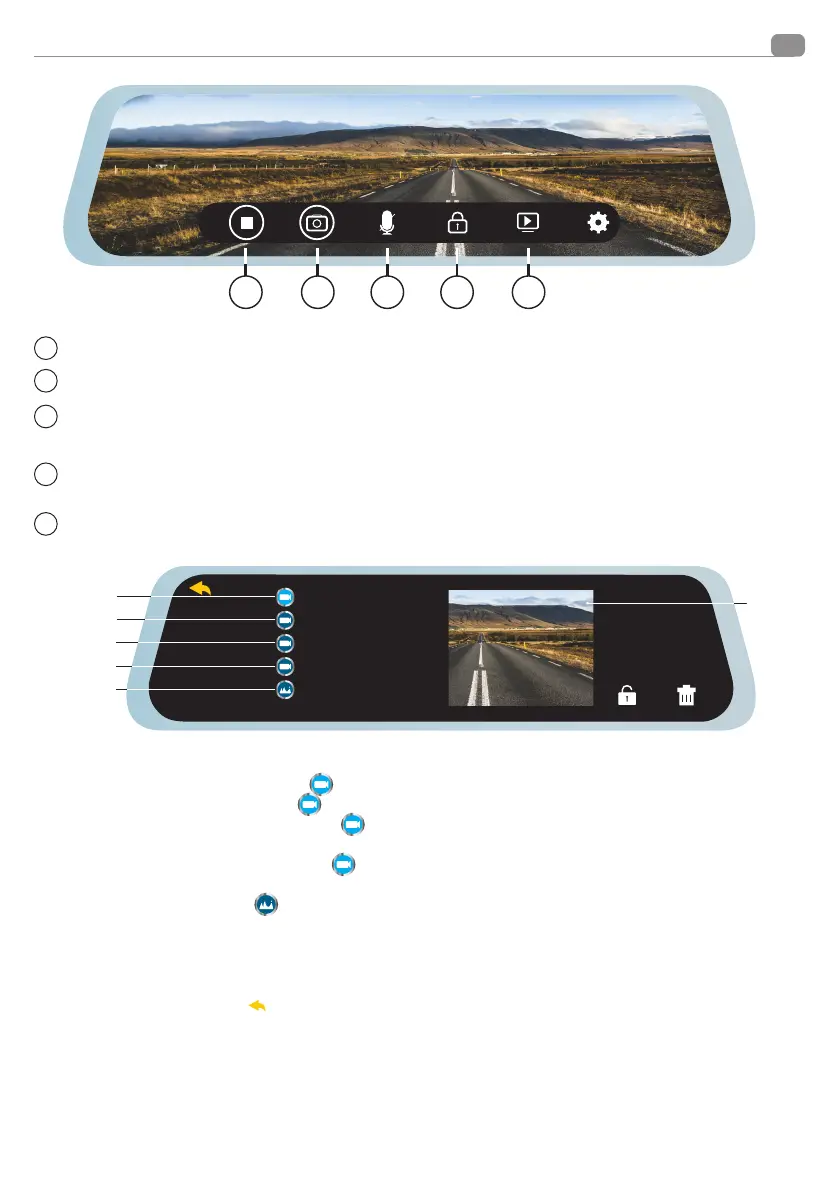
Press (1) to stop or start recording.
Press (2) to take a picture.
Press (3) the icon when recording is off. This function mutes the audio recording. If disabled, a crossed-out micro
-
phone icon appears in the upper right corner.
Press (4) to lock the current file, if locked , the file will not be overwritten. If the lock is activated, a lock icon will
appear in the upper right corner.
Press (5) to enter the PLAYBACK menu
10:07
15-01-2020
FILE170101-000127F.MOV
FILE159451-000052F.MOV
FILE169876-000096F.MOV
FILE17054-000101F.MOV
FILE170001-000136F.JPG
F
R
F
R
B
C
D
E
F
A
A FRONT CAMERA VIDEOS: Pressing
F
the list of videos recorded by the front camera is displayed.
B REAR CAMERA VIDEOS: Pressing
F
the list of “Locked” videos recorded by the rear camera is displayed beside
C FRONT CAMERA VIDEO FILES: Pressing
F
the list of “Locked” videos recorded by the front camera is display-
ed beside.
D REAR CAMERA VIDEO FILES: Pressing
F
the list of “Locked” videos recorded by the rear camera is displayed
beside.
E PHOTO GALLERY: Pressing
you can access the display of the taken photos. They will always be displayed in
a list.
F PREVIEW: Pressing on the preview window you can switch to the playback menu (see diagram on page 12).
Functions
2 3 4 51
2
3
4
5
1
Pressing the arrow at the top left
will bring you back to the previous menu.


 To Next Page